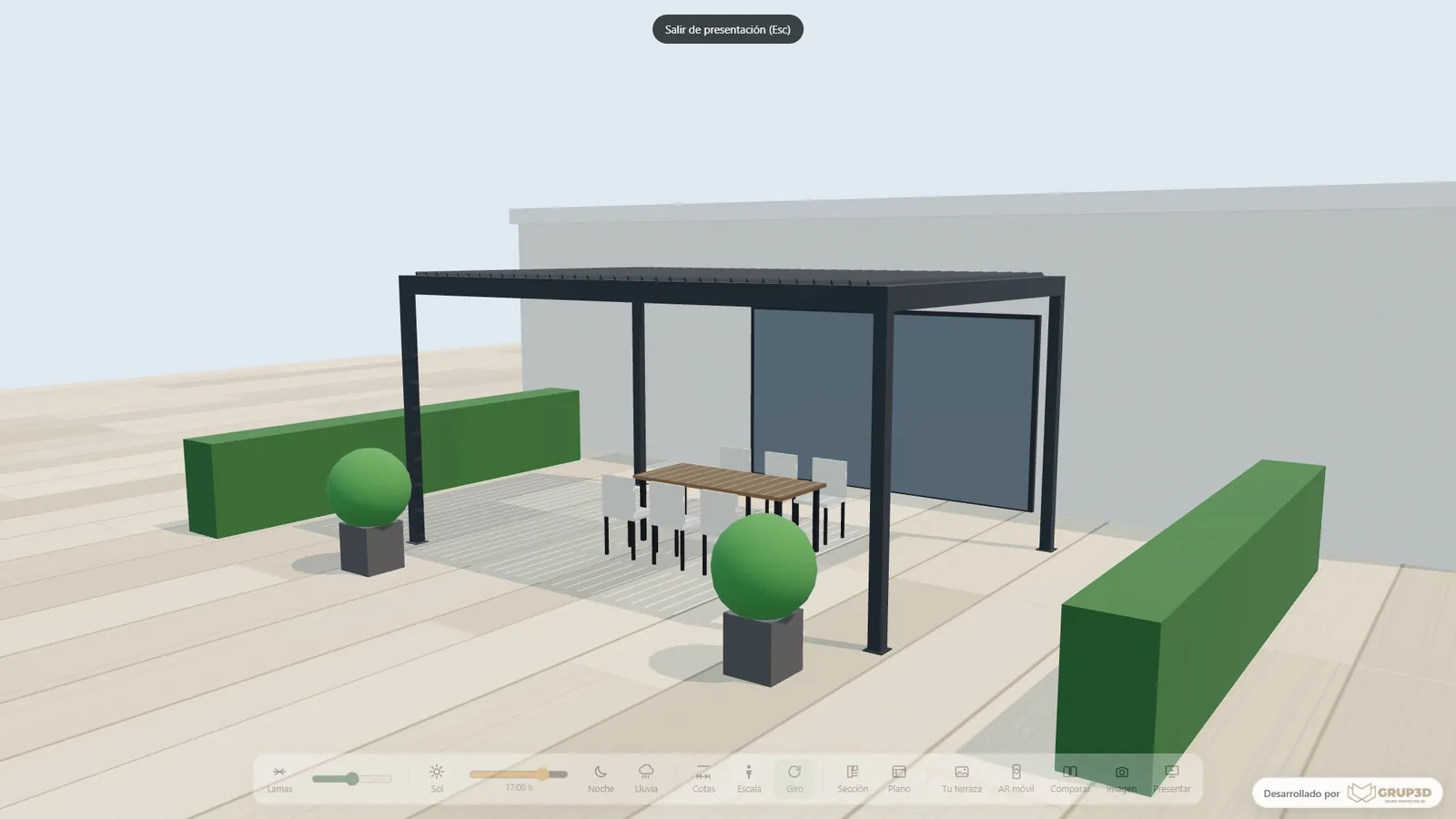
Presentation mode of the 3D pergola configurator from the Grup3D demo, with the pergola full-screen to show it to the customer
GUIDE · SALES REPS · VISIT · PRESENTATION · COMPARATOR · ANALYTICS
— GUIDE FOR MANUFACTURERS · 2026

3D configurator
for the sales team
of a manufacturer.

The configurator is not only for the website. In the hands of the factory's sales rep it is the sales tool they take to the visit: the product in 3D in front of the customer, the price with the discount they can give, the comparator between two options, the PDF with their name and the request logged to their area before they walk out of the door. What it does on the visit, in the showroom and at the trade fair, and what the sales director sees afterwards.

— ON THE VISIT

What the sales rep does
on the visit, with the customer in front of them.

With their user, on the tablet or the laptop, with nothing to install.

01 · THE PRODUCT, IN FRONT OF THEM

Builds what the customer asks for

Sizes, finishes, modules and extras on the 3D, with the factory's rules: what cannot be made is not offered and the rep does not promise what will not come out later. In machinery, the equipment is calculated as it is chosen: positions, boxes per minute, output.
02 · THE PRICE, WITH THEIR MARGIN

Their discount, no more

Each sales rep logs in with their user and sees the price with the maximum discount they can apply; the price list is the same for everyone and head office changes it from the panel. No more quotes that everyone does their own way.

03 · THE COMPARATOR

Two options, side by side

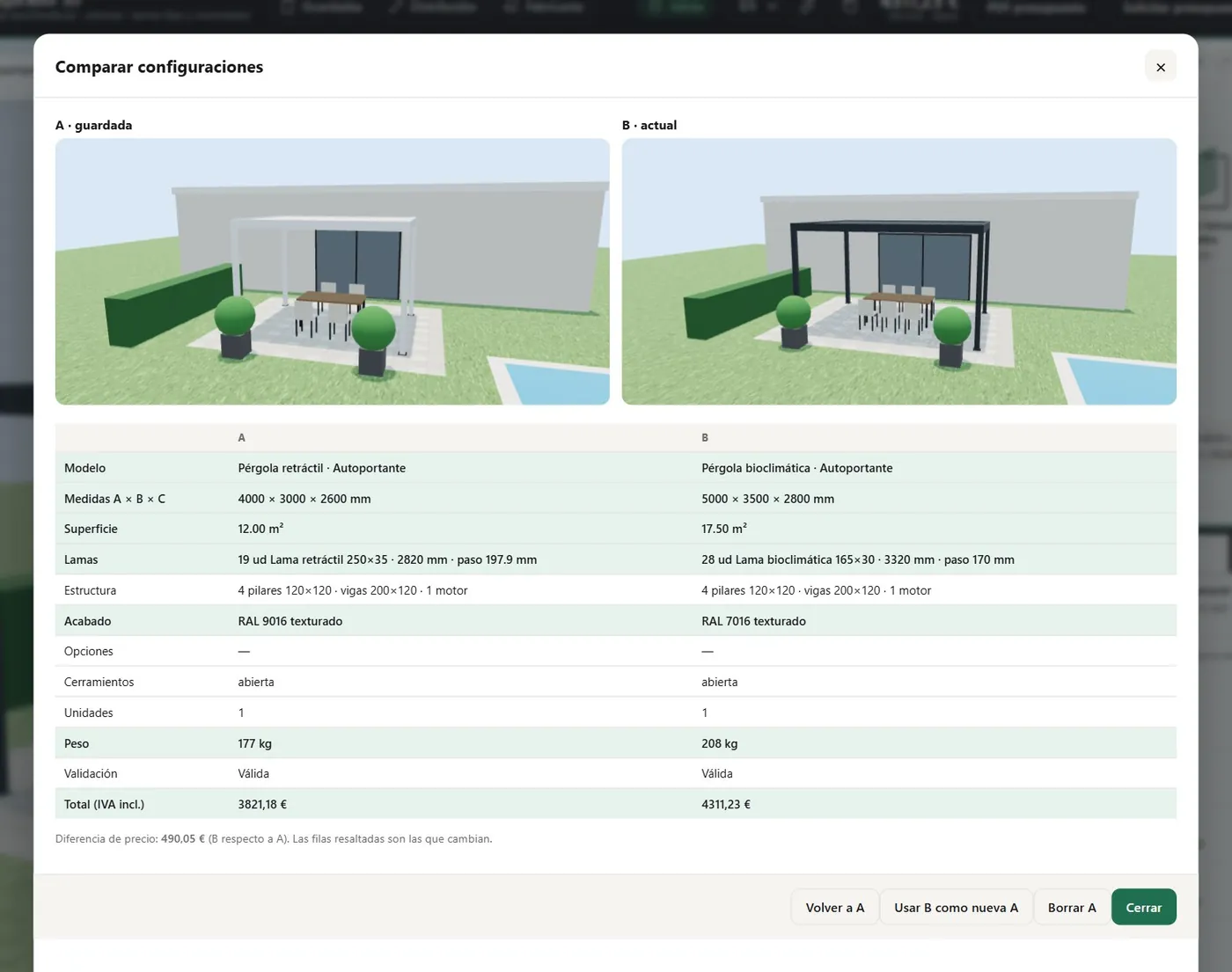
The pergola with louvres or retractable, the shelving with three or four levels, the awning with or without a motor: two configurations with their price, so the customer decides by looking rather than imagining. Like the A/B comparator in the pergola demo.

04 · THE PDF AND THE REQUEST

With their name, before leaving

The PDF with the image, the data and the price comes out with the sales rep's name and the company's brand, and the request is logged to their area in the panel. If the customer wants to think it over, they take the link and the QR code to open it again at home.

A/B comparator of the 3D pergola configurator from the demo with two configurations and their indicative prices side by side
The comparator in the pergola demo: two options with their price, to decide on the visit. Sample prices.
— SHOWROOM AND TRADE FAIR

In the showroom
and at the trade fair.

Where the sales rep does not sell one product, but the whole catalogue.

— PRESENTATION MODE
  • The product full-screen, with no panels or prices, to show it on the big screen in the showroom or at the stand while the sales rep talks.
  • Automatic demonstration that runs through finishes and sizes on its own when nobody is in front of it, and kiosk mode that returns to the home screen without leaving the last customer's details.
  • The whole catalogue, not just what fits in the showroom. More in 3D configurator in the showroom and at trade fairs.
— IN MACHINERY AND INDUSTRY
  • The machine being configured at the stand: conveyor belt by section, shelving by level, warehouse with its light fittings and its lux.
  • The calculation the technical office does today, done at the trade fair: output, positions, boxes per minute, power supply needed.
  • The trade-fair requests, in the panel the next day, assigned to the sales rep for each area. See virtual industrial showroom.
— SALES MANAGEMENT

What the sales director
sees.

A configurator in the hands of the network is also the first time you know what gets configured and what gets ordered.

  1. 01

    Every request, in one panel

    Those from the website, from distributors and from each sales rep, with their status, their configuration and their PDF; exportable to CSV and with an email alert. What comes in through the website is assigned by area; what comes in with a rep's code is in their name.

  2. 02

    Analytics: what gets configured and what gets ordered

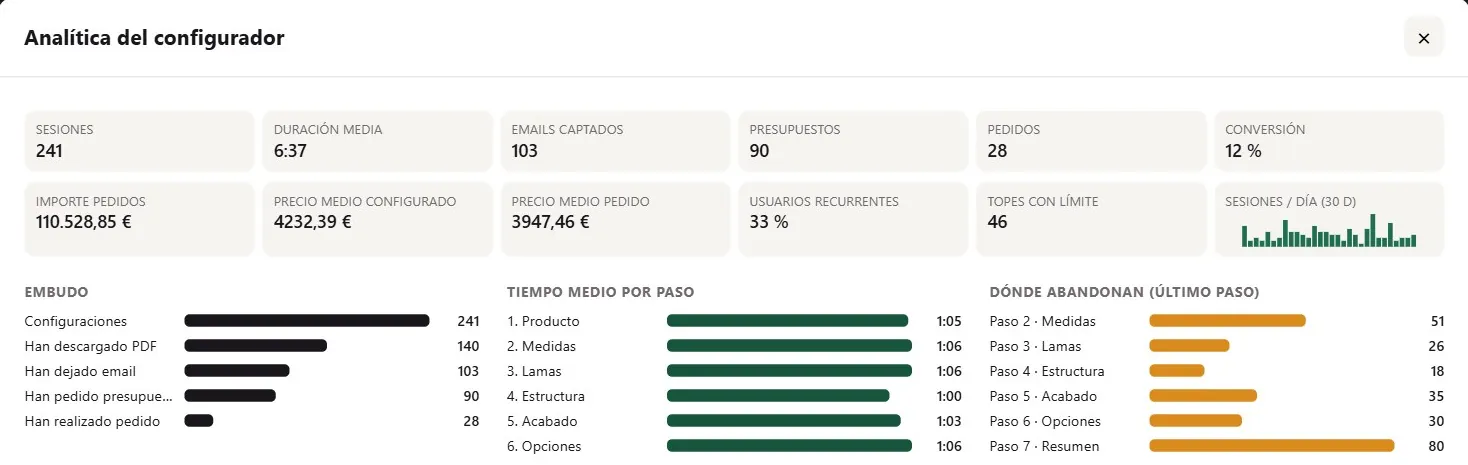
    Which families get opened most, at which step people give up, which finishes get chosen and which nobody asks for, which sizes get requested outside the limits. It is the configurator analytics in the pergola demo, with sample data. Useful for the price list, for the catalogue and for training the network.

  3. 03

    The same price list and the same rules for everyone

    A price or limit change is made once from the panel, with versioning, and every sales rep sees it at the same time. See B2B configurator for distributors.

  4. 04

    Training included at go-live

    When the configurator goes live, the sales team is trained: how to configure on the visit, how to use their code, how the PDF comes out and where the requests go. A sales rep who uses it on day one uses it for good.

Analytics panel of the 3D pergola configurator from the demo: most opened families, abandoned steps and chosen finishes
The analytics in the pergola demo: what gets configured, where people give up and what gets ordered. Sample data.

Development starts from €6,500 for a visual configurator of one product family; most manufacturer projects fall between €14,500 and €35,000, depending on catalogue, rules and integrations, plus maintenance from €190/month. The per-rep area with their discount and the PDF with their name are at the level with rules and price.

— FREQUENTLY ASKED QUESTIONS

What we get asked
about the sales team.

There are more short answers in frequently asked questions about 3D configurators and who we are in 3D configurator company.

Does each sales rep have their own user and discount?

Yes. Each sales rep logs in with their user and sees the price with the maximum discount they can apply; the price list is the same for everyone and head office changes it from the panel. The requests they log are in their name and their area.

Does it work on the visit, offline?

It works on the tablet and the laptop in the browser, with nothing to install, and has an offline mode for visits and trade fairs with poor coverage: the request is stored and sent when the network returns.

Can the PDF carry the sales rep's name?

Yes. The PDF comes out with the company's brand and the name and contact details of the sales rep who generated it, with the image, the technical data and the price. The customer also takes the link and the QR code to open the configuration again.

What is presentation mode?

The product full-screen, with no panels or prices, to show it on the showroom or stand screen while the sales rep talks, with automatic demonstration when nobody is in front of it and kiosk mode that returns to the home screen without leaving details on view.

What information does sales management get?

Every request in a panel with its status and its configuration, exportable to CSV, and the analytics: which families get opened, where people give up, which finishes get chosen and which sizes get requested outside the limits. Useful for the price list, the catalogue and training the network.

How much does a configurator for the sales network cost?

Development starts from €6,500 for a visual configurator of one product family; most manufacturer projects fall between €14,500 and €35,000, depending on catalogue, rules and integrations, plus maintenance from €190/month. The per-rep area with their discount, the comparator and the PDF with their name are at the level with rules and price. Details in the price of a 3D configurator.

— OPEN DEMO

Try it now
or see it with
your range.

Try the pergola demo as a sales rep would: presentation mode, the A/B comparator and the analytics, with sample data and no sign-up, at configurador.grup3d.es/demo.

With your network in front of you? Tell us how many sales reps you have and how they quote on the visit today, and in a 20-minute video call you will see the configurator with your range and a sample sales-rep user. No commitment.

Would you rather talk it through? Call us on 662 061 421 or write to grup3d@grup3d.es.