Questions about
3D configurators
for manufacturers and distributors.
The 106 questions we get asked most before a 3D configurator is commissioned, with the short answer and a link to the page where it is explained in detail. What it is, how much it costs, who owns the code, how the distributor network works with it, what comes out for the factory and what changes in each sector. If yours is not here, ask us.
What it is and what it is for
The basics: what a 3D configurator does, which products it suits and how to choose one.
What is an interactive 3D configurator?
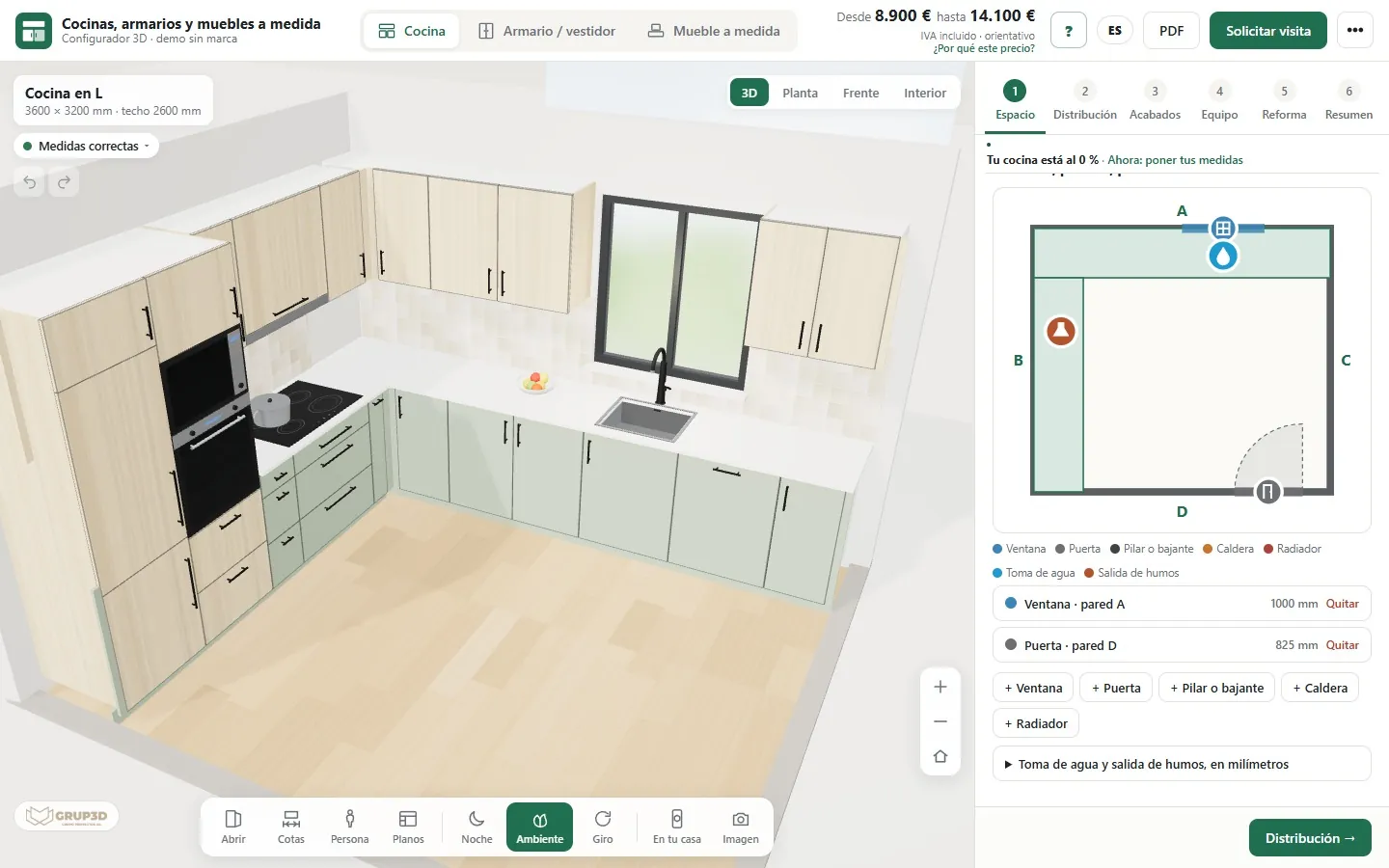
It is a web tool that shows your product in 3D and lets the customer change sizes, materials, colours and options while seeing the result instantly, in the browser and with nothing to install. Every change recalculates the indicative price and, at the end, the configuration comes out as a PDF for the customer and as an order sheet for you.
What does the 3D configurator service include?
Reviewing the material available, defining the scope, an optimised 3D model, the interactive interface, web integration, lead capture, the agreed revisions and delivery adapted to the final use. The exact scope is adjusted to each project.
Which types of product does it work for?
For any product with variants of material, colour, size or accessories: furniture, kitchens, doors and windows, pergolas, tiles, light fittings, machinery, configurable products and digital catalogues. If your product is sold by choosing options, it can be configured.
How do you choose a 3D configurator?
By what it has to solve, not by how pretty the demo is. First, the type: 3D viewer, visual configurator, with rules and price, or connected to orders. Then check catalogue, rules, price list, 3D, languages, integration, maintenance, ownership and pay-per-use. And ask to see one of your own rules working.
What should you ask before hiring a 3D configurator?
Which price it calculates with and who changes it, what reaches you when someone finishes, what is charged separately, whether there is pay-per-use, who owns the configurator, and the lead time, with a date. The same questions to everyone, and the answers in writing.
Custom 3D configurator or platform?
A platform usually charges a recurring licence fee and comes with its own functions: it fits if your product fits into them. A custom build is made with your rules, your price list and your way of selling. At Grup3D the configurator is yours: it does not depend on a pay-per-use platform or third-party licences.
What do I need to build a 3D configurator?
The family to start with, your rules, the price list and whatever files you have: CAD, drawings, data sheets, photos or samples. 3D models are not required: if there is CAD it is used and, if not, we model. At Grup3D, 3D modelling and materials or finishes are charged separately, from €30 to €120 per part or finish (or more).
Can we try a configurator before deciding?
Yes. The Grup3D demo is open, with no registration, with example products and prices from six sectors, at configurador.grup3d.es/demo. And with your product in mind, we show it to you in a 30-minute video call.
When is a subscription platform the right choice?
When the product fits into its options (colours, finishes, few sizes and no technical calculation), you want to start in a few weeks with little outlay, your online shop is already built on a well-known system and you do not mind the configurator looking like other people's. If you use it for a year to test the idea, the money is well spent.
When is a custom configurator the right choice?
When there are manufacturing rules (limits, compatibilities, formulas), a calculated price, a cutting list, distributors with different price lists, your own brand and the expectation of using it for many years. And when you want the configurator to be yours and not a rental.
Can I start with a platform and move to a custom configurator later?
Yes, and it is a sensible way to do it if the product is simple. What you take away from the platform is your rules and your prices (always keep them in your own spreadsheet), not the configurator. When you move to a custom build, that spreadsheet is the starting point of the project.
What is a B2B configurator for distributors?
It is the same 3D configurator the public sees on your website, with a login for professionals. The distributor or installer logs in with their user and sees the product with their terms: their purchase price, their margin on the selling price and their documents with their brand. What they configure reaches the factory as an order, without retyping.
Price, lead times and ownership
How much it costs, what is included and what is not, how it is paid and who owns the configurator at the end.
How much does a 3D configurator cost?
Projects start from €6,500 for a visual configurator of one product family; most projects for manufacturers fall between €14,500 and €35,000, depending on catalogue, rules and integrations, plus maintenance from €190 a month. These are indicative figures: the price is fixed in writing after studying your case, with what is included and what is not.
What is the difference between the three price levels?
The visual configurator (from €6,500) shows one product family with its finishes and sizes, with no technical calculation. The configurator with rules and price (€14,500 – €25,000) applies your manufacturing rules, gives the price on the spot and generates an order sheet and a PDF. The integrated technical configurator (€25,000 – €35,000) adds a cutting list, distributors with their own price list and a connection to your shop or your ERP.
What is not included in the configurator's price?
The 3D modelling of your parts and the materials or finishes faithful to the real ones: from €30 to €120 per part or finish, or more if the part is complex. They are quoted separately, per product, once we see your files. If you already have the models, they are just adapted and that item goes down.
Is there a monthly fee or a licence to pay?
Only maintenance and hosting, from €190 a month, which covers keeping the configurator published, updated and running. There are no third-party licences and no pay-per-use: the configurator is yours and does not depend on a subscription platform.
How long until the configurator is up and running?
Between 3 and 16 weeks depending on scope. A visual configurator of one family is at the low end; one with a cutting list, distributors and a shop connection, at the high end. The specific date goes in the proposal, along with what is included in each phase.
How is it paid?
In three parts: 40% to start, 40% with the test version and 20% at go-live. So you pay most of it once you have seen the configurator working with your catalogue.
What does it cost to change the catalogue or the prices later?
Changing the price list or the rules is something you do yourselves from the dashboard, without programming, and it is covered by the maintenance. Adding new products or finishes that need modelling is quoted per part, as at the start: from €30 to €120 per part or finish, or more.
What do you need to give us a fixed price?
Four things: which product you want to configure, how many options and combinations you handle, what has to come out at the end (image, price, PDF, order sheet, cutting list) and where it will live (your website, your distributors', the online shop). With that and a sample of your files we send you the proposal in writing. You can request it through contact or with the form on this page.
Is the 3D modelling of my products included in the price?
No. 3D modelling and materials or finishes are quoted separately, per product: from €30 to €120 per part or finish, or more if the part is complex. It is settled once we see your files (drawings, data sheets, samples or 3D models). If the product is generated from its dimensions, like pallets or kitchen and wardrobe units, there is no modelling to pay for each reference.
Who owns the code of a custom-built configurator?
Whoever the contract says. If it says nothing, the usual outcome is that the supplier keeps the code and you have a right of use, even though you paid for the whole development. That is why you should ask in writing for the configurator to be yours, with the files delivered, before paying the first instalment. At Grup3D the configurator is yours: it does not depend on a pay-per-use platform or third-party licences.
What is the difference between a licence to use and an assignment?
With a licence to use, the configurator remains the supplier's and you can use it as long as its conditions are met (usually, as long as you pay). With an assignment, the development becomes yours: you can keep using it, change it or commission changes from someone else even if you stop working with whoever built it.
What happens to the configurator if I change supplier?
If it is a subscription platform, it normally stops working when you stop paying, and at most you take away your rules and prices if you kept them separately. If it is an assigned custom build, you take the whole configurator with you: the files, the paid-for 3D models and the enquiry data. What changes is who hosts it and who makes the changes from then on.
Can I stop paying the maintenance and keep using the configurator?
In a Grup3D custom build, yes: the configurator is yours and there is no licence that expires. What the maintenance covers (hosting, changes and extensions) is no longer included, so it has to be written down how hosting is handled in that case. On a subscription platform, stopping payment usually means no longer having a configurator.
Are the 3D models of my products mine?
They should be, because they are paid for separately, per part or finish, and they represent your product. Ask in the contract for the model and finish files to be delivered in a format another studio could work with, and not just what is seen on screen.
What should the contract say about ownership of the configurator?
At the very least: that the custom development is yours (assignment of exploitation rights), that the configurator and 3D model files are delivered to you, that there are no third-party licences or which ones there are and what they cost, that it can be hosted on a server of yours, what happens when maintenance ends, and that enquiries and orders can be exported. Have your adviser review it. More questions in how to choose a 3D configurator.
Distributors, shops and brands without a factory
How the sales network works with the configurator and how the order reaches whoever manufactures.
How is a distributor set up?
The manufacturer sets them up, not the distributor. In the configurators we have developed, each user has a name, a profile (distributor, installer or administration), their city, their tax ID and their discount. Self-registration with a request and approval from the dashboard is developed in the project if you want it.
Can each distributor have a different discount?
Yes. The discount is tied to the user: when they log in, the configurator applies their discount to the retail price and shows it in the summary as the “distributor price”. The purchase price, the order and the PDFs come out with that discount already applied.
What are the margin and the suggested retail price?
The distributor chooses their margin on the purchase price with a control from 0 to 80%, in steps of five. The summary and the PDFs show their purchase price and the suggested selling price to the customer with that margin, so they can quote with the customer in front of them without doing sums on the side.
Can the distributor put their brand on the documents?
Yes. They upload their logo, enter their trading name and tick the box to hide the manufacturer's brand on the PDFs they give the customer. That PDF comes out with their brand, the selling price with their margin and the indicative quote note; the manufacturer still receives the complete order.
How does the order reach the factory?
The distributor fills in their details once, with the job reference, delivery address, desired date and payment method, and the order is saved with the complete configuration, each panel with its sizes and weight and each price line. It comes out as an order sheet in PDF and by email, with a reference. The connection to your management software is developed in the project.
Does the manufacturer know who has used the configurator?
In our demo dashboard each enquiry arrives with name, company, email, phone, sector, what they want, the configurator they opened and the configuration summary, and an email alert is sent. You can also import a list of contacts, generate a personal link for each one and see who has logged in, for how long, which configurators they have seen and whether they asked for a price. Everything exports to CSV.
Does it work for manufacturers who sell through shops and distributors?
Yes. In the project, an area is set up for each shop or distributor, with your price list and their margin, and their logo on the PDF. A price change is made once and reaches everyone, and whoever configures on your website is assigned to the shop in their area.
Can our shops, merchants and installers use it under their own brand?
Yes, as part of the bespoke development: each one logs in with their own access, their margin and their logo, and sees their trade price instead of the retail price. Enquiries from private customers are assigned to the shop or installer in their area.
How do distributors work with their own price list?
Each distributor or professional receives a code with their discount and another for their customers. With their own they see their cost; with the customer code, the enquiry is logged under their name. In their private area they see their enquiries, the selling price, what it costs them and what they keep, and they can mark the status of each one. The configurator can also be placed inside the distributor's website with their code, so whatever comes from there is logged under their name.
Can our distributors, shops and installers use it?
An area can be set up for each one, with their brand and their margin, and the contacts that come in through your website are assigned to the sales rep or the shop for their area. The factory always receives the order sheet in the same format.
Rules, cutting lists and factory orders
The technical side: manufacturing rules, cutting lists, workshop sheets and how it is checked that it calculates correctly.
What is a technical configurator with a cutting list?
It is a web configurator that, besides showing the product in 3D and giving a price, calculates what has to be made: the size of every profile, the size of every glass or board, the weight of every sash, the hardware kit and the bill of materials. It does so with your rules and delivers it in documents the workshop already uses: a cutting and cut-list sheet in PDF, a DXF drawing, a CSV list that opens in Excel, and an order sheet.
More at: Technical configurator with parts breakdown and cutting lists
Does it replace our manufacturing software?
No. The configurator works beforehand: on the website, in the distributor's shop or on the installer's tablet. It calculates the cutting list with the rules you give it so the order arrives complete and with no measurement errors. If you have cutting or optimisation software, the CSV list or the DXF is passed to it; you keep control of the final cutting list.
More at: Technical configurator with parts breakdown and cutting lists
Where do the rules come from: our spreadsheet?
Yes, in most cases. We start from what you already have: spreadsheets, glass deduction tables, limits per system, weights per metre and per square metre, kits per width range. We organise it with you in a rules document, program it and check it against your own cases. Nothing is invented: every formula has a source you have approved.
More at: Technical configurator with parts breakdown and cutting lists
What happens when a size cannot be manufactured?
The configurator says so on screen before an order can be placed: the sash exceeds the system's maximum width, weighs more than the hardware allows, the partition is too thin for that system or the clear opening falls below what is recommended. When there is a way out, it suggests it and applies it with one click: switch to another system, reduce the glass thickness or adjust the opening. An order with uncorrected errors cannot be sent.
More at: Technical configurator with parts breakdown and cutting lists
Which documents come out for the workshop?
In the sliding glass door configurator we have developed, out come the cutting and cut-list sheet in PDF (profile by profile, with size, units and machining), the template for the glazier, the drawing of sashes, glass, profiles and track in layered DXF, the bill of materials in CSV with code, quantity, price and amount, the installation drawing and the order sheet. In the kitchen one, the workshop sheet in PDF and the cutting list in CSV for the cutting software. In each project it is decided which documents are needed.
More at: Technical configurator with parts breakdown and cutting lists
What if we change a rule next year?
Rules and price lists live separately from the code, with a version. A change to a glass deduction or a weight limit is tried first in the test environment, checked against the test cases and, once you approve it, goes to the website. That way all distributors calculate with the same version.
More at: Technical configurator with parts breakdown and cutting lists
How do we know it calculates correctly before publishing it?
With your test cases. Before starting we ask you for real orders already manufactured: the configuration and the cutting list that came out. The configurator has to give exactly the same result in every one. Those cases are kept and run again every time a rule is touched. Until they match, it is not published.
More at: Technical configurator with parts breakdown and cutting lists
What is a technical configurator with rules?
A web configurator in which the customer chooses sizes and options and the system applies the manufacturer's rules: what can be combined, up to which size, how much it weighs, which item code applies and what price comes out. The rules are written once and applied the same way for everyone, regardless of who is on duty that day. We explain it in more detail on the page of the technical configurator with cutting list.
More at: From the manufacturer's spreadsheet to the web configurator
Do we need to rebuild the spreadsheet before starting?
No. We start with the spreadsheet as it is, with its hidden sheets and its notes in the margin. What we do is read it in full, pull every formula, every limit, every compatibility and every code into an ordered list and give it back to you to confirm. What we do ask is that someone on your side can answer the questions that come up.
More at: From the manufacturer's spreadsheet to the web configurator
Can the configurator give different prices to the public, professionals and distributors?
Yes. In a PVC window configurator we are developing there are four price levels: public, customer with a discount code, professional and distributor with a net price list. Each one logs in with their code and sees their price; the price list never leaves the server. It is developed to order for each project.
More at: From the manufacturer's spreadsheet to the web configurator
Who updates the prices when the price list changes?
You do, from the dashboard, without touching code. In the PVC window configurator mentioned, the price list is edited from the dashboard and carries an “I have reviewed this price list” box: until it is ticked, prices are shown with an “estimated price” notice. In each project it is decided which data is edited from the dashboard and which goes inside the rules.
More at: From the manufacturer's spreadsheet to the web configurator
What does validating a technical configurator mean?
It means checking, before publishing it, that it calculates the same as your technical office: the same profile and glass sizes, the same weight, the same hardware kit and the same price, on orders you have already manufactured. It is not “seeing that the 3D moves nicely”: it is matching numbers against real orders.
How many test cases are needed and who solves them?
Enough to cover every system and the edge situations: the minimum size, the maximum, the heaviest glass, the odd opening. As a guide, between ten and thirty already-manufactured orders per product family (an example figure, not a rule). Your technical office solves them, because the case is only worth as much as your method; we load them and compare.
What is the rules version?
Rules and price lists live separately from the code, with a version number. When you change a glass deduction, a weight limit or a price, the change is tested first, checked against the cases and then goes to the website, and all distributors calculate with the same version.
Does it replace our technical office?
No. It makes an indicative base calculation with your rules; your engineer checks it, confirms whatever is needed at the visit and signs off the final project. What changes is the starting point: a complete configuration instead of a photo and an email.
Can we add our own sizing and load rules?
Yes: which system you allow depending on the points or the lubricant, which pump goes in each case, which loads and heights you permit, the ranges of each conveyor or the kits for each van. What you do not make cannot be chosen.
Website, online shop, mobile and augmented reality
Where the configurator lives: your website, the online shop, the customer's phone and their home with augmented reality.
Can it be embedded in my website and connected to my CRM or order system?
Yes. The configurator is embedded in your website or your digital catalogue with one line of code and works on desktop, tablet and mobile. The connection to your CRM, your ERP or your order system is developed in the project, to order; in the meantime, every enquiry stays in a dashboard with its configuration and reaches you by email.
Does it work on mobile with nothing to install?
Yes. It runs in the browser and it is responsive, so it works on desktop, tablet and mobile with no downloads or plugins. The 3D model is optimised to load fast on any device.
What is the difference between a 3D viewer and a 3D configurator in an online shop?
The viewer shows a finished product to rotate it and see it at home (3D viewer for e-commerce). The configurator lets you choose sizes, finishes and accessories, and shows every combination in 3D with its indicative price.
Does it work with WooCommerce, Shopify and PrestaShop?
Yes, with all three and with a custom-built website: the 3D goes on the product page with one line of code, inside a page or behind a button. Passing a calculated price to the basket is developed to order in the project.
Can the customer add it to the basket with the price of what they configured?
It does not come ready-made: it is developed to order for your shop, depending on what your platform allows. The published configurators today end in an enquiry with the complete configuration. Payment stays in your shop, with your payment gateway.
Does every combination have to be set up as a variant?
To show it, no: the 3D and the indicative price come from the options and your rules, even if the combination has never been photographed. How it is recorded in the shop and the warehouse is decided in the project.
Does it connect to our prices, our stock and our ERP?
The indicative price is calculated with your price list; in the kitchen one it is changed from a dashboard, without programming. Reading prices and stock from your shop, or sending the order to your ERP, is developed to order in the project.
Does it help reduce returns?
It helps the customer buy knowing what they are ordering: they see the sizes on the 3D with a person alongside for scale and, from their phone, place it at full size in their home with augmented reality, with nothing to install. It does not replace measuring the opening.
What reaches us when a customer configures a product?
An enquiry with their details and the complete configuration: sizes, finishes, accessories, indicative price and, depending on the product, the order sheet and the PDF. It stays in a dashboard, and reaches you by email if you set up an account.
Is a WooCommerce, Shopify or PrestaShop product options plugin enough as a configurator?
If your product has few options, the price is a sum of surcharges and there is no need to see it, yes: an options plugin does that job inside the shop. If there are free sizes, manufacturing rules, a price that is not a sum or the product needs to be seen before paying, a custom development is needed.
Is the step to the basket done by the plugin or by the development?
An options plugin generally passes the options to the basket and the order itself. In a custom development it does not come ready-made: it is developed for your shop, depending on what your platform allows and together with whoever maintains it. Grup3D's published configurators today end in an enquiry with the complete configuration, which stays in a dashboard. Payment remains yours, with your payment gateway.
Can I start with a plugin and move to a custom development later?
Yes, and it is the reasonable thing to do while the product still has few options. What is worth keeping from the start is your price list and your rules, written down in order: it is the first thing a custom development asks for, and what saves the most time.
What should I ask whoever runs my shop before deciding?
Three things: whether the shop accepts a product whose price is calculated outside the product page; whether the order can carry the complete configuration (sizes, finishes and accessories) without typing it into a text field; and who will maintain the shop when the theme or the version is updated.
Does it work on the installer's phone, on site?
Yes. It opens with a QR code, without downloading any app, with the calculation, the list of materials and the indicative price. With augmented reality, the charger, the enclosure or the sign are seen at full size in place. More at product augmented reality.
More at: 3D lighting and energy configurators
Does it work on a phone and can it be seen in the customer's home?
Yes. With a QR code it opens on the phone, without downloading any app, and is placed at full size on the wall, the façade or the loading bay with augmented reality.
More at: 3D door and window configurators
Artificial intelligence in the configurator
What an AI assistant inside the configurator does and does not do, and what it costs.
What is a configurator with artificial intelligence?
A 3D product configurator with an assistant added: the customer or the distributor writes what they need in their own words (“two doors with two fixed panels, height 2400, width 4000, black”) and the configurator fills itself in with those options. It is another way of filling in the same fields that would be filled in by hand, designed for those who do not know where to start or for those who know exactly what they want and do not want to make thirty clicks.
Does the AI calculate the price or the sizes?
No. The AI only interprets the sentence and turns it into options. Sizes, cuts, hardware and price are always calculated by the configurator's rules, yours, exactly as when the customer chooses the options by hand. If a size falls outside your limits, the configurator warns just as with any other configuration.
Can the AI misunderstand what the customer wrote?
Yes, it can. An ambiguous sentence (“on the left”) can be read in more than one way. That is why the result is always shown on screen, with a summary of what has been changed and the option to undo it, and the customer confirms it before asking for a quote. Nothing is ordered or manufactured from an unconfirmed interpretation.
What does the AI assistant cost each month?
The AI is an external service paid for by usage, every month. It is a small amount, in the order of cents per conversation, but it exists and depends on how much it is used. The account for that service is set up in your name, with a monthly cap you set; Grup3D configures it and charges nothing for that usage. The price of the configurator does not change for having an assistant.
What data is sent to the AI?
Only the sentence the customer writes. No prices, costs, discounts or personal data are sent to it. Your price list and your rules stay in your configurator.
Who is responsible for what the AI suggests?
Grup3D is responsible for the calculation applying your rules: sizes, limits, compatibilities and price. The AI's interpretation of a sentence may not be what the customer meant, and Grup3D is not responsible for that interpretation; that is why the result is always shown and confirmed before continuing.
Is it in any open demo?
No. The open demos at configurador.grup3d.es are configured by hand, with example products and prices. We include the AI assistant in the projects that ask for it, on your catalogue and your rules, and we show it in a video call.
Can we start without the assistant and switch it on later?
Yes. If you prefer to start without it and switch it on later, the price of the configurator does not change: it is left ready and is activated when you decide. The only thing that appears then is the monthly usage cost, in your name and with your cap.
Doors, windows and security
Windows, industrial and entrance doors, roller blinds, gates, subframes and lift cabins.
What is a 3D door and window configurator?
A web tool in which the distributor, the installer or the customer choose dimensions, opening, finishes and extras while seeing the piece in 3D, with an indicative price calculated with your price list. At the end, a PDF for the customer and an order sheet for the factory come out. It opens in the browser, with nothing to install.
More at: 3D door and window configurators
Which products in the sector can be configured?
The demo has seven: windows, industrial and garage doors, subframes, entrance doors, roller blinds and insect screens, gates and lift cabins. Balcony doors, combined fixed panels or pleated insect screens are added in the custom development, with your rules and your price list.
More at: 3D door and window configurators
How are handing and opening direction mistakes avoided?
The piece opens in 3D at the press of a button and the handing is chosen by looking at it, with the hinges in view: the window, seen from inside; the entrance door, from outside. The choice travels with the order; for the entrance door it is written in the PDF and on the factory order sheet.
More at: 3D door and window configurators
Does it respect our manufacturing sizes and combinations?
Yes. Your rules are programmed in: minimum and maximum sizes per series and opening, weight per sash or colours that only exist in one series. What you do not make cannot be chosen, and anything outside the limits shows on screen before the order is sent.
More at: 3D door and window configurators
Do we still need to go out and measure?
To confirm the opening before manufacturing, usually yes: the configurator does not replace the final survey. What changes is that you no longer go out to measure just to give a price: whoever calls you has already chosen type, dimensions, finish and extras, and knows roughly what it will cost.
More at: 3D door and window configurators
Can our aluminium and PVC series be loaded with their limits?
Yes. Each series is loaded with its material, its depth, the glass it accepts, the maximum sash size per opening type and the weight the hardware can bear. If a glass does not fit the series, a sash exceeds the size or weight, or a series does not belong to the family of the chosen opening, the configurator warns with the solution (add a panel, choose other glass or move up a series) before the order is sent. From the dashboard you untick what you do not make and it stops being shown.
What is the indicative cutting list and how far does it go?
From the opening size, the composition and the series, the configurator calculates the outer frame size, the size of each sash and of each glass, with the weight per sash, and puts it on the order sheet in PDF and on an elevation in DXF. It is indicative: it serves to quote, to order glass and to spot what does not fit. The final profile cutting list is still generated by your manufacturing software with the real profiles of the series.
Furniture, wood and textiles
Kitchens, wardrobes, board decors, office, fittings, sofas, mattresses and bedrooms.
What is a 3D furniture configurator?
It is a web application where the customer or the shop picks a piece from your catalogue, changes sizes, finishes, fabrics and extras and sees it in 3D instantly, with an indicative price from your price list. When the configuration is closed, out come the PDF and the order sheet for the factory.
Which furniture and products can be configured?
Nine, all with an open demo: made-to-measure kitchens, wardrobes and furniture, kitchens for manufacturers, wardrobes, office furniture, sofas, mattresses and beds, internal doors, fittings, and blinds and curtains. Another product? It can be developed to measure if it has clear rules for sizes and compatibility.
Can our fabrics, finishes and manufacturing sizes be loaded?
Yes; that is what gets developed to order. The demo uses a generic catalogue; yours carries your fabrics, finishes and sizes, and your rules: which fabrics each model accepts or which combinations you do not make.
What does the factory receive when an order is closed?
The order sheet with every reference and its quantity, and the PDF with the piece and its dimensions, as chosen on screen. For kitchens, wardrobes and made-to-measure furniture, also the workshop sheet with the cutting list and the CSV. The connection to your ERP is developed in the project.
Does it replace the design software used by our shops or our technical office?
That is not what it is for: the design software is still needed for the technical project and the final render. The configurator covers what comes before and after: the customer arrives having decided, and the order reaches the factory without being typed in again.
Bathroom, tiles and flooring
Tiles, showers, shower screens, shower trays, bathroom furniture, worktops and flooring.
What is a 3D bathroom configurator?
A web page where your customer, the shop or the installer picks the product with its sizes and finishes and sees it assembled in 3D, with an indicative price from your price list, a comparison tool for up to three options and the configuration as a PDF or on their phone. Six of the seven in the sector also produce the factory order sheet. More on what a 3D configurator is.
Which configurators do you have for the bathroom sector?
Seven, each with its own page and open demo: floor and wall tiles, shower and bath, made-to-measure shower tray, shower screen, bathroom furniture, stone or quartz worktop and paint colour.
We make several product families, for example trays and screens. How does that work?
Each family has its own flow and its own rules: the tray asks for the size, the cut-out and the waste; the screen, the type, the width, the side panel and the height. In the proposal we set which families are included, and the price depends on that scope.
What reaches the factory?
The order sheet with every reference, its description and its quantity: boxes of tiles and grout, the tray with its cut-out and its waste valve, the toughened glass and the profiles, the unit with its basin or the worktop with its cut-outs. Six of the seven produce it; the paint one gives litres and tins. If you want it to go into your ERP, it is connected in the project.
Outdoor, metal and street furniture
Pergolas, awnings, railings, carports, prefabricated modules, street furniture, terrace enclosures and pools.
What is a 3D configurator for outdoor products?
A web tool in which your customer or your network choose the dimensions, finishes and extras of a pergola, an awning, a railing, a carport, a module or a bench while seeing it in 3D, with an indicative price calculated with your price list. At the end, a PDF for the customer and an order sheet for the factory come out. It opens in the browser, with nothing to install.
Can the price include transport, installation and extras?
Yes. In the demo, the awning, the railing, the carport and the bench add installation, and the prefabricated module adds transport and unloading. Extras come in with their price: wind sensor, edge fixing, charger, engraved crest. In your version it is calculated with your price list and your rules, for example by area or by number of modules.
Does it calculate the material the factory has to prepare?
Every configuration generates its factory order sheet with references and quantities. In the demo, 8 metres of glass railing at 1,000 mm come out with 7 laminated glass panels and 14 fixings on the order sheet, and 8 posts in the technical data; twelve benches with armrests come out with 24 armrests and 12 fixing kits. In your version, the count follows your modules and your references.
Does it warn about what cannot be made or what is missing on site?
Yes. The railing warns when the height drops below 1,000 mm and reminds you of the minimum height for sections with a big drop; the prefabricated module states in writing that it needs a level slab and utility connections; in pergolas, the technical rules explain the limit and suggest the alternative in one click. Checking each project against regulations remains the job of the engineer who signs it off.
Machinery, air conditioning, logistics and plastics
Centralised lubrication, air conditioning, racking, conveyor belts, vans, tanks and pallets.
What is a 3D industrial configurator?
A tool on your website where the customer, the distributor or your sales rep choose a piece of equipment in 3D while what is done by hand today gets calculated: distributors and tubing, pallet positions, boxes per minute or capacity. At the end, the PDF with the indicative price and the factory order sheet come out.
Can our distributors, integrators and installers use it?
Yes. The project includes an area where each one logs in with their margin and their brand, configures with their customer in front of them and sends you the order sheet with your references.
Does it connect to our ERP or our CRM?
It is connected in the project, if you have them: it does not come ready-made, it is developed to order. In the meantime, every enquiry stays in the dashboard with its configuration and, with an email account set up, it also reaches you by email.
How does the 3D pallet catalogue work?
The pallets are generated from their dimensions, without modelling each one. The customer sees where the forks go in, ticks the ISPM-15 treatment, loads the lorry and sends you the order with the weight and the trips, or offers you their used pallets. More at the 3D pallet catalogue.
Lighting, electrical and energy
LED strips, light fittings, warehouse lighting, signs, electrical enclosures, solar panels and chargers.
What is a 3D lighting and energy configurator?
A web page in which the wholesaler, the installer or the customer choose the product and see it in 3D, switched on if it is light, with the technical data calculated on the spot. At the end, an indicative price with your price list, a PDF and an order sheet with references come out. Nothing to install. More at what a 3D configurator is.
More at: 3D lighting and energy configurators
Which products in the sector can be configured in the demo?
Seven, each with its own page and open demo: LED strip and profile, recessed and pendant light fittings, warehouse lighting, signage letters and signs, electrical enclosures, solar panels and electric car chargers.
More at: 3D lighting and energy configurators
Do the calculations replace our technical office's study?
No. The lux, the solar output, the savings, the charging time or the DIN modules are indicative: they are there so the enquiry arrives with a first calculation and to tell which ones deserve the full study, which your technical office still does.
More at: 3D lighting and energy configurators
Can we add our own calculation and compatibility rules?
Yes, that is the core of the project: driver margins, strip limits, light levels per use, which driver each light fitting takes or which accessories each enclosure accepts. What you do not make cannot be chosen, and the order sheet comes out with your references.
More at: 3D lighting and energy configurators
Can the wholesalers, shops and installers that buy from us use it?
Yes, as part of the custom development: every wholesaler, lighting shop, sign maker or dealer can have their own area with their brand and, if they resell, their margin on your price list. Orders reach you with the complete sheet and your references, and the enquiries from your website can be assigned by area to the right sales rep or installer.
More at: 3D lighting and energy configurators
What do we receive when a customer asks for a price?
A request with their details and their configuration, in a dashboard with its status and exportable to CSV; if you set up an email account, by email as well. The customer takes away a PDF with the image, the technical data, the order sheet and the indicative price.
More at: 3D lighting and energy configurators
Ask us
with your product
in front of you.
Tell us what you make or what you sell and how orders reach you today. We reply from grup3d@grup3d.es and, if you wish, we show it to you in a 20-minute video call with your range. In the meantime, all 48 demo configurators are open, with no registration, at configurador.grup3d.es/demo.
Would you rather talk it through? Call us on 662 061 421.