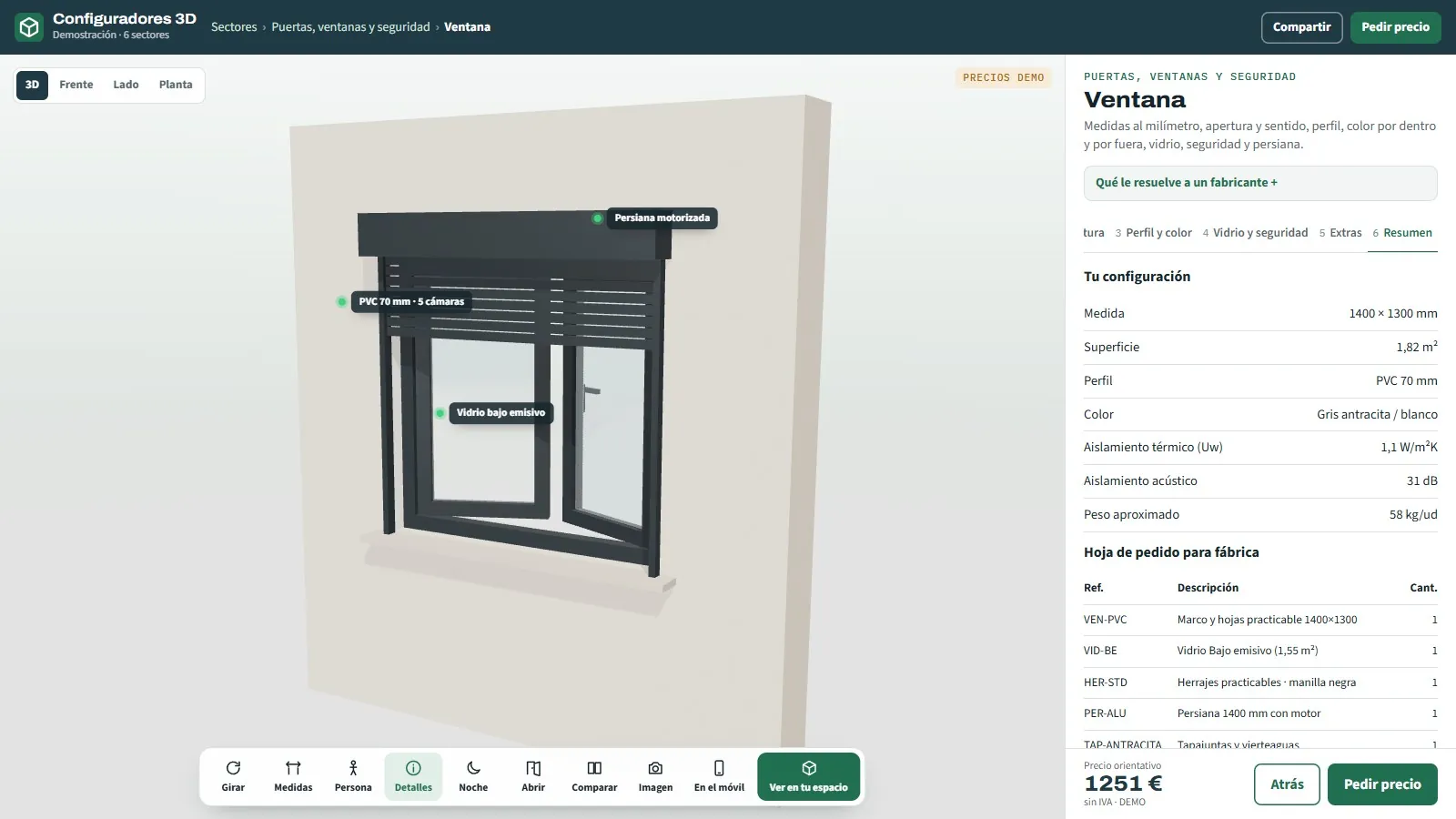
Summary of the 3D window configurator from the Grup3D demo with the configuration, the indicative price and the order sheet: configure, price and quote on one screen
GUIDE · CPQ · CONFIGURE · PRICE · QUOTE
— GUIDE FOR MANUFACTURERS · 2026

CPQ configurator
for manufacturers
what it is and what it calculates.

CPQ stands for configure, price, quote. It is what your technical office does every time a made-to-measure order comes in: check that it can be made, work out what it costs and send a proposal. A CPQ configurator does it on the website, with your rules and your price list, and a 3D configurator adds seeing the product. What each one is and when each one is needed.

— WHAT CPQ IS

What CPQ means
for a manufacturer.

Three steps that today happen in three places: the sales rep configures, the technical office sets the price and admin sends the quote. A CPQ brings them together.

C · CONFIGURE

Choose only what can be made

Sizes, materials, options and extras, with the manufacturer's rules: what combines with what, up to what size, with what weight, which accessory goes with each use. What cannot be made cannot be chosen; what goes beyond the limits is flagged with the alternative.
P · PRICE

Calculate with the price list, instantly

Per unit, metre, square metre or module; extras with their price; transport and installation by area; discounts per distributor or by volume. Every change recalculates the indicative price. You change the price list yourself from the panel.

Q · QUOTE

Deliver the document, and the order

PDF for the customer with the image, the technical data and the price; order sheet for the factory with references and quantities; request in your panel with the full configuration. In the technical ones, cutting list and cut list.

— CPQ AND 3D

CPQ, 3D configurator
or both.

Many CPQ programs are forms with rules: they work, but the customer does not see what they are configuring. The 3D is not decoration: it is what makes the end customer, the one who does not read data sheets, decide.

A CPQ without 3D works for a sales rep or a distributor who knows the product: they pick options from a list, the system applies the rules and produces the quote. It is the norm in management software for sales networks. The end customer, on the other hand, does not know what a micro-bevel, an adjustable louvre or a five-point lock is, and from a list they choose the cheapest.

A 3D configurator with CPQ does the same, but the customer sees the product change: the window with the sash open to choose the handing, the pergola with the louvres turning, the sofa with the fabric. The rules warn on screen, the price is recalculated and at the end the PDF and the order sheet come out. And it works on the installer's phone on site and on the shop's tablet. See what a 3D configurator is.

Both is what each of the 48 demo examples carries: the 3D in front and the CPQ underneath. In the window demo, for example, the configuration (series, opening, glazing, roller shutter), the indicative price and the order sheet all come out of the same screen.

— WHAT IT CALCULATES

What a CPQ really
calculates, with examples.

What the technical office does by hand today, with the spreadsheet. Examples from the open demos, with sample products and prices.

01 · CENTRALISED LUBRICATION

Pump, distributors and tubing

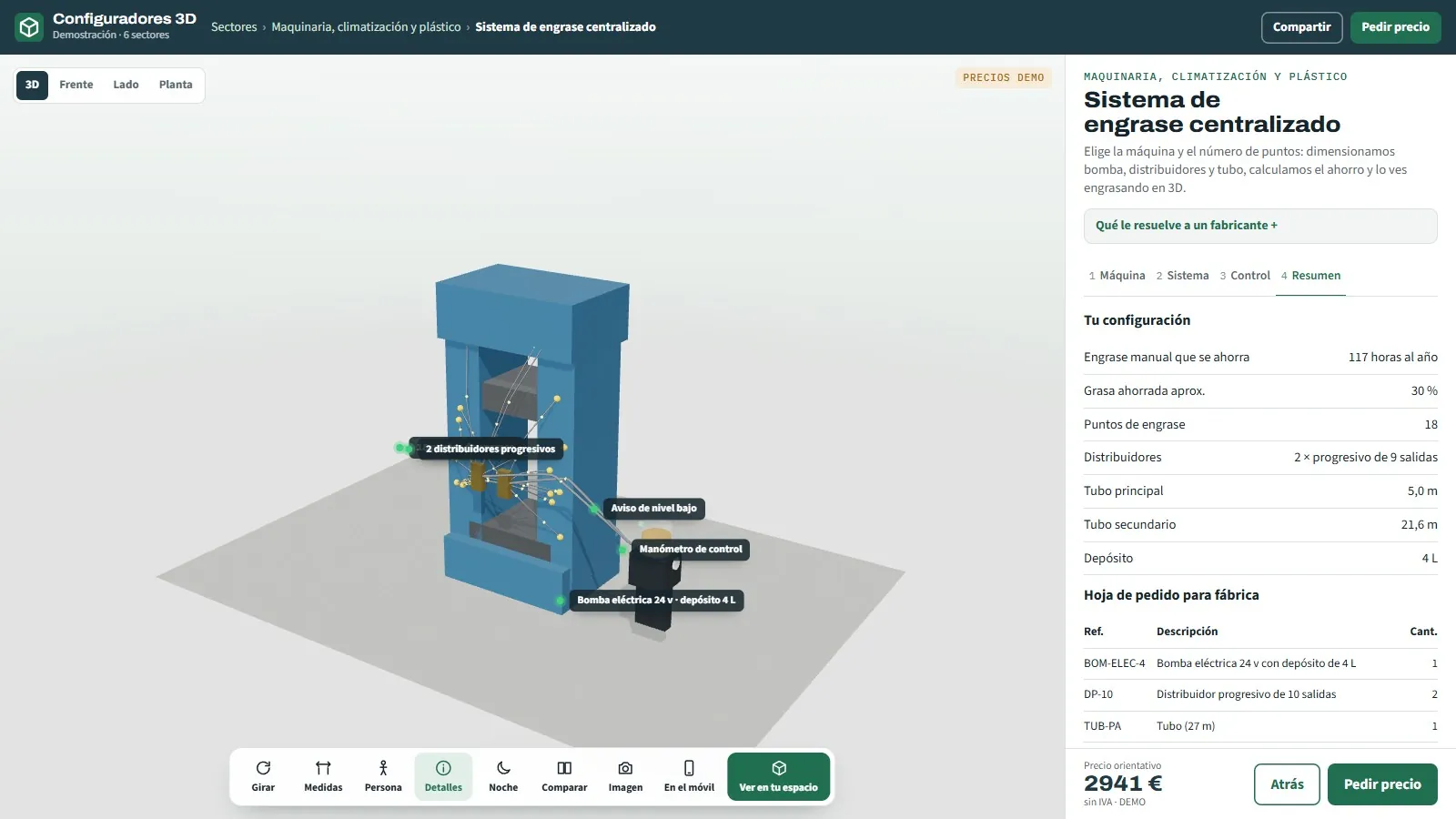
With the machine and the number of points, the CPQ shares outlets between distributor blocks, sizes the pump and the tubing and calculates the hours of manual greasing saved per year. The order sheet comes out with the reference and quantity of each component.

02 · TERRACE ENCLOSURES

Panel split and itemised quote

With the front, the depth and the height, it splits the panels according to the system (glass curtain, sliding, folding), with the maximum width and weight per panel, and quotes glass, tracks, corners, roof, extras and installation by area and floor.

03 · WAREHOUSE LIGHTING

High-bays, lux, consumption and saving

With the warehouse dimensions, the use and the optics, it calculates how many high-bays are needed, how to lay them out, the average lux, the annual consumption and the saving compared with the old ones, and produces the order sheet.

04 · SUB-FRAMES PER PROJECT

Units per opening and a label per home

With the list of openings in a development, it calculates units, metres of insulating tape, lead time and the cost of a rush job, and generates the order sheet with a label per opening and home.

05 · PALLETS

How many fit in the lorry

With the pallet type and the units, it calculates how many fit per trailer, the weight and the trips, and sends the order with everything. No prices in the demo: final price after studying the case.

06 · GLASS SLIDING DOORS (TECHNICAL)

Cutting list, weights and fittings kit

In the technical configurator developed for a manufacturer, the CPQ calculates the size of each profile and each glass panel, the weight per panel, the fittings kit and the bill of materials, and delivers them in PDF, DXF and CSV. See technical configurator with cutting list.

Summary of the lubrication system configurator from the demo with the pump, the distributor blocks, the metres of tubing, the yearly saving and the factory order sheet
CPQ in the lubrication demo: sizing, yearly saving and order sheet from the machine and the points. Sample prices.
— THE RULES

The rules are the CPQ;
the rest is screen.

A CPQ is worth what its rules are worth. That is why the project starts with your Excel and your orders already manufactured.

  1. 01

    The rules, in writing

    Limits per system, weights, compatibilities, which accessory goes with each use, calculation formulas. They are taken from the Excel and from the foreman's head into a document you approve. See from the manufacturer's Excel to the web configurator.

  2. 02

    The price list, apart from the code

    Prices, extras, areas and discounts live in the panel, with versioning. A change is tested first and then goes to the website; all distributors calculate with the same version.

  3. 03

    The test cases

    Real orders already manufactured, with their configuration and their result. The CPQ has to give the same in each one, and they are run again every time a rule is touched. See how a technical configurator is validated.

  4. 04

    The test environment

    First at a password-protected address, with the technical office and a trusted distributor or two using it with real orders. Until it all matches, it is not published.

— WHO IT IS FOR

Who it is for
is for.

For any manufacturer or distributor whose price depends on sizes, options or calculation. And for their network.

— MANUFACTURERS
  • Made-to-measure product with a price per metre, m², module or part: windows, pergolas, railings, shelving, shower screens, kitchens.
  • Product with technical calculation: lubrication, air conditioning, lighting, LED strips, solar panels, EV chargers.
  • Technical offers that a person does today, whether they get signed or not: the CPQ does the base calculation and the technician reviews.
— DISTRIBUTORS, SHOPS AND INSTALLERS
  • Quoting with the customer in front of you, with their discount and their margin, without calling the factory.
  • Ordering without retyping: the order sheet comes out of the same configuration, with the manufacturer's references.
  • Brands without a factory: your catalogue and your brand, the manufacturer's price list and your margin on top. See 3D configurator company for manufacturers and for those who sell without a factory.
— FREQUENTLY ASKED QUESTIONS

What we get asked
about CPQ.

There are more short answers in frequently asked questions about 3D configurators and who we are in 3D configurator company.

What is a CPQ?

A program that configures a product with the manufacturer's rules (what can be combined and up to what size), calculates the price with its price list and generates the quote. The initials stand for configure, price, quote. A 3D configurator with rules and price is a CPQ in which, on top of that, the customer sees the product.

Is a 3D configurator a CPQ?

It is when it carries rules and price: it configures with the manufacturer's rules, calculates with their price list and delivers a PDF and an order sheet. A 3D viewer or a purely visual configurator is not a CPQ: it shows, but it does not calculate.

Do you need 3D to have a CPQ?

Not for a sales rep who knows the product. Yes when the end customer chooses, when the product sells on what you see or when you have to convince someone who was not there. In the 48 demo examples both go together.

Does the CPQ replace our technical office?

No. It does the base calculation with your rules: distributor blocks and tubing, high-bays and lux, panels and weights, pallet positions. Your technician reviews a calculation that is already done, confirms on the visit whatever needs confirming and closes the price.

Does it connect to our ERP or our CRM?

It is connected in the project, if you have them: it does not come ready-made; it is developed bespoke. In the meantime, every request stays in the panel with its full configuration and, with an email account set up, also reaches you by email.

How much does a CPQ configurator cost?

Development starts from €6,500 for a visual configurator of one product family; most manufacturer projects fall between €14,500 and €35,000, depending on catalogue, rules and integrations, plus maintenance from €190/month. The CPQ with rules and price is at the middle level; with cutting lists and an ERP connection, at the top level. Details in the price of a 3D configurator.

— OPEN DEMO

Try it now
or see it with
your range.

The 48 demo examples carry a CPQ underneath: configuring with rules, instant price and order sheet. Open, no sign-up, with sample products and prices, at configurador.grup3d.es/demo.

With your rules in front of you? Bring a technical offer you have already done by hand and in a 20-minute video call we will configure it together to see what your CPQ would calculate. No commitment.

Would you rather talk it through? Call us on 662 061 421 or write to grup3d@grup3d.es.