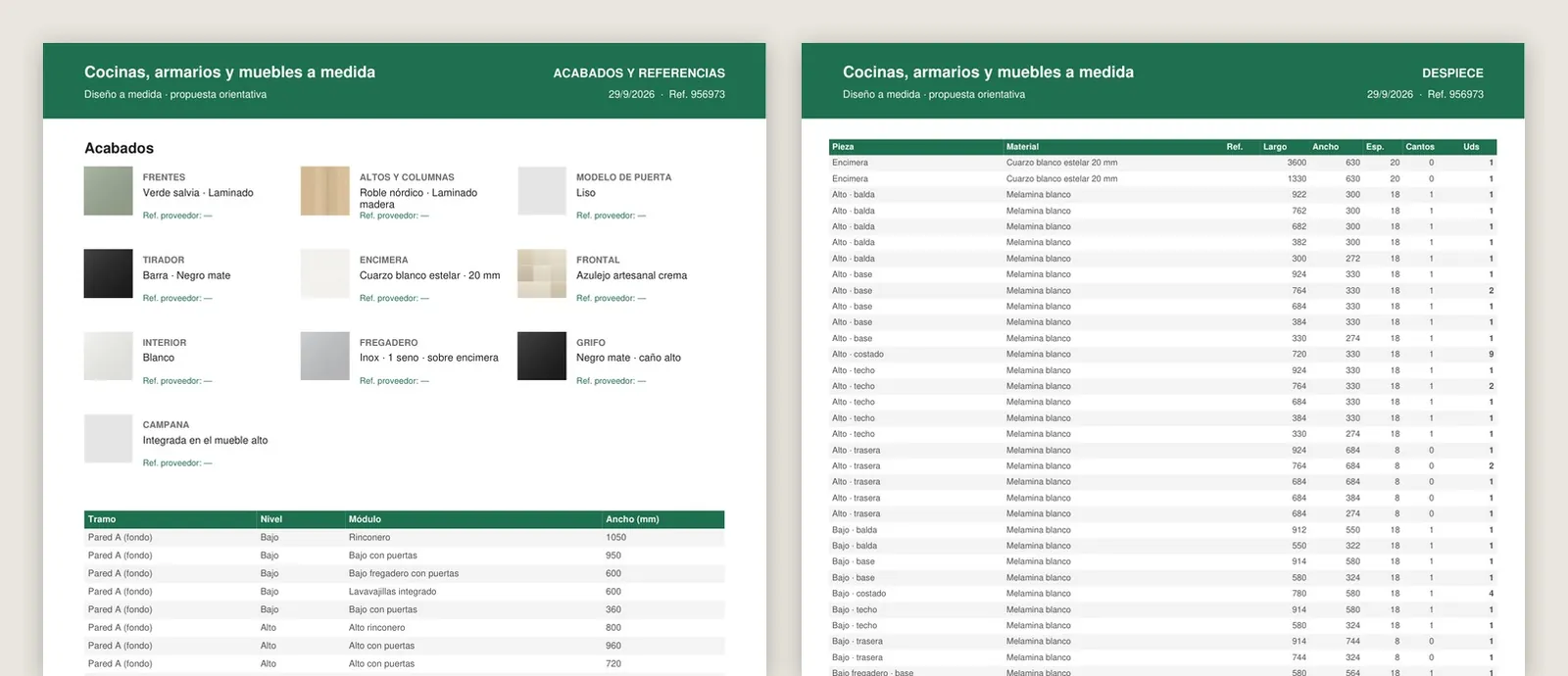
Workshop sheet with cutting list generated by the 3D kitchen and wardrobe configurator of the Grup3D demo, with the parts, the sizes and the references
GUIDE · PDF · ORDER SHEET · DRAWING · CUTTING LIST · DXF
— GUIDE FOR MANUFACTURERS · 2026

Which documents
a 3D configurator generates
and who receives each one.

The 3D spinning on screen is the part you see. What is worth money is what comes out of it: the PDF the customer shows at home, the order sheet the factory reads without interpreting, the dimensioned drawing for the installer, the cutting list that goes into the cutting machine. Which document each level of configurator generates, who receives it and what it has to carry so that nobody has to write it out again.

— FOR THE CUSTOMER

What goes to
the customer.

Documents to decide with, and to convince whoever was not there.

01 · QUOTE PDF

Image, technical data and price

The configuration as they saw it, with the sizes, the finishes, the items that make up the price and the site notes. With your brand or, if a distributor is selling, with theirs. In the kitchen demo, with the proposal and the drawings in the same PDF.

02 · LINK AND QR CODE

To come back and to show

The configuration is saved and opens from any device: the customer shows it to their partner or opens it again in the shop. By WhatsApp or by email, with the QR code on the PDF.

03 · SPECIAL DOCUMENTS

Residents' association, comparison, hotels

The PDF for the residents' meeting in terrace enclosures; the comparison between two models in mattresses; the order by sizes and units for hotels in bedrooms. What each sector needs for the customer to decide.

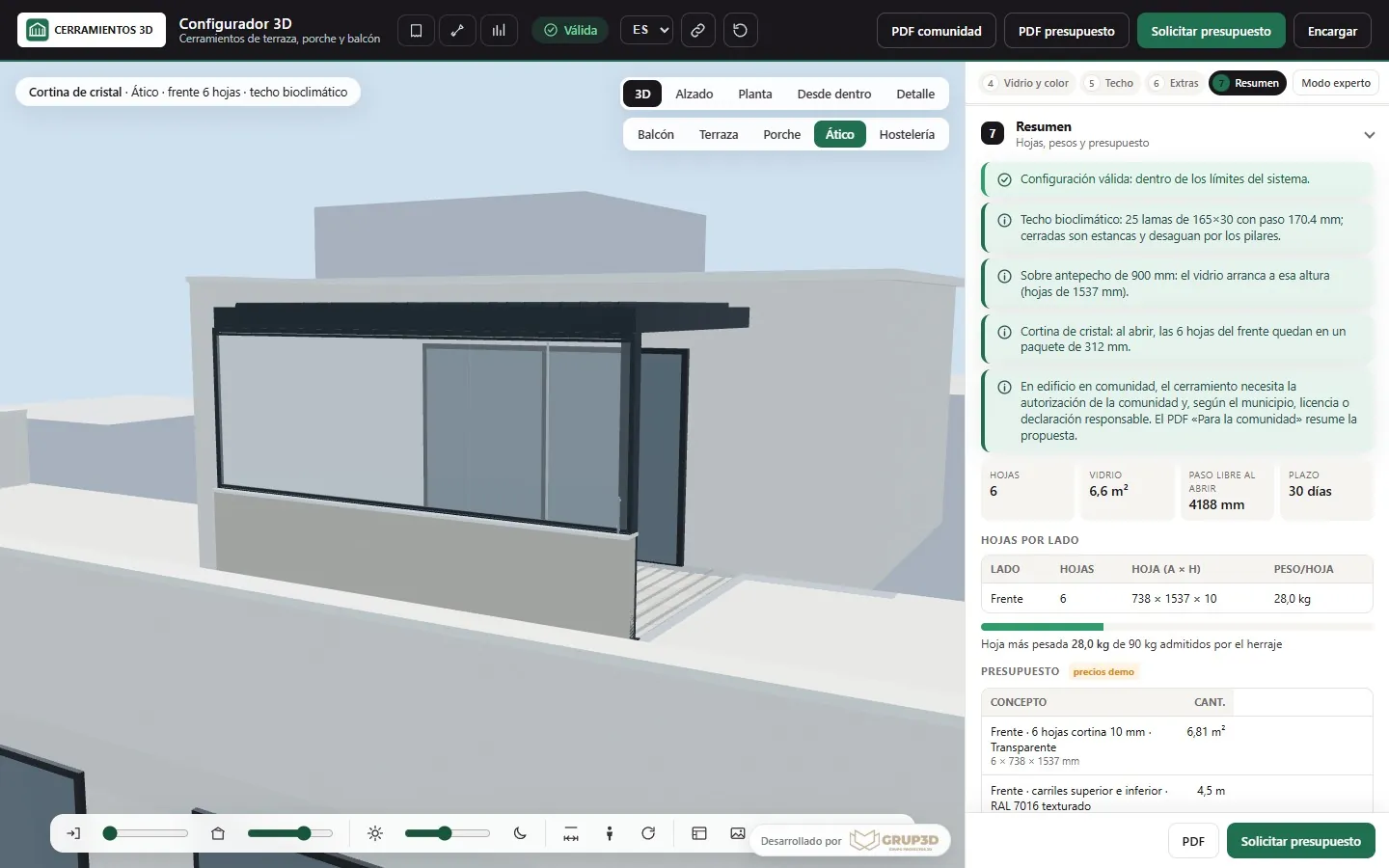
PDF for the residents' association generated by the 3D terrace enclosure configurator from the demo, with the enclosure and its data
The terrace enclosure demo generates the PDF the customer takes to the residents' meeting: the enclosure in 3D, sizes and system. Sample prices.
— FOR THE FACTORY

What goes to
the factory.

The documents that turn the configuration into production without anyone writing it out again.

— 04 · ORDER SHEET
  • Reference, description and quantity of each component, with your codes: 7 glass panels and 14 anchors for 8 metres of railing; reels, profiles, end caps, clips and power supply for an LED strip.
  • Sizes, handing and finishes as chosen on screen, with the weight per sash where it matters.
  • Order details: customer or distributor, project reference, delivery address and desired date.
  • Always the same format, whether it comes from the website, a distributor or a shop's tablet. See how to reduce order errors in the factory.
— 05 · WORKSHOP SHEET AND DIMENSIONED DRAWING
  • The workshop sheet with the parts and their sizes: in kitchens and wardrobes, module by module, with the decor and the edging of each part.
  • The dimensioned drawing of elevation and plan, for the fitter and for the customer, as in the pergola demo and the terrace enclosure demo.
  • The bill of materials against stock: what has to be ordered from the supplier to make the order.
  • What the site has to prepare: slab, service connections, clear opening, written in the same document.
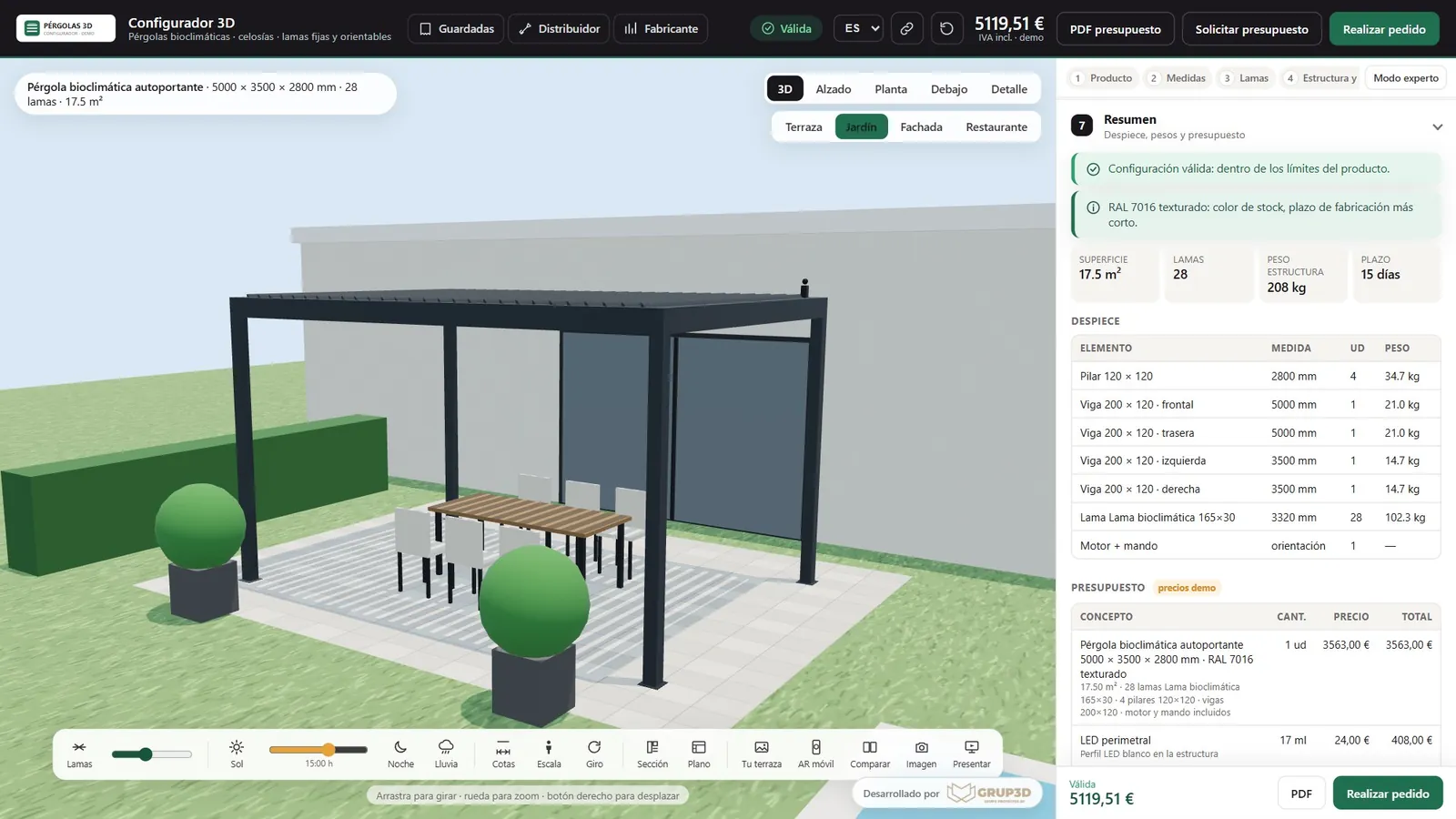
Summary with cutting list and quote generated by the 3D pergola configurator from the demo, with the items and the parts
The summary from the pergola demo: itemised quote and cutting list of the structure in the same document. Sample prices.
— TECHNICAL

The documents
of a technical configurator.

When the configurator calculates the cutting list, what comes out goes into the machine.

  1. 06

    Cutting list and cut list

    Every profile with its cut length and its angle, every glass panel with its sizes, every fitting with its reference, calculated with your rules: profile deductions per series, clearances, weight limits. See automatic cutting list: profile cuts and glass sizes.

  2. 07

    DXF and CSV for the machine and the management software

    The DXF with the geometry for the cutting or optimisation software; the CSV with the order lines for the management software. Which software you use and which columns it expects are defined at the start of the project.

  3. ✓

    Checked against your orders before publishing

    The cutting list is validated against orders already manufactured: the configurator has to give the same sizes in each one. Those cases are stored and run again every time a rule is touched. See how a technical configurator is validated and technical configurator with cutting list.

— WHO RECEIVES WHAT

Who receives what
and at which configurator level.

The three levels (visual, with rules and price, technical) differ above all in the documents they generate.

The three levels are described on the 3D configurator pricing page.
DocumentWho receives itLevel
01 · Quote PDF with imageCustomerVisual (no price) · with rules and price
02 · Link and QR code for the configurationCustomer, shop, distributorVisual
03 · PDF for residents' association, comparison, hotel orderCustomerWith rules and price
04 · Order sheet with references and quantitiesFactory and officeWith rules and price
05 · Workshop sheet, dimensioned drawing, bill of materialsFactory, fitterWith rules and price · technical
06 · Cutting list and cut listFactoryTechnical
07 · DXF and CSVMachine and management softwareTechnical
Requests in the panel, CSV and email alertSales officeAll

Development starts from €6,500 for a visual configurator of one product family; most manufacturer projects fall between €14,500 and €35,000, depending on catalogue, rules and integrations, plus maintenance from €190/month. What marks the jump between levels is, above all, which documents have to come out and what they are validated against.

— FREQUENTLY ASKED QUESTIONS

What we get asked
about the documents.

There are more short answers in frequently asked questions about 3D configurators and who we are in 3D configurator company.

What does the PDF the customer receives contain?

The configuration as they saw it on screen, with the sizes, the finishes, the items that make up the indicative price and the site notes, with your brand or the distributor's. A link and a QR code let them open it again and show it.

What is the difference between the order sheet and the workshop sheet?

The order sheet is the list of what was ordered with reference, description and quantity, for the factory and the office. The workshop sheet goes down to the parts: every module or every component with its sizes, decor and edging, for whoever makes it.

Does the configurator generate the cutting list for the cutting machine?

At the technical level, yes: the cut list with sizes and angles, the glass sizes, the fittings and the DXF and CSV for the cutting or management software. It is validated against your orders already manufactured before publishing.

Can we put our brand or the distributor's on the documents?

Yes. The PDFs come out with your brand and, if you allow it, with that of the distributor or the shop serving the customer. The order sheet and the factory documents always carry your references.

How do the documents reach the factory and the office?

By email with the request, as PDF, and from the panel, where every request stays with its status and its documents; requests export to CSV. The direct connection to your management software is developed in the project.

How much does it cost, depending on the documents we need?

Development starts from €6,500 for a visual configurator of one product family; most manufacturer projects fall between €14,500 and €35,000, depending on catalogue, rules and integrations, plus maintenance from €190/month. The PDF with the image is at the visual level; the order sheet and the drawing, at the level with rules and price; the cutting list, DXF and CSV, at the technical level. Details in the price of a 3D configurator.

— OPEN DEMO

Try it now
or see it with
your range.

Generate the documents yourself in the open demos: the kitchen PDF with drawings, the residents' association one in terrace enclosures, the summary with cutting list in pergolas. No sign-up, with sample products and prices, at configurador.grup3d.es/demo.

With your documents in front of you? Send us an order sheet and, if you have one, a cutting list from a real order, and in a 20-minute video call we will see what would have to come out of the configurator so that the factory never retypes anything again. No commitment.

Would you rather talk it through? Call us on 662 061 421 or write to grup3d@grup3d.es.