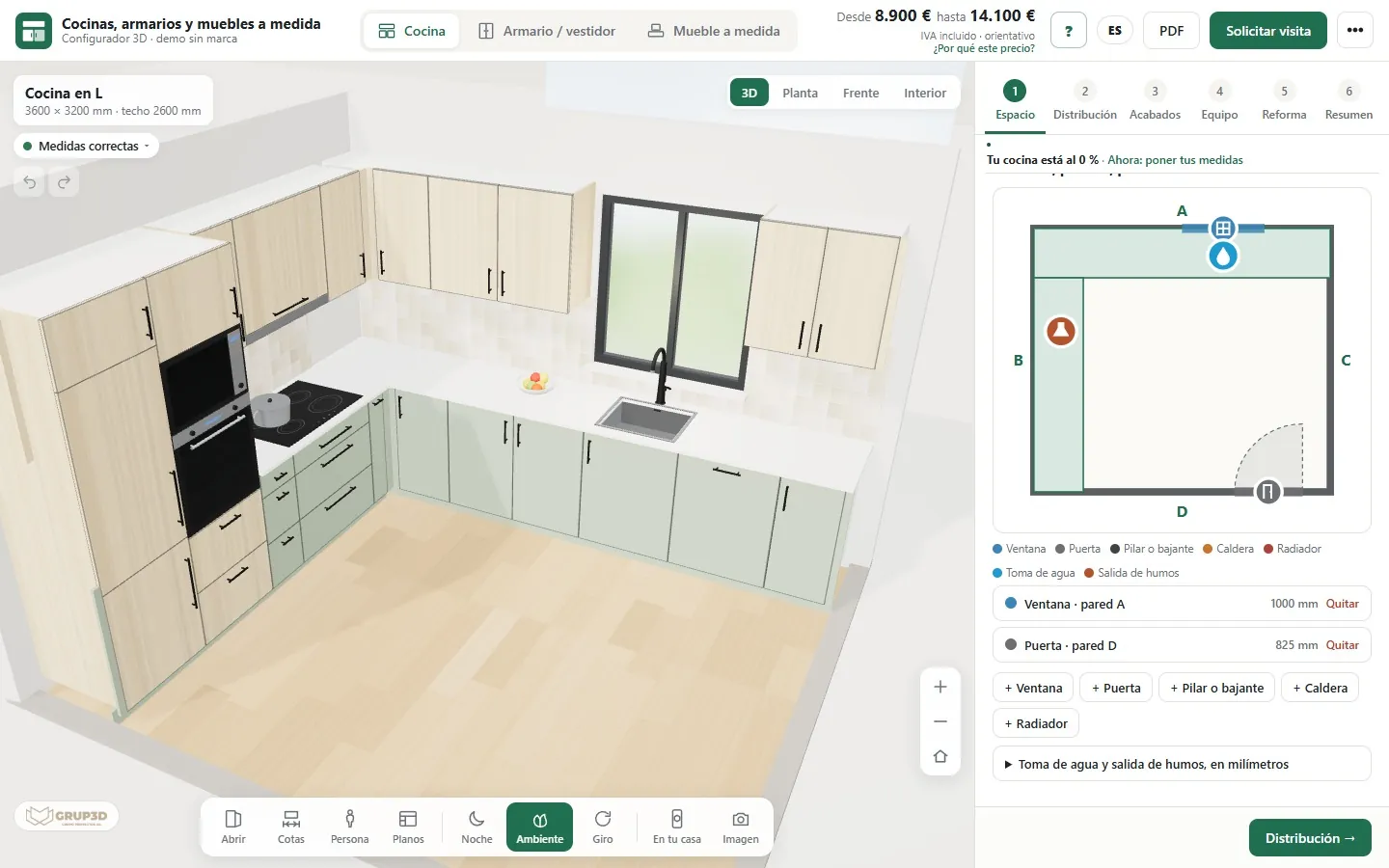
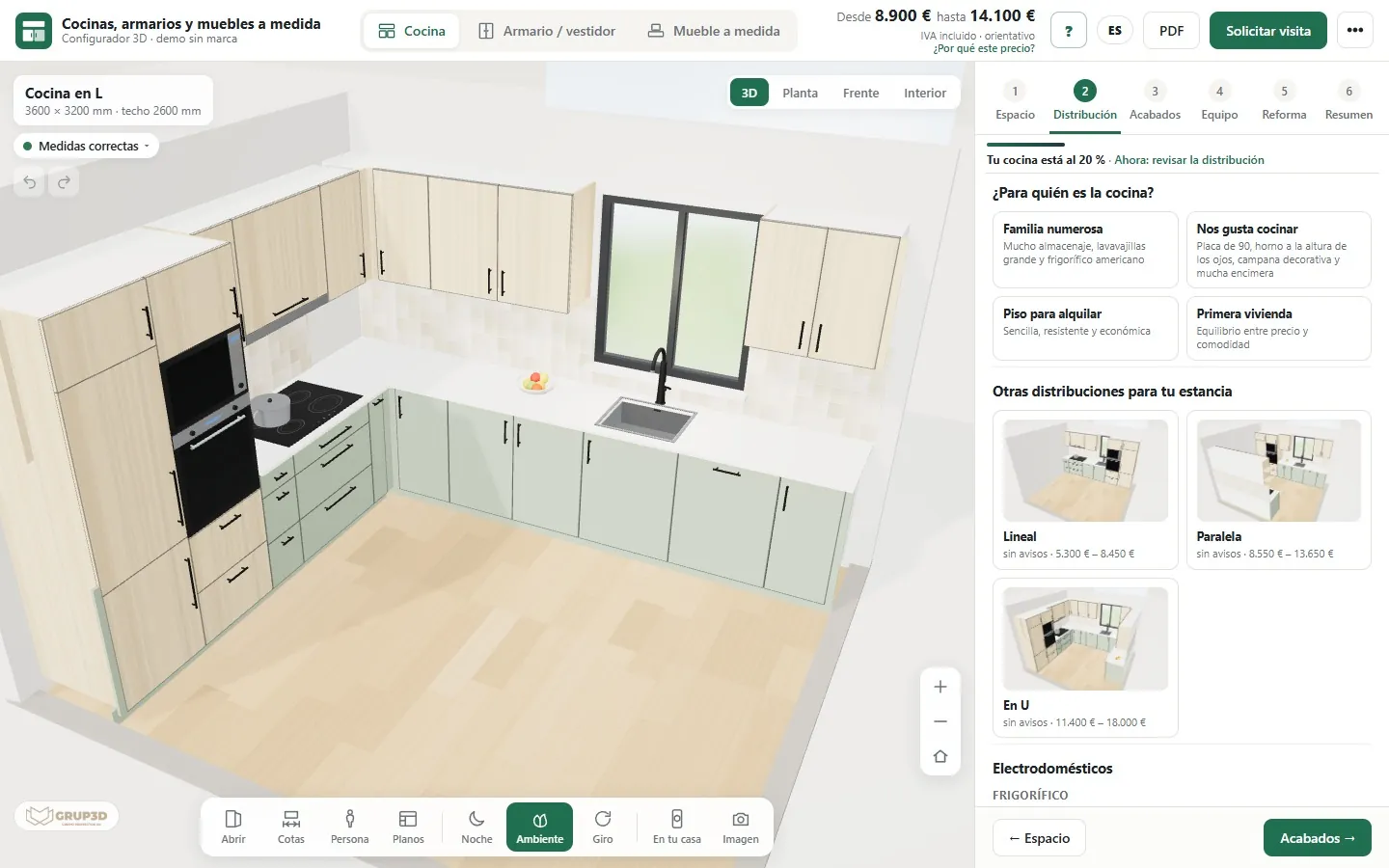
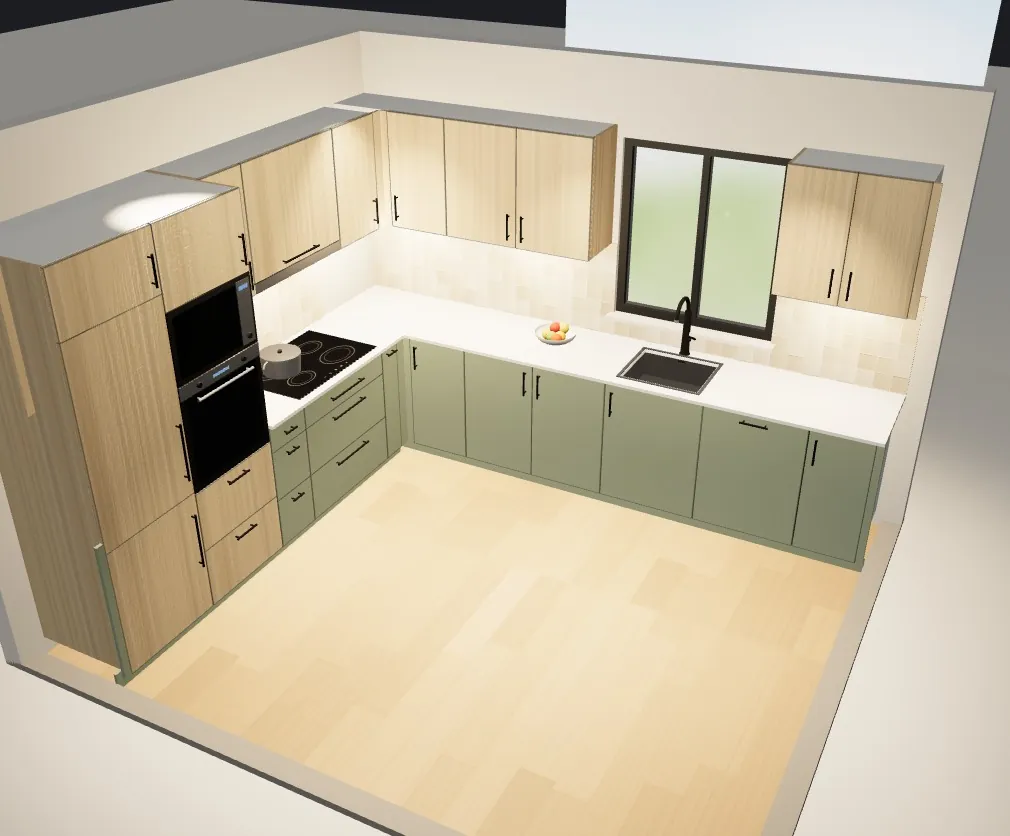
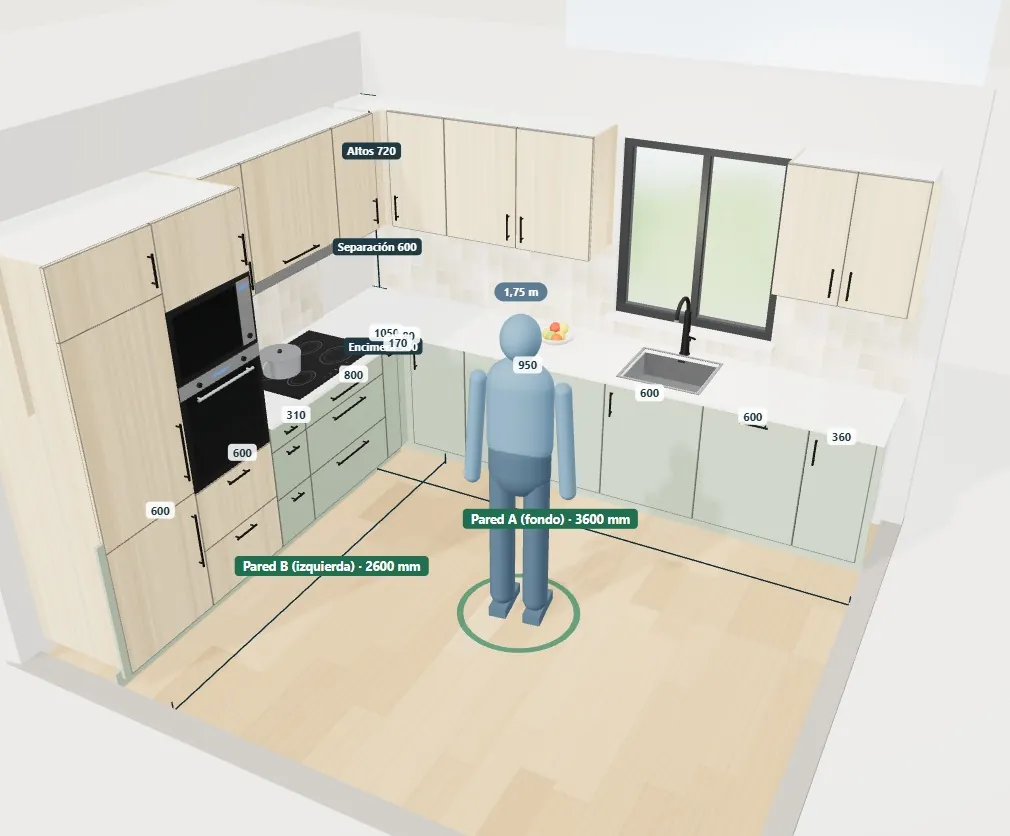
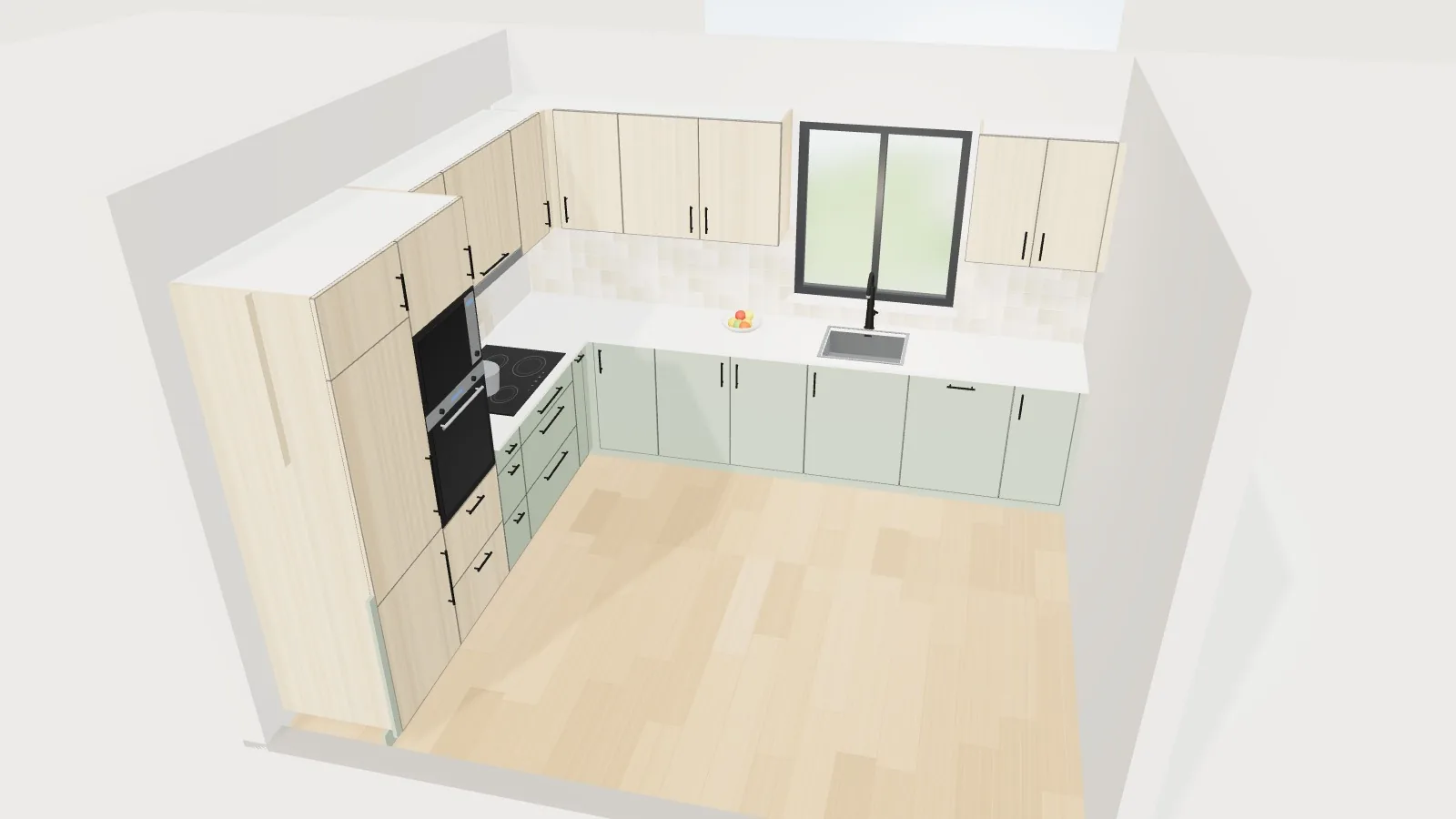
L-shaped kitchen with sage green base units, oak wall units and tall units and a light worktop, designed in the Grup3D 3D kitchen and wardrobe configurator
KITCHENS · WARDROBES · MADE-TO-MEASURE FURNITURE · OPEN DEMO
— FOR WORKSHOPS, MANUFACTURERS AND KITCHEN SHOPS

3D configurator
for kitchens and wardrobes
made to measure.

“How much would a kitchen cost me?”, with a photo of the old one and not a single measurement. Behind it come a visit, hours of design work and a quote that often never gets signed. Here the customer enters their measurements, sees their kitchen in 3D with an indicative price and reaches you with a plan, finishes and a PDF.

— WHAT HAPPENS TO YOU

Too many hours
of design work for
so few kitchens.

Monday, five past nine. On the workshop phone there are three messages from the weekend. One is a photo of a kitchen from the nineties with a note saying “it's quite small, how much would it cost me?”. Another is a plan drawn in biro on a paper napkin. The third is someone who wants “an island like the one in the photo” in a kitchen they have not sent a single measurement for. To answer any of the three you have to go and measure, and to go and measure you have to call, fix a day and cross half the city.

On Wednesday the designer has the first-floor flat's kitchen open in the design software: L-shaped, sink under the window, tall units for the oven and the fridge. The customer sees it and asks how it would look as a U. And in white. And without wall units, “so it does not feel cramped”. Every round means redoing the design and the quote, and the week goes on three kitchens nobody has signed yet. One of them, on top of that, is heading to another shop with your design under its arm to compare prices.

The one that does get signed goes to the workshop, where someone turns the plan into boards, edging and fittings by hand, using a price list in an Excel file that not everyone keeps up to date. And on site comes the surprise: the window was lower than it looked, the pillar in the corner was not on the plan or the dishwasher door hits the oven door. Another part gets made, it is fitted all over again and the margin on that kitchen is lost along the way.

— THINGS YOU HEAR EVERY WEEK

What it takes
to sell made-to-measure
kitchens.

In the shop, in the design office and in the workshop. Behind every one of these lines there are hours, visits and orders slipping away; under each one, how it gets solved.

“How much would a kitchen cost me?”

Enquiries with no information at all

They arrive on WhatsApp with a photo of the old kitchen and an “it's quite small”. To give a serious price you need a visit, and very often the visit is for someone who only wanted to know whether their budget would stretch.

With the configuratorThe customer enters their measurements, their window and their door, tries shapes and finishes and sees their kitchen with an indicative from–to price, VAT included, before calling you.

“Do me a design and I'll let you know.”

Design hours that never get paid

Every kitchen is drawn from scratch in the design software, even though the customer has not decided anything yet. Many end up as the 3D that gets shown in another shop to ask for a lower price.

With the configuratorThe layout comes out on its own from the measurements: sink next to the water supply, hob at the extraction outlet, corner units, tall units and wall units that respect windows and doors.

“What if we make it L-shaped? And in white?”

Every change means redoing everything

Three or four rounds of design and quote per kitchen, and the decision drags on for weeks. Meanwhile, the customer asks for another quote at the shop next door.

With the configuratorShape, finishes and equipment change with one click and the price is recalculated instantly, showing how much it goes up or down. Three alternative layouts come out automatically, each with its price.

“On site, the fridge wouldn't fit.”

What does not fit is discovered at fitting time

A window lower than it looked, a pillar, the boiler, a radiator or a door that clashes. It comes to light with the customer watching and the fitter trying to work out how to fix it.

With the configuratorWhile the design is being made, it warns about anything that does not fit or gets in the way, explains why and offers a fix that has already been checked: one click and it is solved.

“Send me the cutting list, we need to order the boards.”

The workshop types it all in again by hand

Boards, edging and fittings are taken off the plan module by module. One figure copied wrong is a board cut all over again, and every designer sets heights and depths their own way.

With the configuratorYour manufacturing dimensions are built in, and every design produces the workshop sheet with the cutting list, the metres of each material and the fittings, plus the cutting list as a CSV.

“Is this the right price list?”

Prices in an Excel file and suppliers by guesswork

Fronts, worktops, handles and fittings change price and the change does not reach every quote. Which supplier works out best for this kitchen never gets calculated: there is no time for it on every order.

With the configuratorPrice list, finishes and costs for each supplier in one panel; it tells you which combination of suppliers works out best for each design and what your margin is.

“I need to talk it over with my partner.”

The customer has nothing to show at home

A catalogue and four finish samples do not show the whole kitchen, and the person deciding with them was not in the shop. The conversation at home happens from memory.

With the configuratorThey take away an image of their design, with the measurements and the price, and a link to keep changing it, by WhatsApp or email, or they open it on their phone with a QR code.

“If Marta is off, the quotes stop.”

Everything depends on one or two people

The person who designs is the one who knows how to do the quotes. If they are on holiday or off sick, the enquiries pile up. And wardrobes and furniture are done the same way: from a blank sheet.

With the configuratorThe first design is done by the customer, and wardrobes, walk-in wardrobes and nine types of made-to-measure furniture are designed in the same tool.

— THE JOURNEY TODAY

How a kitchen
reaches your workshop
today.

Five steps that almost every workshop and shop repeats by hand. Each one loses time or lets an error slip in.

  1. 01

    Enquiry

    A photo of the old kitchen on WhatsApp and “it's quite small”. What you lose: there is no information to answer with.

  2. 02

    Visit and measuring

    Travelling out and measuring walls, window, water supply and extraction outlet. What you lose: half a working day.

  3. 03

    Design

    Layout and render in the design software; then changes, and more changes. What you lose: designer hours.

  4. 04

    Quote

    Modules, fronts, worktop, appliances and fitting. What you lose: the extras nobody showed.

  5. 05

    Workshop order

    Measurements, cutting list and fittings typed in by hand all over again. What you lose: the odd cut, which has to be done again.

— WHERE THE MARGIN GOES
  • On the design that does not sell: designer hours for customers who were only comparing prices.
  • On the visit that was not needed: half a day measuring a kitchen the customer could not afford.
  • On the mistake that shows up on site: a module that does not fit or an extra trim, made and paid for twice.
  • On the customer who puts it off: without seeing their kitchen with their own measurements they do not decide, and the job goes to whoever shows them a 3D with a price first.
— AND YOUR BUYERS DO NOT HAVE IT EASY EITHER
  • They cannot picture their kitchen: the catalogue photos are not their home.
  • They do not know how much it will cost without having a visit and committing.
  • They do not know what fits: whether the island goes in, the American-style fridge or wall units up to the ceiling.
  • They cannot decide from loose samples of front, worktop and handle.
  • They want an answer now; if it takes a week, they ask for another quote.

The problem is not the price of your kitchens. It is everything that happens between the customer's first message and the workshop sheet.

— DO THE MATHS

What it costs you
with your own numbers.

We do not know your figures; you do. Replace the example values with yours and in two minutes you will know how much designing and quoting by hand costs you today.

Assumed figures, just to see how the sum works out. They are not data from any company.
FigureExampleHow it is calculated
A · Quote requests per month20Kitchens, wardrobes and furniture
B · Hours per request5 hVisit, design and quote
C · Requests that end in an order25 %One in four
D · Orders with a measurement or fit error5 %One in twenty
Hours a year on designs that do not sell900 hA × B × (100 − C) % × 12 months
Orders a year that need correcting3A × C % × D % × 12 months

And what the sum leaves out: the free designs the customer takes to another shop, the kitchens put off until next year and the extras — LED lighting, organisers, one more tall unit, the island — that nobody got round to showing.

— WHAT IT IS

What a
3D kitchen
configurator is.

A 3D kitchen configurator is a web application where the customer enters the measurements of their kitchen, places the window, the door, the water supply and the extraction outlet, chooses the shape and the finishes, and sees their kitchen in 3D with an indicative price that changes with every decision. With no sign-up and nothing to install, on a computer, tablet or phone.

For a workshop or a manufacturer it is not a pretty catalogue: it is a sales and production tool. It filters enquiries before the visit, lays out the units with your manufacturing dimensions, warns about anything that does not fit, works out the price with your price list and turns the approved design into a workshop sheet with a cutting list.

At Grup3D we develop it bespoke, on a base that already works: straight, L-shaped, U-shaped and galley kitchens, with an island or a peninsula; fitted, freestanding and walk-in wardrobes; and nine types of made-to-measure furniture. The demo uses an example catalogue and example prices; when it goes live, your catalogue, your dimensions, your price list and your brand are loaded in.

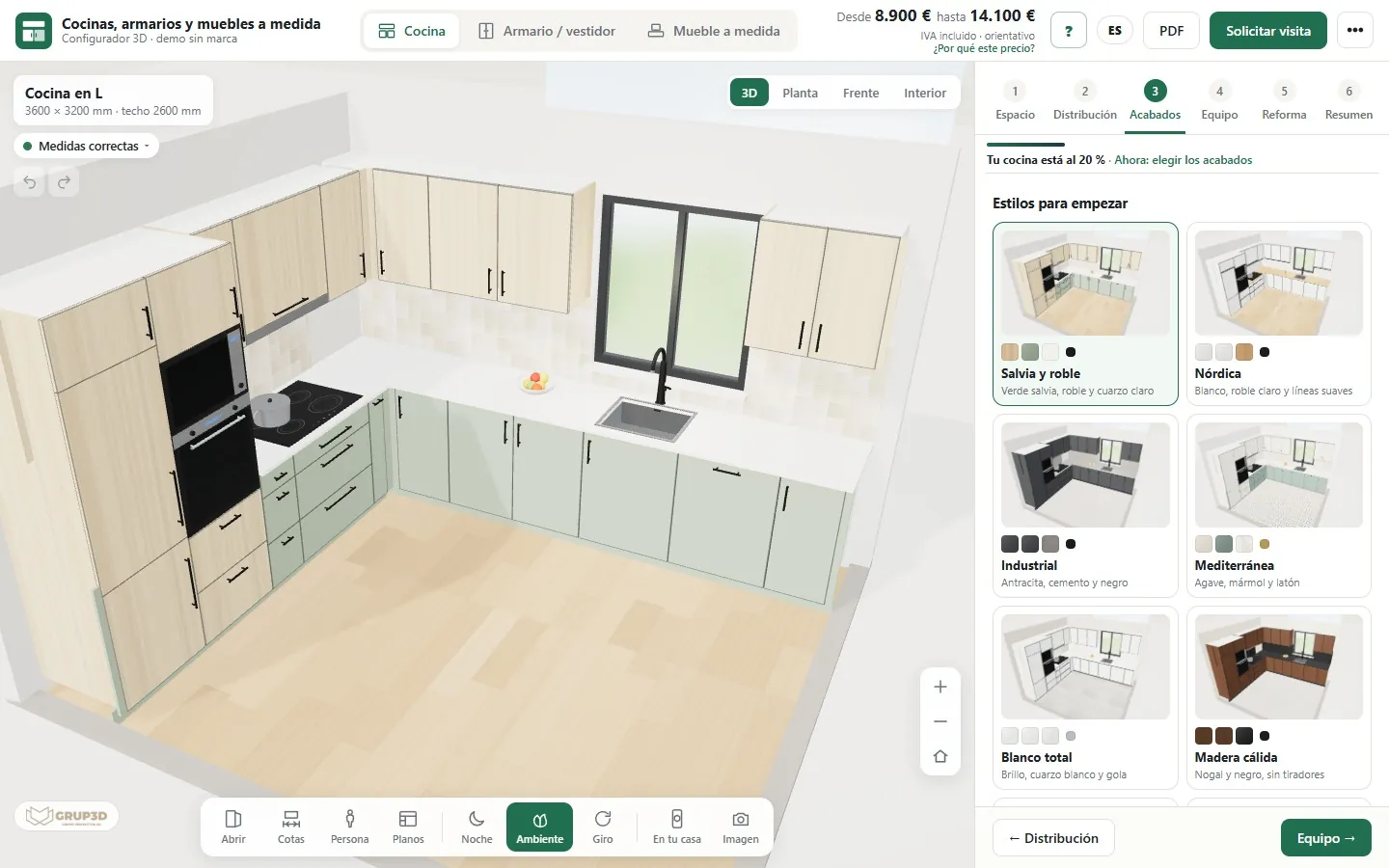
Screen of the 3D kitchen configurator at the finishes step: L-shaped kitchen in 3D on the left and one-click styles on the right, with the indicative price at the top
“Finishes” step: one-click styles with real 3D thumbnails and the price at the top, changing with every decision. Screenshot of the demo with an example catalogue and prices.
— WHO IT IS FOR

One tool,
from the shop window to the workshop.

The customer sees their kitchen and its price. Your team receives the request with everything it needs, and the workshop gets the cutting list.

01 · WORKSHOP AND JOINERY

The workshop that designs, makes and fits

It stops drawing every enquiry from scratch: customers arrive having already seen their kitchen and its price, and every signed design becomes a workshop sheet with its manufacturing dimensions.

02 · MANUFACTURER

The kitchen and wardrobe manufacturer

It shows its whole catalogue of fronts, worktops and handles without having it on display, with its own rules, and receives orders from its shops with the same data and the same cutting list.

03 · KITCHEN SHOP

The shop and its designer

They design on the tablet with the customer in front of them, change the shape or the finishes in seconds, show the alternatives with their price and compare suppliers on the same design.

04 · RENOVATION AND INTERIOR DESIGN

Whoever handles the full renovation

They quote the kitchen together with the renovation of the room — strip-out, plumbing, electrics, tiling, painting, suspended ceiling and flooring — calculated from the real measurements.

05 · END CUSTOMER

The person who will pay for the kitchen

They design from the sofa, see what fits and how much it costs, show it at home and ask for the visit once they know what they want.

— WHAT CAN BE CONFIGURED

Kitchens, wardrobes
and made-to-measure furniture.

Three products in the same tool, each with its own flow and its own rules. The customer only sees what applies to what they have chosen.

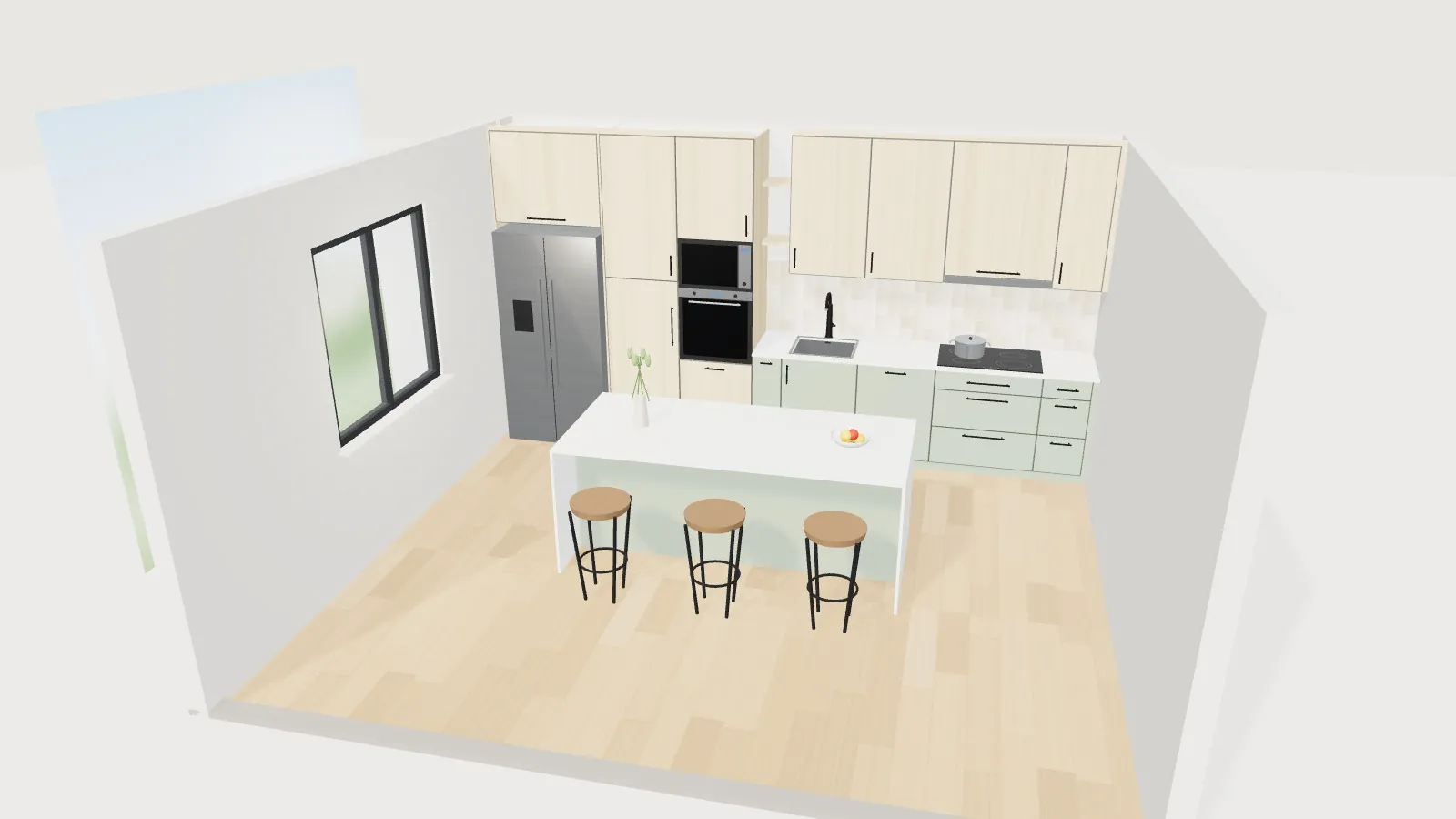
Straight kitchen with a white-topped island and stools, an American-style fridge and oven tall units in the 3D configurator

Kitchen

Straight, L-shaped, U-shaped, galley, with an island or a peninsula, with several windows and doors, pillars, downpipes, boiler and radiator. The configurator places the sink, dishwasher, hob, extractor hood, tall units and wall units following your rules, and any module can be changed to the millimetre. Seven examples to start with and four customer profiles that adjust the equipment.

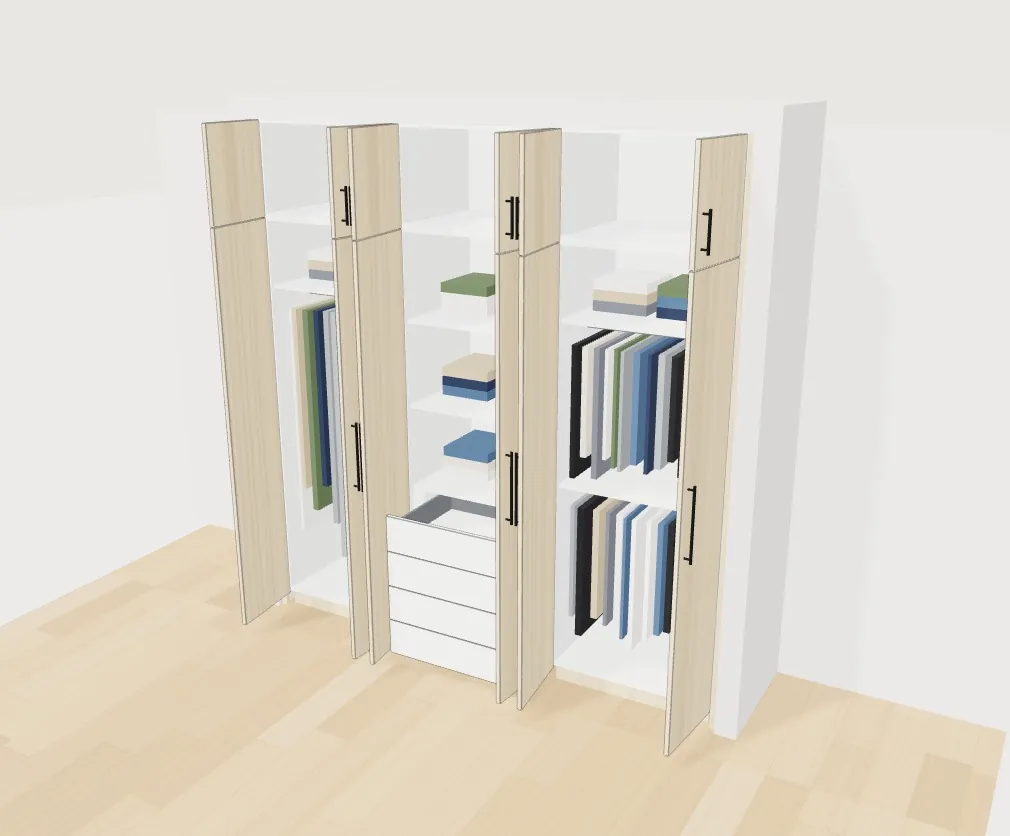
Fitted wardrobe in 3D with the doors open, showing the hanging area, shelves and an internal drawer unit

Wardrobe and walk-in wardrobe

Fitted, including under a sloping ceiling, freestanding, or an open walk-in wardrobe in a straight, L or U layout with a drawer island. Hinged doors, sliding doors with 2 to 4 panels or folding doors, top box, mirror and finishing trims. Interior per section: hanging, double hanging, drawers, shelves, shoe rack, trouser rack, jewellery tray and pull-down rail.

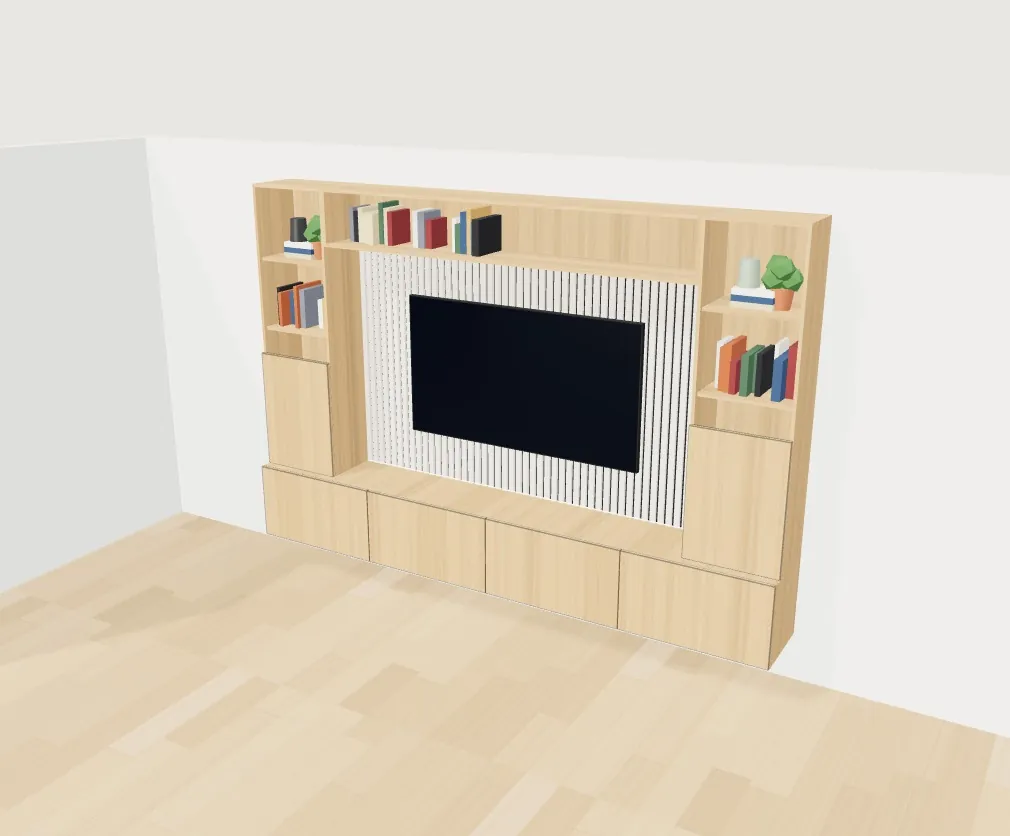
Made-to-measure living room unit with a space for the TV, a slatted panel and shelves with books in the 3D configurator

Made-to-measure furniture

Nine types: living room and TV, bookcase, bathroom vanity, hallway unit, desk, headboard, sideboard, utility room and window seat. Each one with its own options — wall-hung or floor-standing, drawers or doors, LED, mirror — and the same price, plans and cutting list as the kitchen.

Images from the demo with an example catalogue. When it is implemented, your modules, finishes, manufacturing dimensions and price list are loaded in.

— FEATURES

Everything the configurator
does.

From the customer's first message to the workshop sheet, without switching tools or retyping data. Each feature answers one of the lines above.

Space step of the kitchen configurator with the room plan, the window, the door, the water supply and the extraction outlet
The customer draws their kitchen: walls, window, door, water and extraction.
01 · THEIR MEASUREMENTS, NOT CATALOGUE ONES

The enquiry arrives with the kitchen already measured

Answers “how much would a kitchen cost me?”. The customer enters the length of each wall and the ceiling height, and drags the window, the door, the water supply and the extraction outlet onto a plan.

  • Several windows and doors, with their opening: inwards, outwards or sliding.
  • Pillars, downpipes, boiler and radiator, which the units respect or go around.
  • A “How to measure” guide with drawings and a printable PDF measurement sheet.
  • Seven example kitchens to start from instead of a blank page.
Layout step of the kitchen configurator with customer profiles and three alternative layouts, each with its thumbnail and price
Customer profiles and three alternatives for the same measurements, with their price.
02 · AUTOMATIC LAYOUT

The kitchen lays itself out, with a craftsman's judgement

Answers “do me a design”. From the measurements, the program looks for the best arrangement: sink next to the water, dishwasher right beside it, hob at the extraction outlet, corner units, tall units and wall units that skip the window.

  • 46 module types: drawer units, pan drawers, wine cooler, recycling, pull-out larder, washing machine and dryer in a tall unit…
  • Any module can change type or width to the millimetre; the one next to it adjusts on its own.
  • Three alternative layouts with a thumbnail and price for the same measurements.
  • Profiles that adjust the equipment: large family, we love cooking, flat to let, first home.
  • Undo and redo, and saved designs.
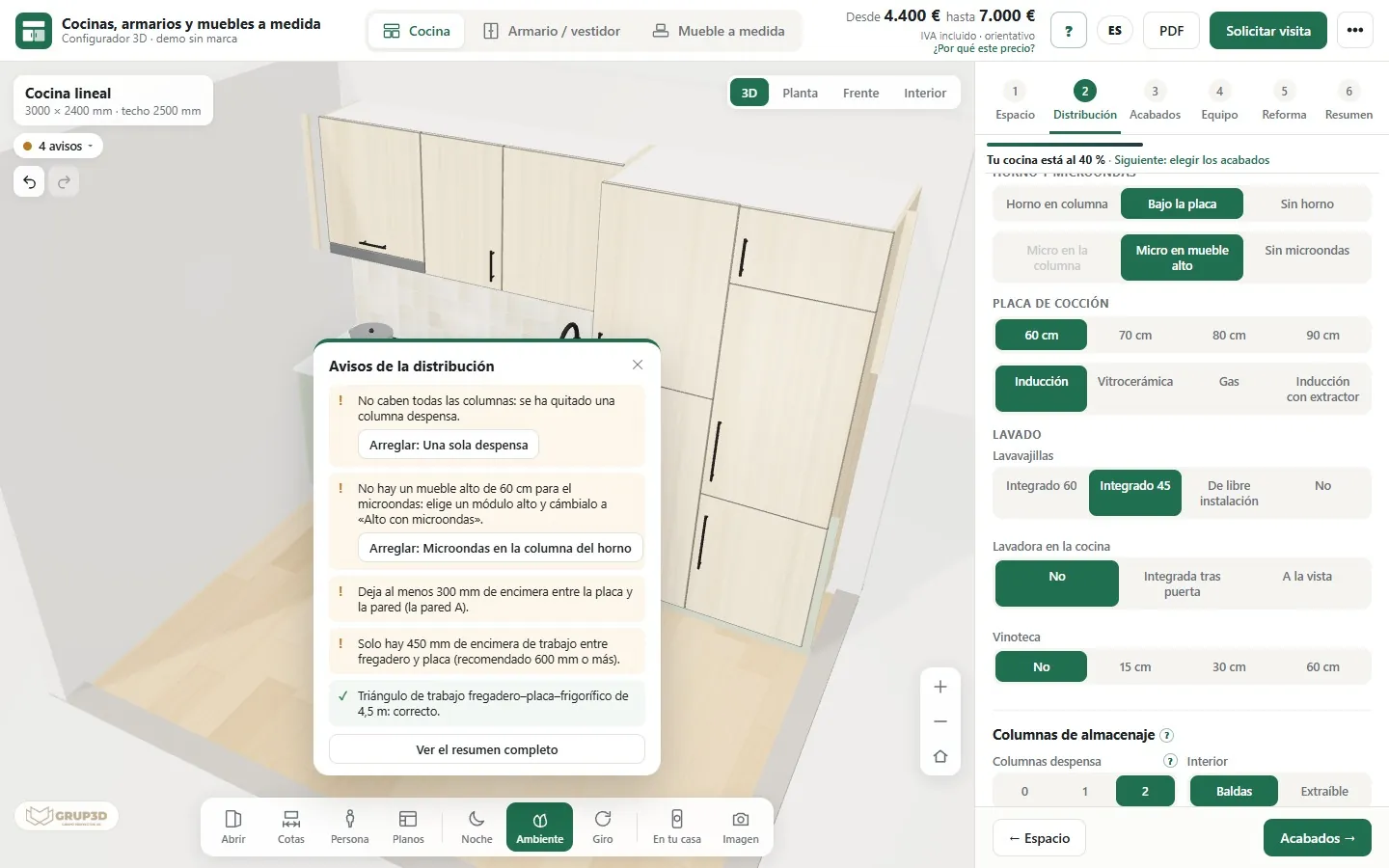
List of layout warnings in the kitchen configurator with buttons to fix each measurement problem with one click
Each warning explains the problem and, when there is a fix, applies it with one click.
03 · WARNINGS WITH A FIX

What does not fit shows up on screen, not on site

Answers “on site the fridge would not fit”. The configurator checks every design against your manufacturing dimensions and ergonomic rules, and warns before the customer falls in love with something that cannot be fitted.

  • Tall units that do not fit, a hob right against a wall or a tall unit, a hob under a window.
  • Too little worktop between sink and hob, the work triangle, walkways and clearance beside the island.
  • Doors that brush against an island, a window that opens over a tall tap, a radiator behind the units.
  • Doors and drawers that never clash when they open.
  • The fix comes already checked: move the hob, switch walls, remove a larder unit…
04 · SEE IT AS IT WILL BE

The whole kitchen, not a loose sample

Answers “I cannot picture it”. Fronts, worktop, handle, splashback, floor and wall are seen together on the whole kitchen, with relief and sheen, and the customer switches from one style to another with one click.

  • An example catalogue with 59 fronts in 7 families, 47 worktops, 6 door models and 11 handles.
  • 14 one-click styles with real 3D thumbnails; two-tone and an island in another colour.
  • Preview by hovering over a finish, without touching the design.
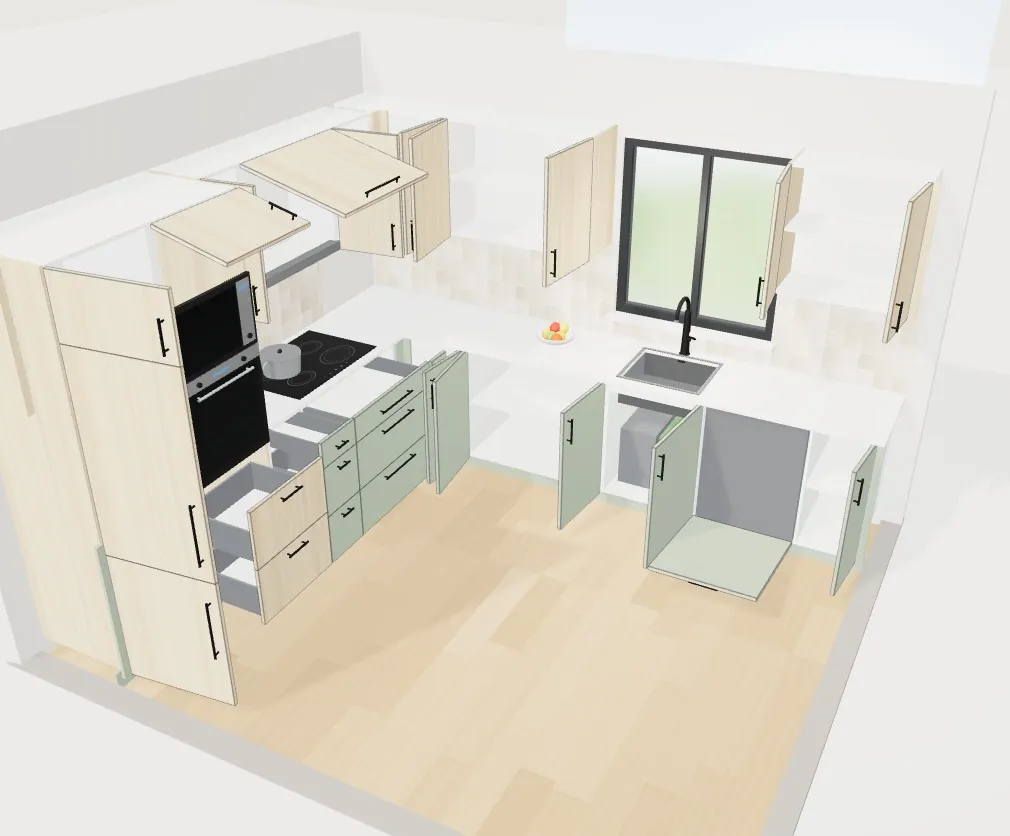
  • Open doors and drawers, night mode with LED and spotlights, decorative setting, person for scale and dimensions.
  • 3D, plan, front and interior views, and navigation that really zooms in on the unit you point at.
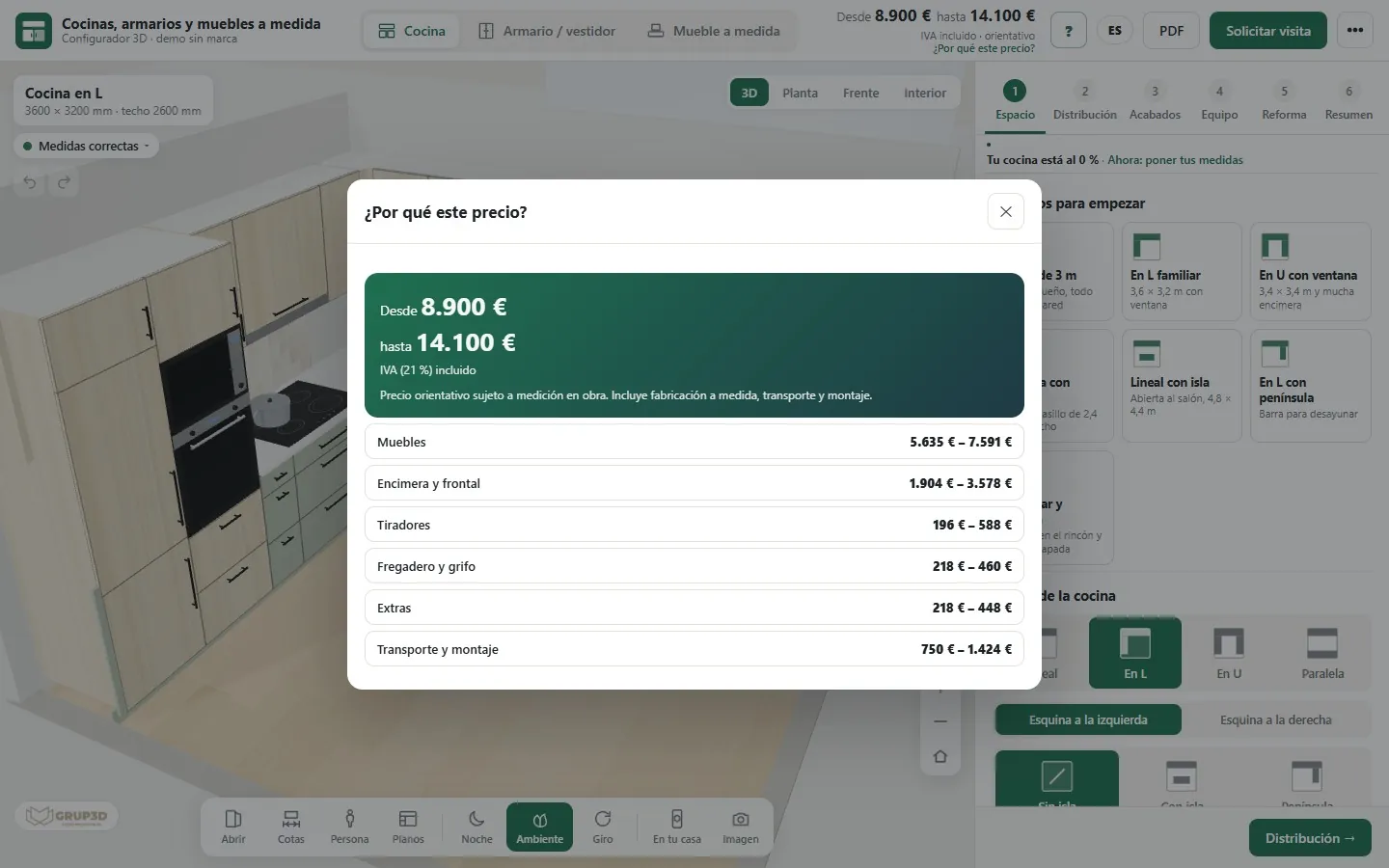
“Why this price?” window in the kitchen configurator with the from–to price and the breakdown by units, worktop, handles, sink, extras and fitting
“Why this price?”: the breakdown by section.
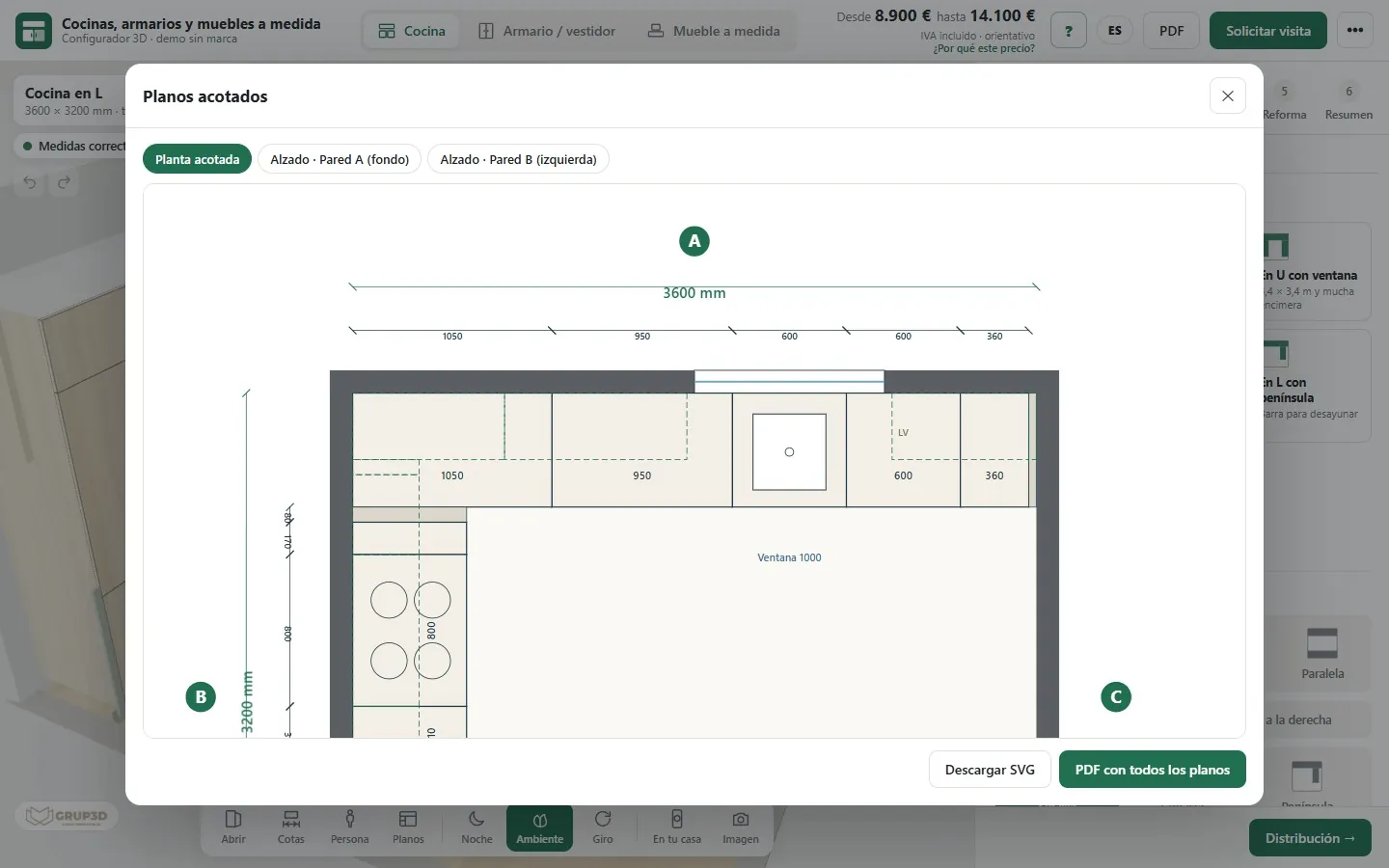
Dimensioned plans from the kitchen configurator with the floor plan and the elevation of each wall with its measurements
Dimensioned floor plan and elevations.
05 · PRICE AND PLANS

A price people understand and plans you can measure from

Answers “what if we make it L-shaped?”. Every change recalculates the price instantly with your price list, and the customer sees how much it goes up or down and why.

  • Indicative “from – to” price with VAT, fitting and delivery.
  • “Why this price?” with the amount for each section.
  • Downloadable dimensioned plans of the floor plan and every elevation.
  • Optional room renovation step, with the real measurements.
  • Compare two designs side by side with the differences highlighted.
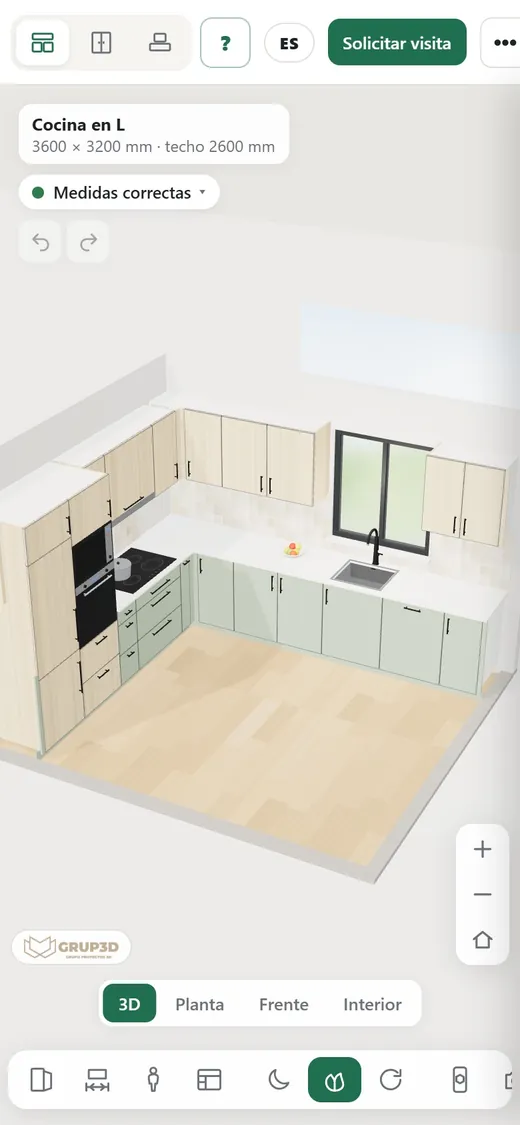
Kitchen configurator open on a phone with the kitchen in 3D and the viewer tools
On the phone, with their kitchen and its price.
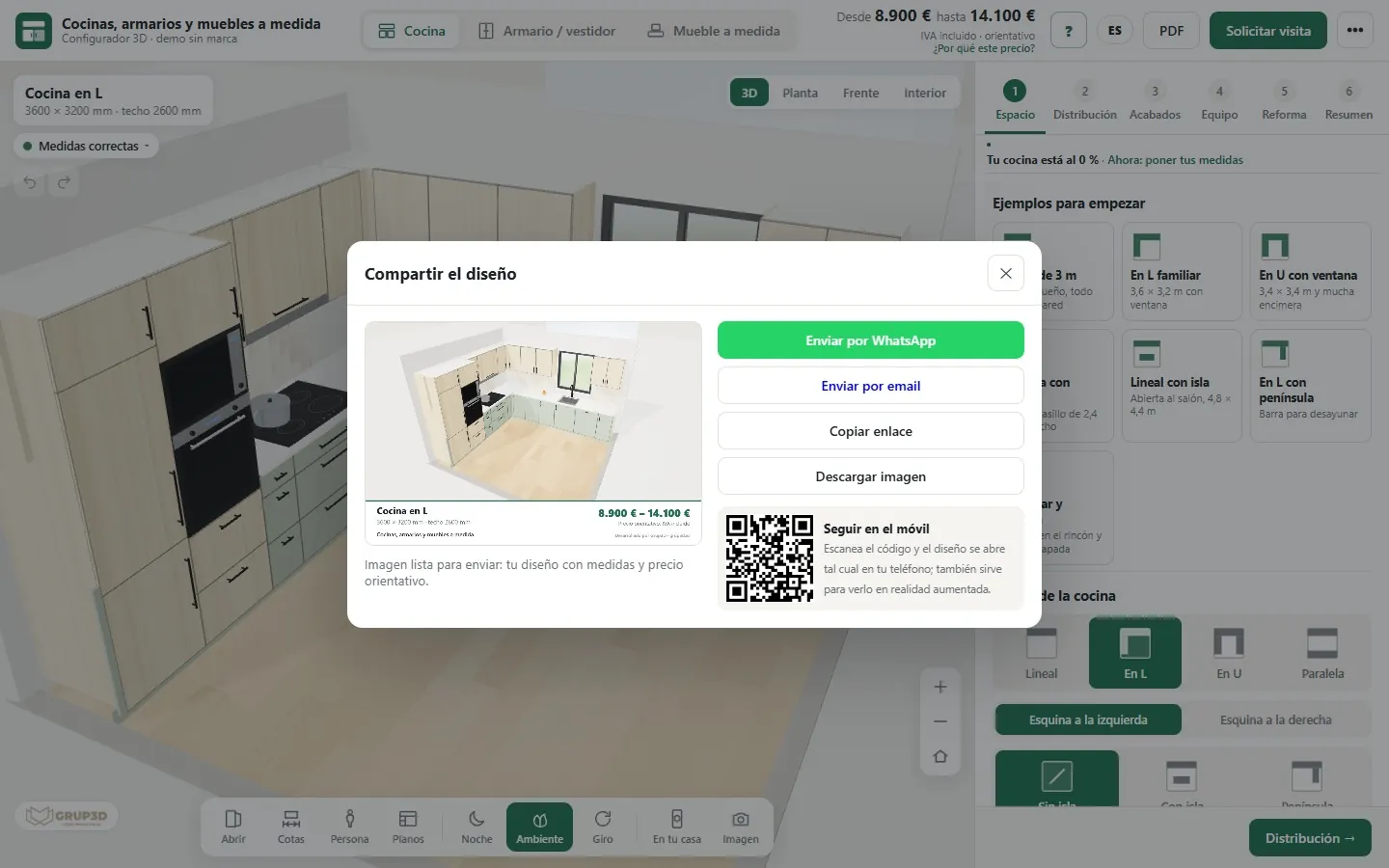
Window for sharing the kitchen design by WhatsApp, by email, with a link or with a QR code to carry on on the phone
Share by WhatsApp, email, link or QR.
06 · TO SHOW IT AT HOME

The conversation at home, with the kitchen in front of them

Answers “I need to talk it over with my partner”. The customer takes away their kitchen, not a brochure.

  • A card with the image of the design, the measurements and the price, for WhatsApp or email.
  • A short link to keep changing the design, and a QR code to open it on the phone.
  • Augmented reality: “In your home” places the kitchen at real scale, with no app to install.
  • High-quality image and full-screen presentation mode for the shop or a trade fair.
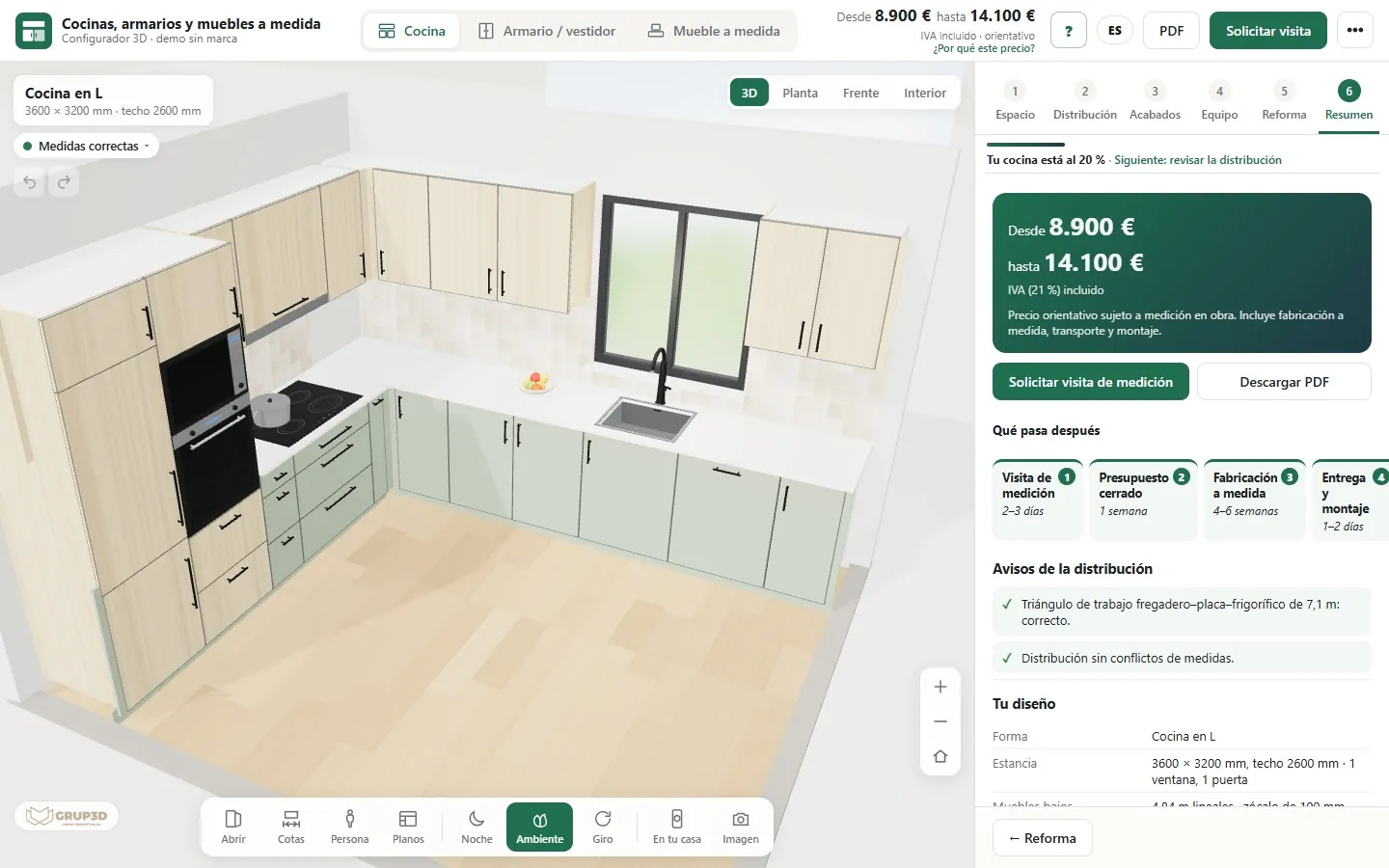
Summary step of the kitchen configurator with the price, the timeline of visit, quote, manufacturing and fitting, and the design details
Summary with what happens next and the timescales.
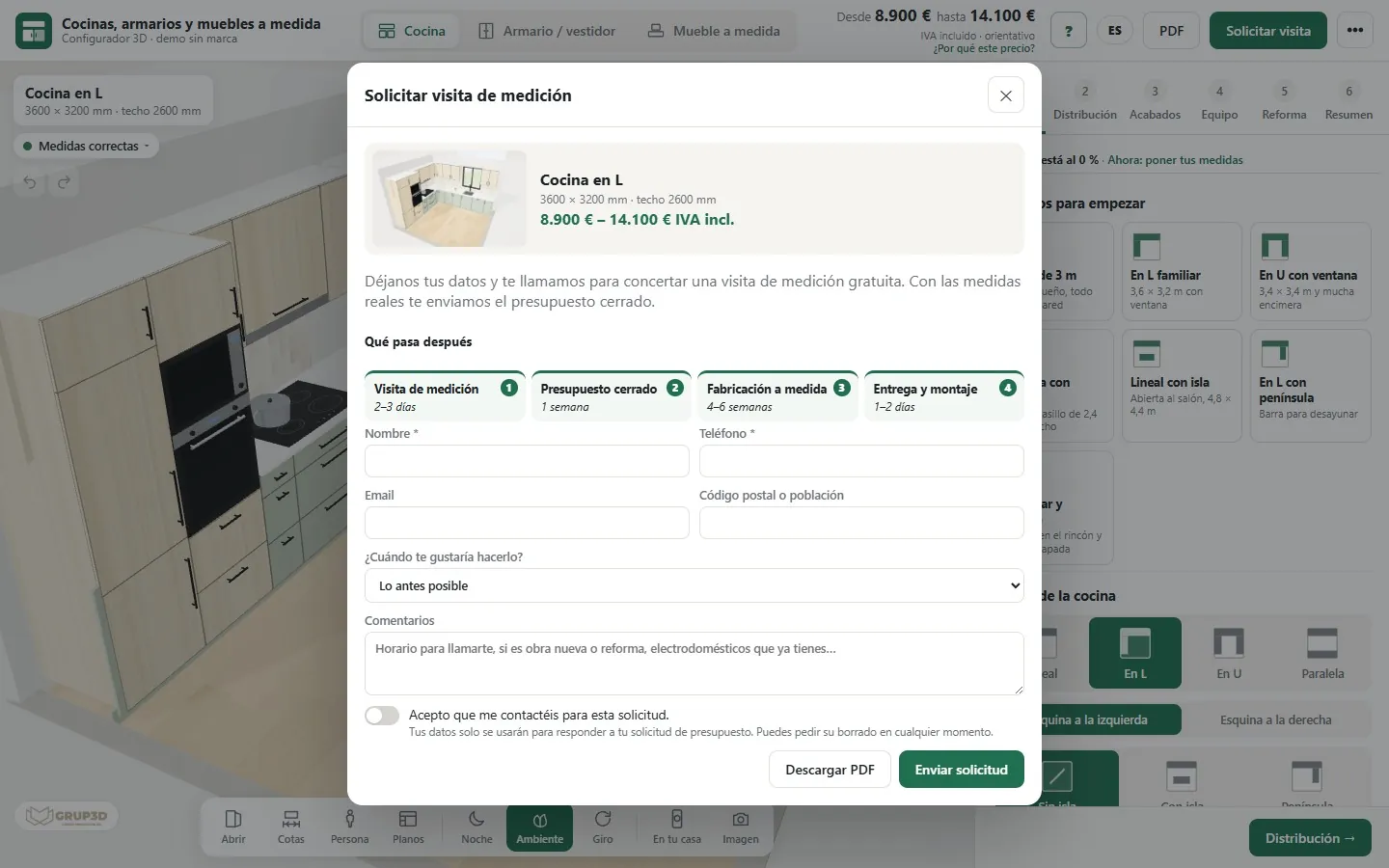
Measuring visit request form in the kitchen configurator with the image of the design, the price and the customer's details
Visit request with the design and the PDF.
07 · THE REQUEST

To the visit, with the customer already decided

Answers the visit that was not needed. When the customer asks for the measuring visit, you receive everything they have decided.

  • Their details, the image, the plan, the measurements, the finishes and the indicative price.
  • The PDF proposal the customer saw and the button to open their design in 3D.
  • Email notification, and a confirmation to the customer with their proposal, if you set up an account.
  • “What happens next”: visit, quote, manufacturing and fitting, with your timescales.
  • Honeypot field and a daily limit against spam, without losing requests.
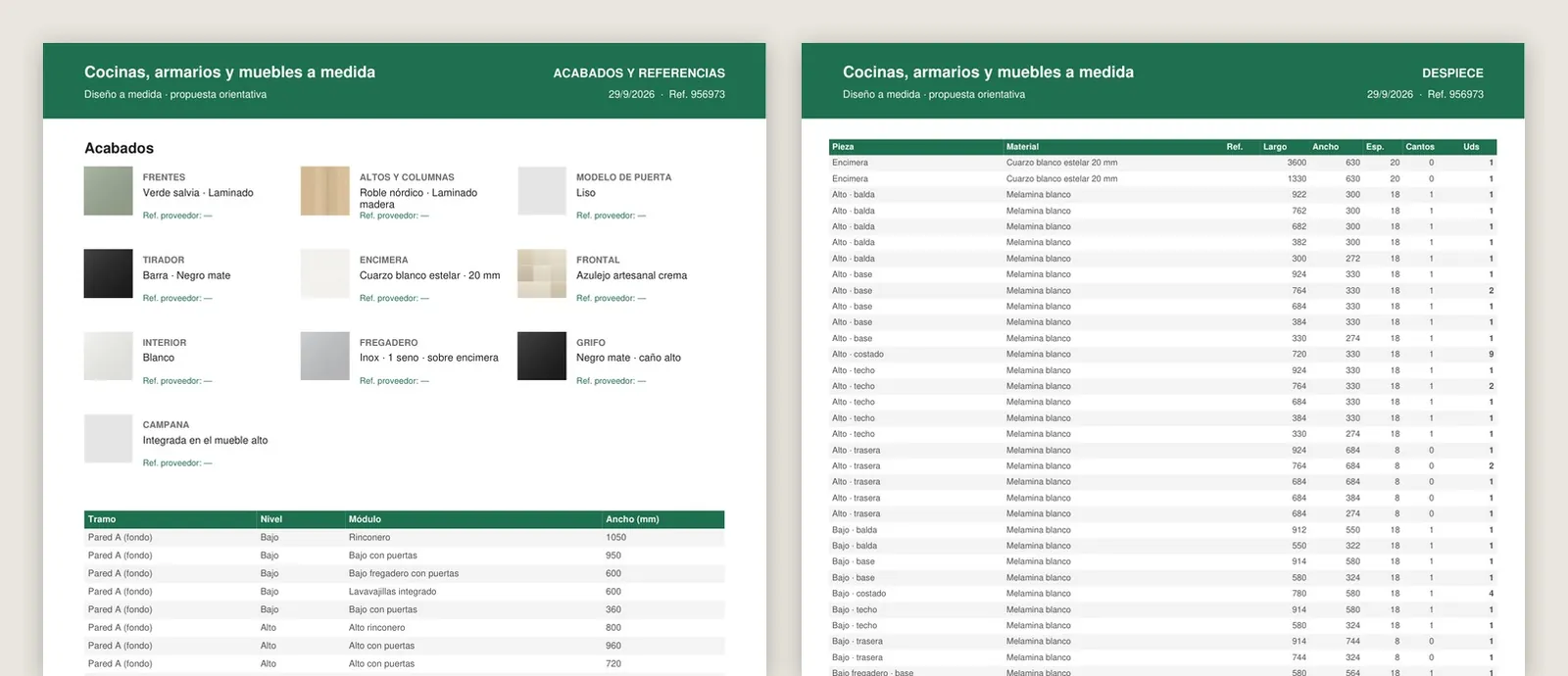
Workshop sheet generated by the kitchen configurator: finishes with supplier reference, list of modules per wall and cutting list with part, material, length, width, thickness, edging and quantity
Workshop sheet for the example kitchen: finishes, modules per wall and cutting list, taken from the same design.
08 · WORKSHOP, PRICE LIST AND SUPPLIERS

What the customer does not see, and the workshop appreciates

Answers the hand-made cutting list and the price list in an Excel file. In the password-protected professional area:

  • PDF workshop sheet: part, material, measurements, edging and quantity for each module, square metres per material and fittings.
  • Supplier reference for each finish and a CSV cutting list for your cutting software.
  • Price list panel with from and to prices, VAT, rounding, fitting, delivery and multipliers by range.
  • Costs for each supplier and the best combination by section, with your margin.
  • Requests with status, notes and export, and your own brand: name, logo, colours and copy.
— TRY IT FOR YOURSELVES

One minute
with the configurator.

Kitchen with an island, a change of style, open doors, night mode, a wardrobe and a living room unit, and the price with its breakdown. And then, try it: choose “Straight with island”, go to “Finishes” and open “Why this price?”.

Video of the 3D configurator for made-to-measure kitchens, wardrobes and furniture, recorded in the demo with an example catalogue and prices.
— WITH THE CONFIGURATOR

From the first message
to the workshop sheet.

The same journey as before, without the steps that used to be done by hand.

  1. 01

    They design

    The customer enters their measurements on your website and sees their kitchen with its price, without signing up.

  2. 02

    They show it

    They share the design at home by WhatsApp or see it at real size in the kitchen with their phone.

  3. 03

    They book the visit

    You receive the request with plan, measurements, finishes, indicative price and PDF.

  4. 04

    You measure and adjust

    You open their design, adjust it with the measurements from the visit and send them the final quote.

  5. 05

    It gets made

    The same design produces the workshop sheet with the cutting list and the fittings, and the CSV for cutting.

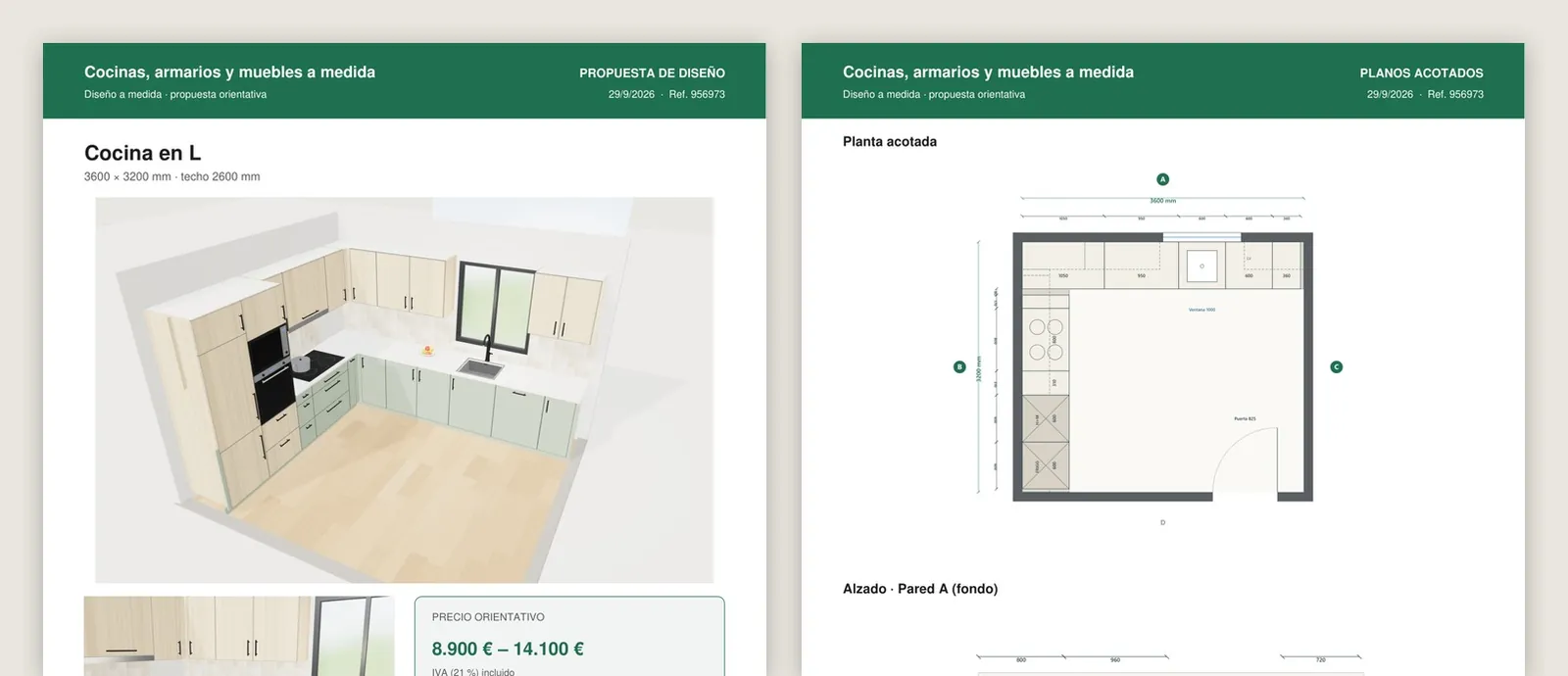
PDF proposal generated by the kitchen configurator: image of the kitchen, indicative price with VAT, design details, dimensioned floor plan and elevation of the sink wall
The PDF proposal the customer takes away and that reaches you with the request: their kitchen, the indicative price, the measurements and the dimensioned plans.
— COMPARISON

Design software,
online planner
or bespoke.

Three ways to design and quote kitchens. You do not always need a bespoke configurator: this table helps you decide.

An indicative comparison between approaches; the software and planners on the market vary a great deal from one to another.
CriterionKitchen design software (on the designer's computer)Generic online plannerBespoke 3D configurator
Who does the first designYour designer, after the visitThe customer, on their ownThe customer, and you receive it to fine-tune
MeasurementsThe ones taken at the visitUsually fixed sizes and limited shapesThose of their own kitchen, with windows, doors, pillars and supply points
Manufacturing rulesThe software's, plus the designer's judgementThose in the catalogue of whoever offers itYours, with warnings and one-click fixes
Price for the customerLater, in the quoteThe one in its catalogueYour price list, instantly and broken down
Workshop documentationDepends on the softwareNoWorkshop sheet, CSV cutting list and supplier references
On your websiteNoOn the website of whoever offers itYes, with your brand and your languages
Cost modelPer-seat licenceIt is not yoursAn implementation and maintenance project, with no third-party licences

The honest summary: design software is still needed for complex projects and the final render. The configurator does not replace it: it does the work that gets lost today before that point — the enquiry with no information, the visit that does not sell, the first design and the changes — and, afterwards, the cutting list.

— PRICE AND GO-LIVE

Bespoke development,
at a fixed price.

We start from this configurator, which already works, and adapt it to your catalogue, your dimensions and your price list. You are not paying for development from scratch.

— HOW MUCH IT COSTS

From €6,500

Most projects for manufacturers fall between €14,500 and €35,000, depending on the catalogue, the manufacturing rules and the integrations. Maintenance and hosting from €190 a month. Once we have studied your case we give you a fixed price, in writing, before we start.

  • Timeframe: between 3 and 16 weeks depending on the scope; the exact date goes in the proposal.
  • Payment terms: 40% to start, 40% with the test version and 20% at go-live.
  • The configurator is yours: it does not depend on a pay-per-use platform or on third-party licences.
— QUOTED SEPARATELY, PER PRODUCT
  • Your finishes, faithfully reproduced: preparing and applying each front, worktop and handle so it looks like the real thing, from €30 to €120 or more per finish. The figure is fixed once we see your files, with a paid trial.
  • 3D parts: handles, appliances or special parts, from €30 to €120 per part. If you give us the model, it only needs adapting.
  • Modules are not modelled one by one: they are generated to size.
  1. 01

    Your catalogue

    The shapes, modules, fronts, worktops, handles and appliances you sell.

  2. 02

    Your dimensions

    Your manufacturing ones: plinth, heights, depths, openings and what you do not make.

  3. 03

    Price list and suppliers

    Prices, fitting, delivery and what each supplier costs you.

  4. 04

    Website, brand and languages

    Logo, colours, languages and who the requests go to.

— FREQUENTLY ASKED QUESTIONS

What workshops
ask us.

There are more short answers in frequently asked questions about 3D configurators and who we are in 3D configurator company.

What is a 3D kitchen configurator?

It is a web application where the customer enters the measurements of their kitchen, positions the window, the door and the supply points, chooses shape and finishes, and sees their kitchen in 3D with an indicative price instantly. For the workshop it is a sales and production tool: requests arrive with a plan, measurements, finishes and a PDF, and every design can be turned into a workshop sheet with a cutting list.

Does the customer have to sign up or install anything?

No. It opens in the browser on a computer, tablet or phone, with no sign-up and nothing to install. They only leave their details if they want to request the measuring visit; until then they can design, change and compare as many times as they like.

Can our manufacturing dimensions be built in?

Yes, and that is what makes the design buildable: plinth height, wall unit height, worktop depth, gap between worktop and wall units, board and front thicknesses, the modules you make and the ones you do not. The warnings and the automatic layout work with those dimensions, not with generic ones.

What happens if something does not fit?

The configurator warns about it while the design is being made: a tall unit that does not fit, a hob right against a wall, too little worktop between sink and hob, a narrow walkway beside the island, a door that brushes against something. Each warning explains why and, when there is a fix, offers it already checked and applies it with one click.

Does it work for wardrobes and other furniture too?

Yes. The same tool includes the fitted wardrobe (also under a sloping ceiling), the freestanding wardrobe and the walk-in wardrobe in a straight, L or U layout with a drawer island, with hinged, sliding or folding doors and its interior by section. And made-to-measure furniture: living room and TV, bookcase, bathroom vanity, hallway unit, desk, headboard, sideboard, utility room and window seat.

How does it calculate the price?

With your price list: each item has a “from” and a “to” price, plus VAT, fitting, delivery and multipliers by range and door model. The customer sees an indicative range that changes with every decision and, with “Why this price?”, the breakdown by section. The price list is changed from the panel, with no programming.

What do we receive when a customer requests the visit?

A request with their details, the image of the design, the plan, the measurements, the finishes, the indicative price and the PDF proposal the customer saw, with a link to open their design in 3D. It stays in the panel with its status and, if you set up an email account, it also reaches you by email.

Does it produce documentation for the workshop?

Yes, in the professional area: a PDF workshop sheet with the cutting list for each module (part, material, measurements, edging and quantity), the square metres of each material, the fittings and the supplier reference for each finish; and the cutting list as a CSV for your cutting software. That area is password-protected and the customer does not see it.

Can we compare the cost of several suppliers?

Yes, in the panel. Each supplier has its cost per item, its fitting and its delivery; for any design or request the configurator works out the cost with each one, your margin against the indicative price and the best combination by section. None of this appears in what the customer sees.

Which languages does it work in?

Spanish, English, French and German, with a menu in the header or straight from the link. The steps, the buttons, the guide and the PDF proposal are translated. If a customer requests the visit in another language, they get their confirmation in their language and you get the request and the PDF in Spanish.

How much does a 3D kitchen and wardrobe configurator cost?

Developments start from €6,500 for a visual configurator of one product family; most projects for manufacturers fall between €14,500 and €35,000, depending on the catalogue, the rules and the integrations, plus maintenance from €190 a month. Faithfully reproduced finishes and special 3D parts are quoted separately, per product. Once we have studied your case we give you a fixed price; you will find more detail on the price of a 3D configurator.

How long does it take to go live?

The 3D, the layout rules, the plans, the PDF and the panel already exist, so the work focuses on your catalogue: modules, fronts, worktops, handles, appliances, manufacturing dimensions, price list and brand. The timescale depends on how many finishes need preparing and is set in the proposal.

Can I try it first?

Yes. The demo is open at configurador.grup3d.es/cocinas, with no password, with an example catalogue and prices. If you would like to see it with your own catalogue in mind, we can show it to you on a 30-minute video call.
— OPEN DEMO

Try it now
or see it with
your catalogue.

The demo is open, with no password: configurador.grup3d.es/cocinas. It opens in any browser, on computer, tablet and phone, with an example catalogue and prices.

If you would rather see it with your own catalogue in mind, we will show it to you on a 30-minute video call: how your fronts and your dimensions would look, how requests would reach you and what would come out on the workshop sheet.

  • No commitment.
  • We reply from grup3d@grup3d.es.

Would you rather talk it through? Call us on 662 061 421 or write to grup3d@grup3d.es.