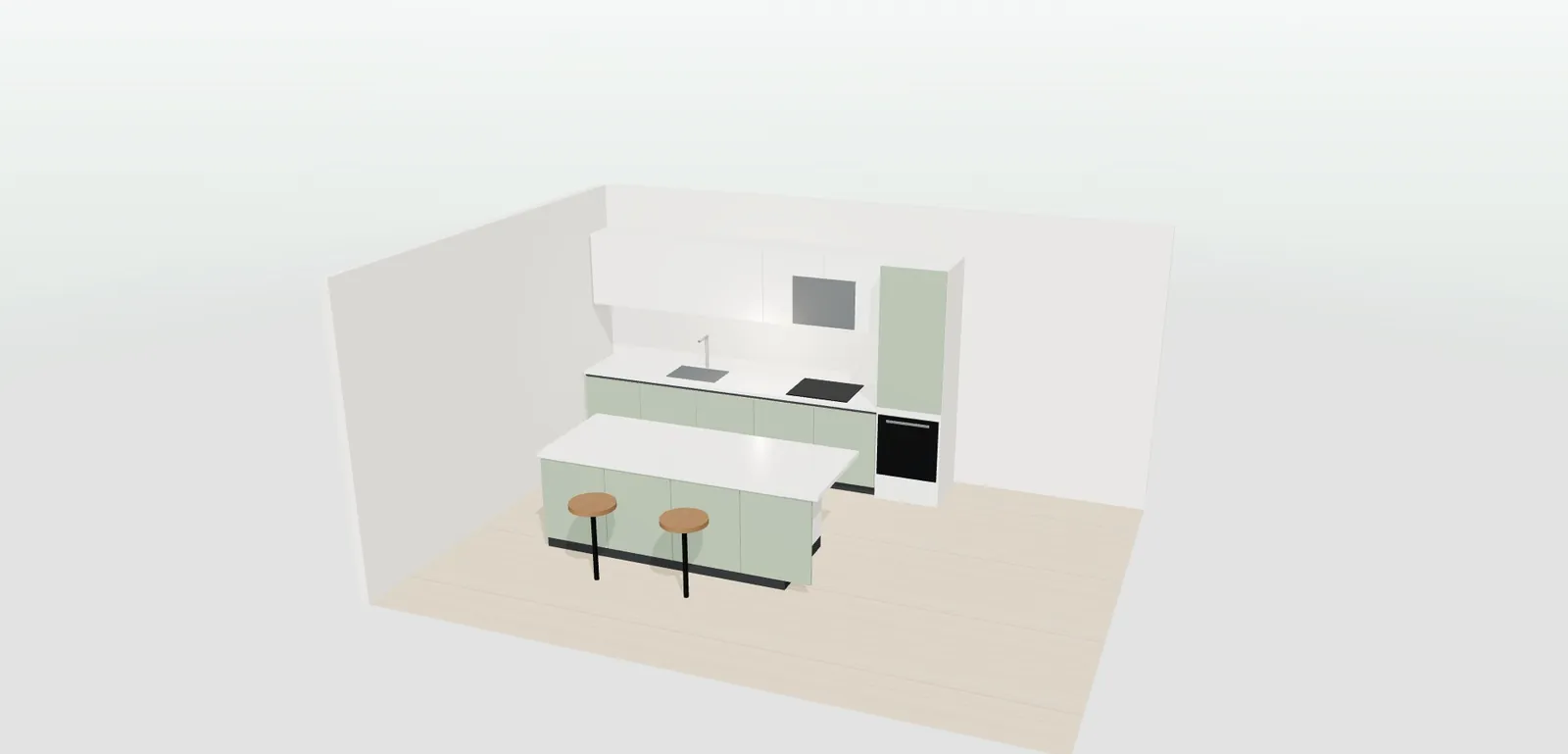
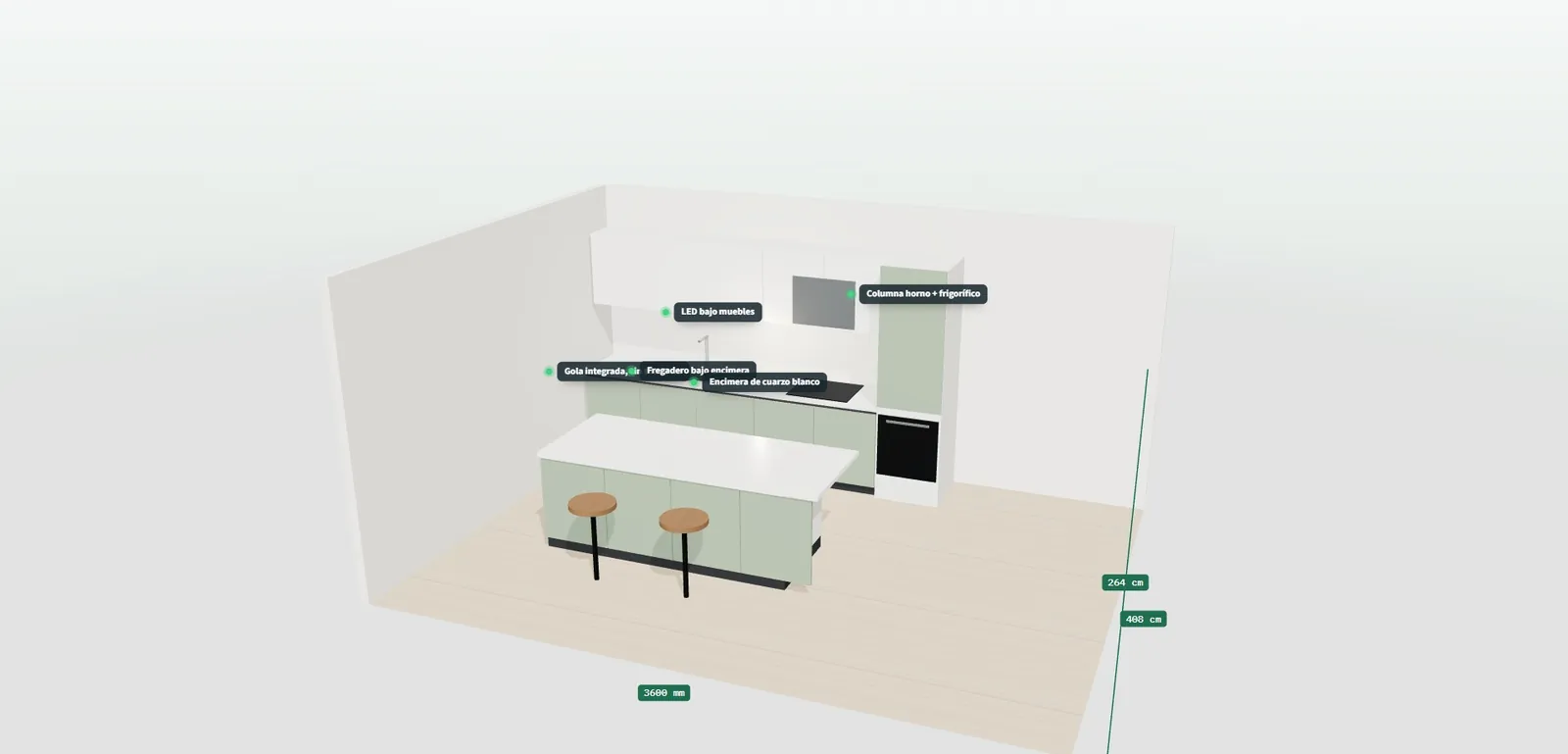
Straight kitchen with an island in the 3D configurator, with sage green fronts, white wall units and a quartz worktop
FURNITURE, WOOD AND TEXTILES · OPEN DEMO
— FOR MANUFACTURERS WITH A RETAIL NETWORK

3D configurator
for kitchens
built for your network.

Your shops ask you for the same kitchen three times: in sage green, in midnight blue and with a shorter island. The technical office redraws plans that never sell and, when the signed order finally arrives, someone types modules, fronts and worktop into the workshop sheet all over again.

— WHAT HAPPENS TO YOU

Tuesday, 9:15.
Three emails
and one single kitchen

The technical office opens the inbox and finds three messages from the same shop. It is a kitchen for a couple who have already been in twice: a 3.6 metre main wall, a 2.2 metre short side and an island. First they wanted it in sage green with matt white wall units; now they are asking how it looks in midnight blue, with a finger pull instead of a rail handle and a black porcelain worktop. Every version is another plan, another image and another quote, while the other thirty-four shops in the network wait their turn.

It is not the shop's fault. The customer cannot picture seven front finishes combined with four worktops by looking at a loose display door, and asks to see it before spending what a kitchen costs. The problem is that your designer works just as hard on the kitchen that gets signed as on the one that ends up with a competitor. And while the shop waits for the third version, the second visit goes cold — which was exactly when the couple were ready to decide.

When the signed order arrives, the other half of the problem starts. Someone types in the base units, the wall units, the oven and fridge tall units, the island, the metres of worktop, the handle rails and the LED strip. If the shop measured the short side wrong, you find out in the workshop or, worse, on site, with the fitter standing in front of a tall unit that does not fit. The end customer does not know whose mistake it was; they only know their kitchen is another week late.

— WHERE THE SALE LEAKS AWAY

The bottlenecks
you will recognise
straight away.

“Can you do it in midnight blue as well?”

Three versions for every kitchen

The shop asks you for colour, handle and worktop variants because the customer needs to see them before deciding. Each one goes through your technical office as if it were a new project, even when only one finish changes. With thirty-five shops asking at the same time, the queue of versions grows faster than the queue of orders and the designer spends the day on kitchens that will never be made.

What it costs youHours of technical office time that get paid for whether the kitchen sells or not.
“I will send you the sizes, but they are approximate”

Sizes that change halfway through the project

The first proposal is made with the sizes the customer wrote down on a piece of paper. Then the real measuring happens and the wall is twenty centimetres shorter, or the short side no longer takes the tall unit. Linear metres and modules have to be recalculated, and sometimes the whole layout redone. The shop waits again and the customer hesitates again.

What it costs youRedesigns that add weeks to a project that had already been decided.

“Two handle rails and a wall unit were missing in the workshop”

A workshop sheet typed by hand

Between the approved project and the workshop sheet there is a manual step: someone counts 60 cm base units, wall units, tall units, handles and metres of LED strip, and types them into your system. It is repetitive work done in a hurry, right when the shop has already promised the customer a date. Anything forgotten shows up on fitting day.

What it costs youParts manufactured twice and installations held up waiting for one piece.

“In the end they took it in white, just to be safe”

The customer does not dare go for colour

Without seeing the fronts, the worktop and the handles together, the customer chooses whatever feels safest: white with a rail handle. It is not that they dislike sage green or walnut; it is that they cannot picture it on their 3.6 metre wall or combined with wall units in another colour. The shop ends up selling the simplest option in the catalogue.

What it costs youYou sell the most basic option in the range, not the kitchen the customer wanted.

“Every shop quotes it their own way”

Every shop quotes differently

Some shops use your printed price list, others their own spreadsheet, and some apply whatever margin they feel like. The customer receives quotes in different formats for similar kitchens and, when comparing with another manufacturer, only looks at the total. You do not know what is being offered in your name or at what price.

What it costs youYou lose control of how your kitchen is presented and priced.

— DO THE MATHS

What it costs you
today, with
your own numbers.

The versions that never get manufactured cost money on their own. Replace the example values with your technical office's own.

versions
h
€
MONTHLY COST OF REDOING VERSIONS BY HAND 0

€ a month

The values are an example: replace them with yours. The calculation is a simple multiplication and does not come from any study.

— HOW IT IS SOLVED

Every bottleneck,
with its
answer.

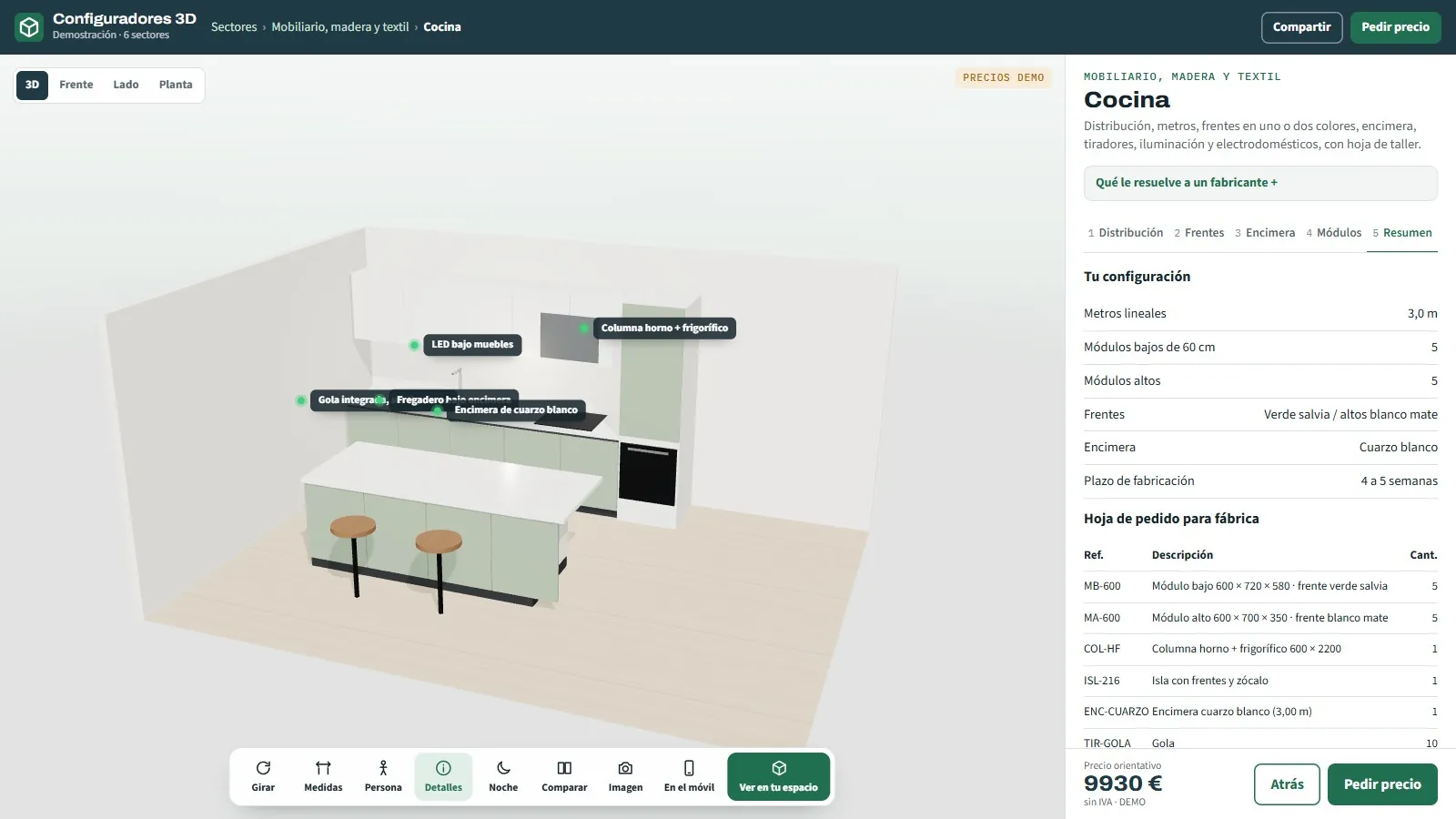
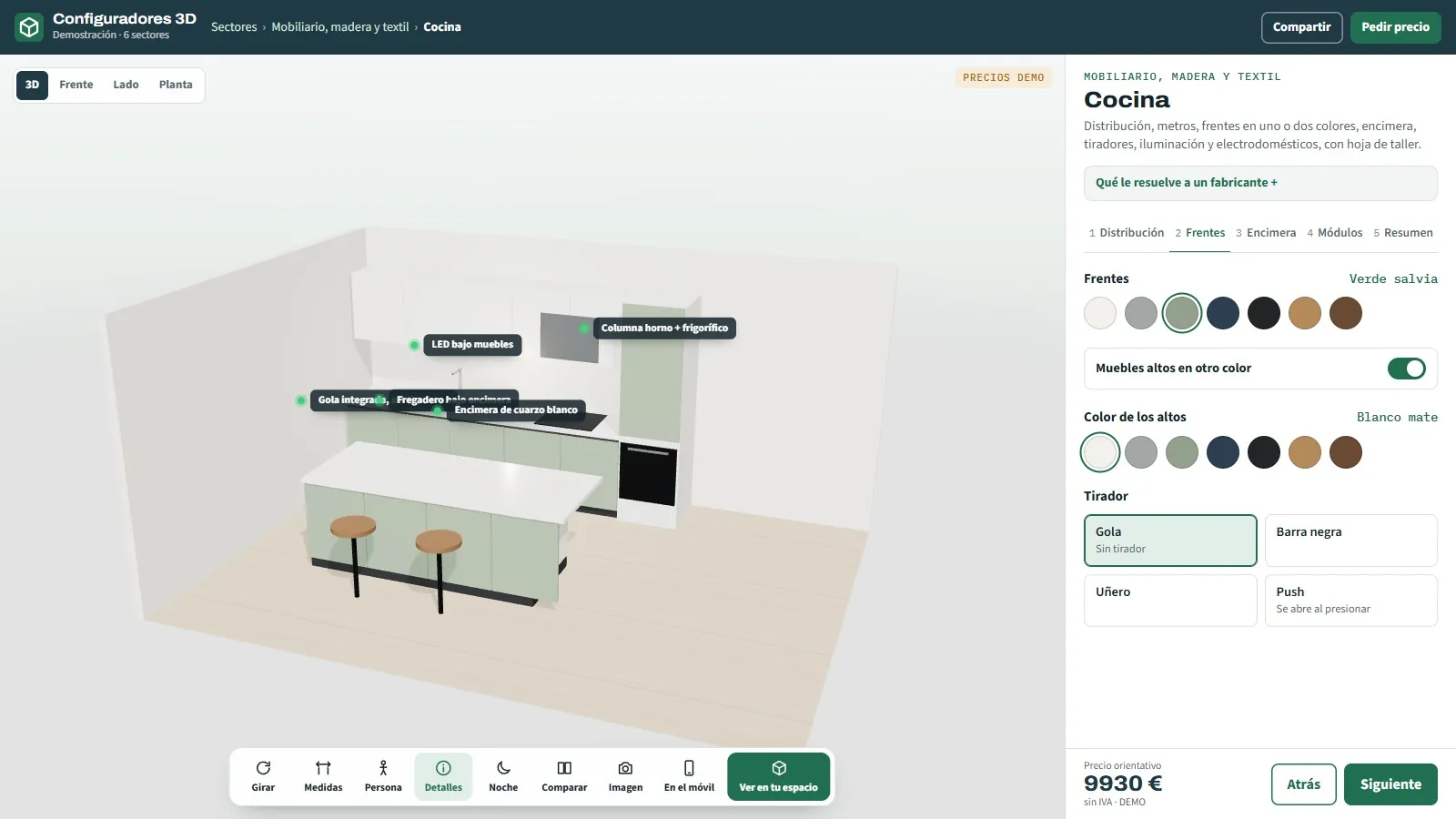
Kitchen configurator panel with sage green fronts, matt white wall units, a rail handle and a quartz worktop
Answers · Three versions for every kitchen

The shop shows all three versions without calling you

The customer changes fronts, wall units in another colour, handle and worktop in front of the salesperson, and saves up to three versions to compare, with the differences between them highlighted. Only the chosen kitchen reaches your technical office, with its options locked in, instead of three plan requests for one single sale.

Compare up to three versions
Kitchen with an island in 3D with dimension labels on the main wall, the short side and the base units
Answers · Sizes that change halfway through the project

Metres and modules recalculated the moment the wall changes

The shop enters the length of the main wall and the short side, chooses straight, L-shaped or with an island, and the kitchen adjusts instantly: linear metres, base units, wall units and tall units. If the real measurements come out different, you correct the number and that is it, with your manufacturing rules applied.

Layout and sizes in millimetres
Kitchen order summary with modules, quartz worktop, handle rails, LED strip and appliances with references and quantities
Answers · A workshop sheet typed by hand

The order reaches the workshop already counted

When the configuration is closed, out comes the order sheet with every reference: base and wall units, oven and fridge tall units, island, worktop with its metres, handle rails, LED strip and appliances. If you need it, it connects to your ERP so nobody types the order again.

Factory order sheet
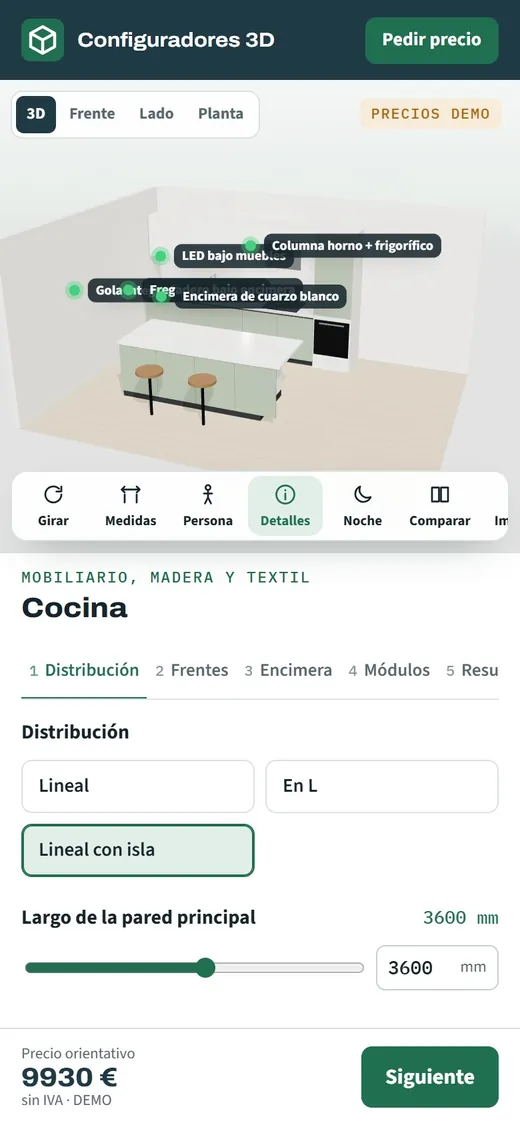
Kitchen configurator open on a phone with the island kitchen in 3D and the QR code to see it at home
Answers · The customer does not dare go for colour

The colour is decided seeing the whole kitchen, not a sample

The customer rotates the kitchen, tries walnut on the base units and white on the wall units, switches on the LED under the cabinets and, from their phone, sees it at real size in their own home in augmented reality. With the whole thing in front of them they dare to choose finishes that did not convince them on a display door.

Augmented reality on a phone
Straight kitchen with an island, sage green fronts, matt white wall units and a white quartz worktop, generated in the demo
Answers · Every shop quotes differently

Every shop quotes with your price list

Each shop logs into its dealer area, with its margin and its brand on the PDF, but with your price list and your rules underneath. The customer gets a consistent indicative price across the whole network, and the enquiry that comes in through your website goes to the shop nearest them.

A dealer area with their own margin
— TRY IT NOW

Try it
for
yourselves.

Choose “Straight with island”, drop the main wall length to 3,000 mm and watch the modules being recounted in the order sheet.

An open demo, with no registration, with example products and prices. It is designed for manufacturers, dealers and installers: private customers are welcome to try it, but we do not sell the product.

— INVESTMENT AND NEXT STEP

Bring us a kitchen you have redone three times

With a catalogue of modules and finishes like yours, you will see how one of your shops would have closed it without going through the technical office.

From €6,500

Most projects for manufacturers fall between €14,500 and €35,000, depending on the catalogue, the manufacturing rules and the integrations. Maintenance and hosting from €190 a month. We start from a base that already works: you are not paying for development from scratch.

  • What is includedThe configurator with your products, your rules and your price list, embedded in your website and in your dealers' sites, with training for the sales team.
  • TimeframeBetween 3 and 16 weeks depending on the scope; the exact date goes in the proposal.
  • Payment terms40% to start, 40% with the test version and 20% at go-live.

Would you rather talk it through? Call 662 061 421 or write to grup3d@grup3d.es.

— FREQUENTLY ASKED QUESTIONS

What we
get asked.

There are more short answers in frequently asked questions about 3D configurators and who we are in 3D configurator company.

Can every shop in our network have their own login?

Yes. Each dealer logs into their own area, with their margin on top of your price list and their brand on the PDFs they hand to the customer. You keep the price list and the manufacturing rules in one place, and contacts coming in through your website are assigned to the shop for each area so none go unanswered.

Does it work for our modules and sizes, or only for standard kitchens?

It is developed with your catalogue: your module widths, heights, front finishes, worktops and handles, and your manufacturing rules, such as which combinations are not made or what minimum length an island needs. The demo uses a generic catalogue so you can see how it works; your version is built on yours.

Does it replace the design software our shops use?

That is not its job. The design software is still there for the detailed technical project. The configurator covers what happens before: the customer seeing their kitchen, comparing versions and getting an indicative price. When the shop opens its software, it works on a kitchen that has already been chosen, not on three possible ones.

How much does a kitchen configurator cost for a manufacturer?

It depends on how many layouts, modules and finishes have to be loaded, and on whether it connects to your ERP or opens a dealer area. As a reference: developments start from €6,500 for a visual configurator of one product family; most projects for manufacturers fall between €14,500 and €35,000, depending on the catalogue, the rules and the integrations, plus maintenance from €190 a month. Before giving you a fixed figure we review your catalogue, and we send it in writing with no commitment.

What does the factory receive when a shop closes a kitchen?

An order sheet with every reference and its quantity: base and wall units, tall units, island, worktop with its metres, handles, lighting and appliances, together with the PDF of the kitchen in 3D and its dimensions. If the factory works with an ERP, the order can go straight into it.

Can the end customer keep trying options at home?

Yes. It opens in a phone or desktop browser, with nothing to install. The shop shares it with a QR code so they can keep trying finishes at home, see the kitchen in their own space in augmented reality and show the image or the PDF to whoever decides with them. They come back to the shop with the version they prefer.