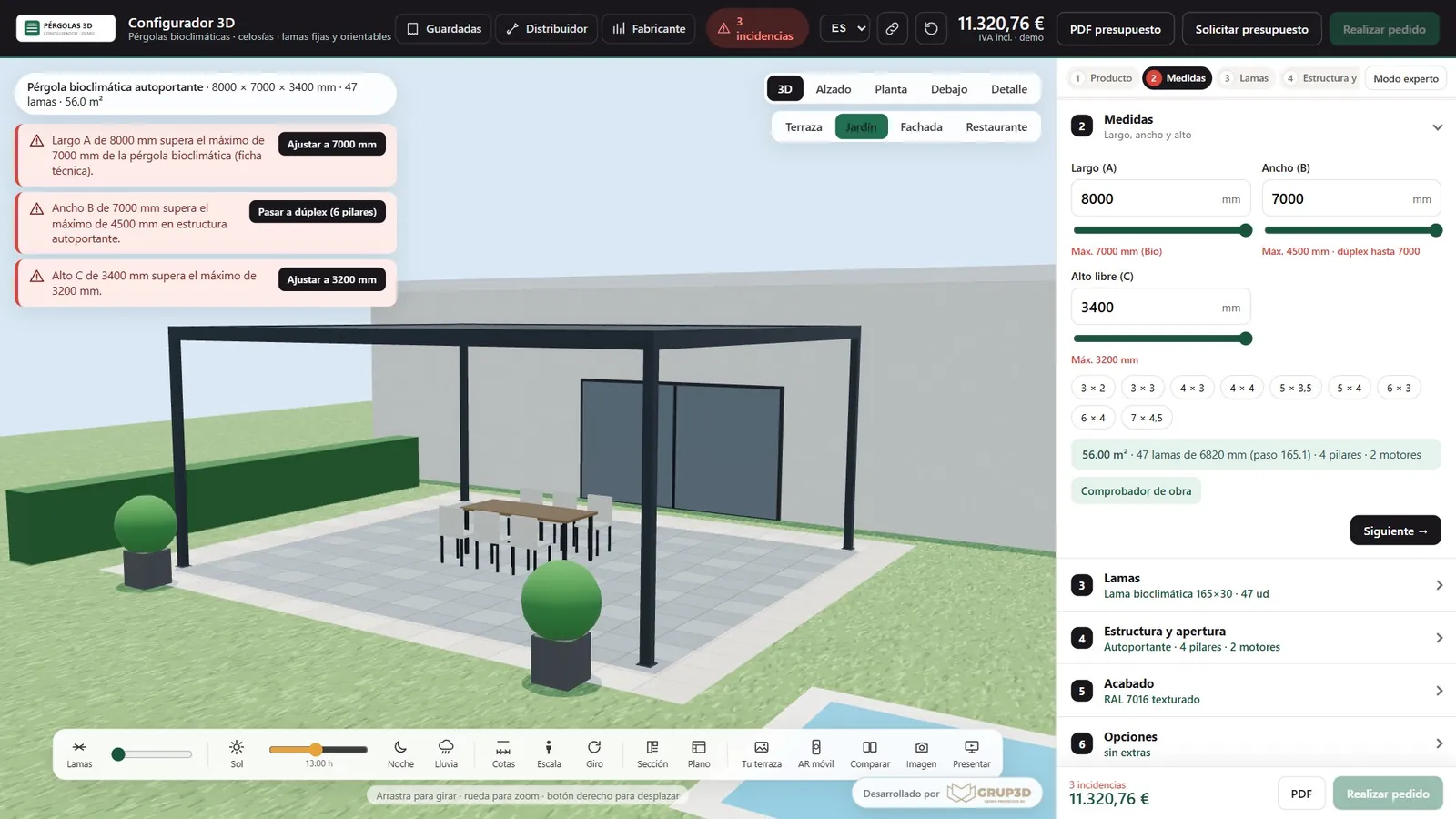
Technical rules of the 3D pergola configurator from the Grup3D demo: size, wind and load limits that warn before ordering
GUIDE · RULES · LIMITS · COMBINATIONS · CALCULATIONS · VERSIONING
— GUIDE FOR MANUFACTURERS · 2026

Manufacturing rules
for a 3D configurator
from the foreman's head to the table.

The rules are what stops a configurator letting people order what cannot be manufactured. Almost no manufacturer has them written down: they are in the foreman's head, in a technical-office notebook and in the orders that went wrong. The five classes of rules there are, how they are drawn out in two meetings and put in a table, how the customer sees them without having the door shut on them, and how they are tested, published and changed later without programming.

— FIVE CLASSES

The five classes of rules
that any product has.

Every manufacturing rule we have ever programmed fits into five drawers. With examples from the open demos.

01 · LIMITS

Minimums, maximums and weights

Minimum and maximum width and height per series and opening, maximum weight per sash, minimum height of a railing, maximum load per level of a shelving bay, maximum length of a pergola depending on the wind in the area. They are the first to be written and the ones that generate most warnings.
02 · DEPENDENCIES

If this, then that

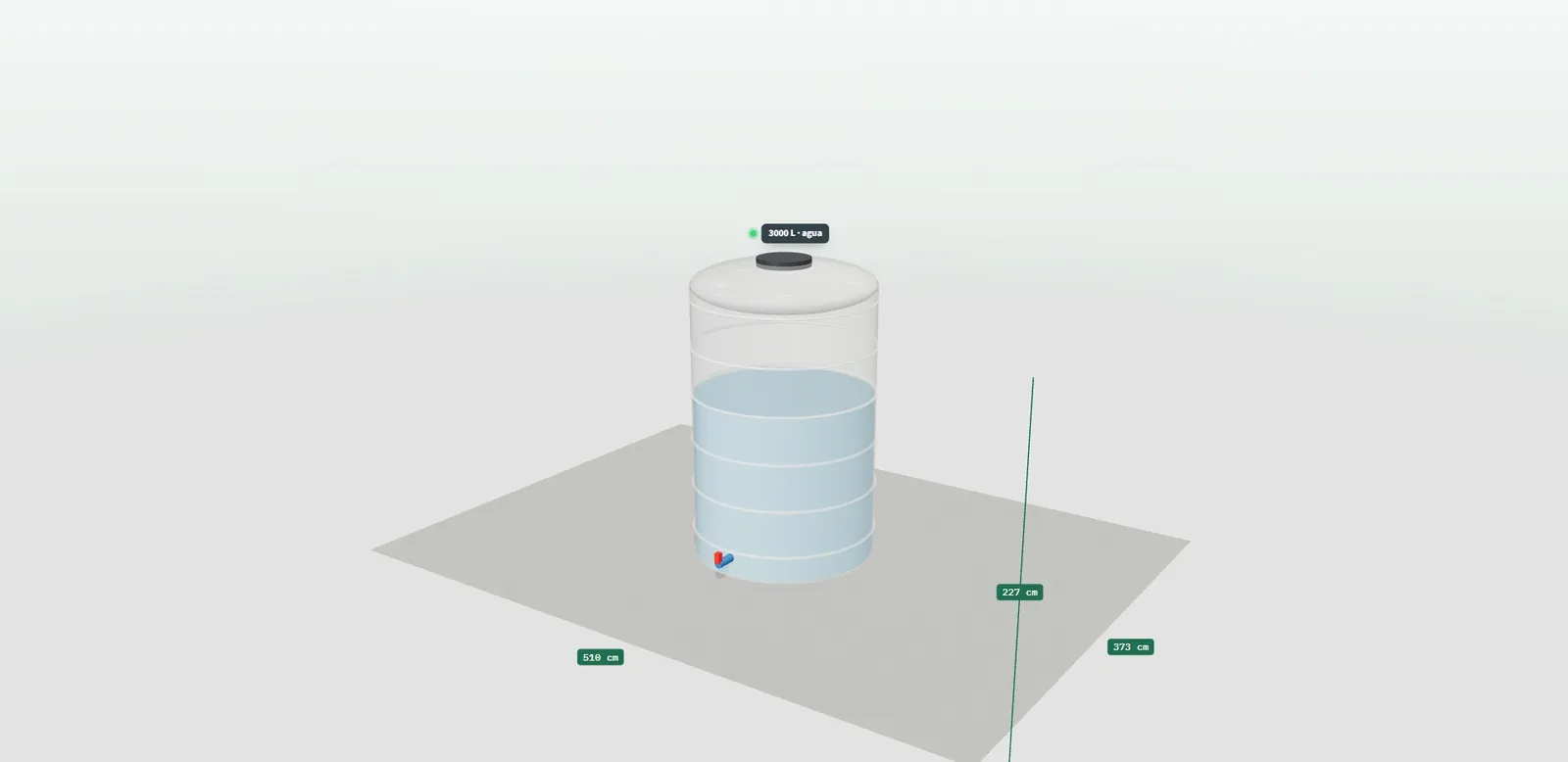
If the gate weighs more than so much, the motor is the big one; if the tank is for chemicals, it carries a bund; if the window has a roller shutter, the box takes height off the sash; if the enclosure exceeds the panel width, one more panel. A rule of this class changes another choice or calculates it.

03 · EXCLUSIONS

This does not go with that

A colour that only exists in one series, a glass that does not allow an opening type, a fabric that does not go with a headboard, a finish that is not supplied in a market. What cannot be chosen does not appear, or appears explaining why.

04 · MANDATORY ITEMS

What always goes in, depending on the use

The anchors of a railing, the protectors of a shelving bay in a forklift area, the power supply of an LED strip, the sill of an external window. The customer does not choose it: the configurator adds it and counts it on the order sheet.

05 · CALCULATIONS

What is calculated from what was chosen

How many posts and glass panels for 8 metres of railing, which power supply for 12 metres of strip, how many boxes with wastage for 14 square metres of tiles, how many pallets fit in the lorry, what output for a 90-square-metre home, the weight of each sash and, in the technical ones, the cutting list. They are the rules the technical office does by hand today. See technical configurator with cutting list.

Detail of the 3D plastic tank configurator from the demo with the tank, its use and the bund the rule adds
Class 02 rule in the tank demo: if the use is chemical, the bund goes in on its own. Sample products.
— INTO THE TABLE

From the foreman's head
to a versioned table.

Two meetings, one table and one person who reviews it. It is the part of the project that depends most on you.

  1. 01

    First meeting: the catalogue, family by family

    With whoever manufactures in front of us, we go through each family asking the same thing: which sizes, what does not go with what, what goes in on its own depending on the use, what is calculated. Out come the limits, the dependencies and the mandatory items. It takes a morning.

  2. 02

    Second meeting: the orders that went wrong

    Bring three or four orders that had to be remade. Each one is a rule that was missing or that nobody had written down. It is where the odd exclusions and the “the foreman knows that” cases appear.

  3. 03

    The table: one row per rule

    Each rule with its condition (“sash width greater than 1,200 in series X”), its warning in the customer's words and its way out (another system, one more panel, request a study). The table is reviewed by whoever knows the rules; then it is programmed. See what a manufacturer needs for a 3D configurator.

  4. 04

    Versioning

    The rules carry a version: you know which rule was in force when each order was placed, and a change is tested before going to the website. If a limit changes because a supplier changes, the row changes, not the configurator.

— HOW THE CUSTOMER SEES THEM

How the customer sees them:
a warning with a fix, never a closed door.

A rule that only says “no” loses the customer. One that says “no, but this way yes” sells.

— WHAT THE CONFIGURATOR DOES
  • It warns before ordering, the moment the size or the combination goes out of bounds, not at the end of the flow.
  • It says it in the customer's words: “this sash weighs more than the fitting allows”, not an error code.
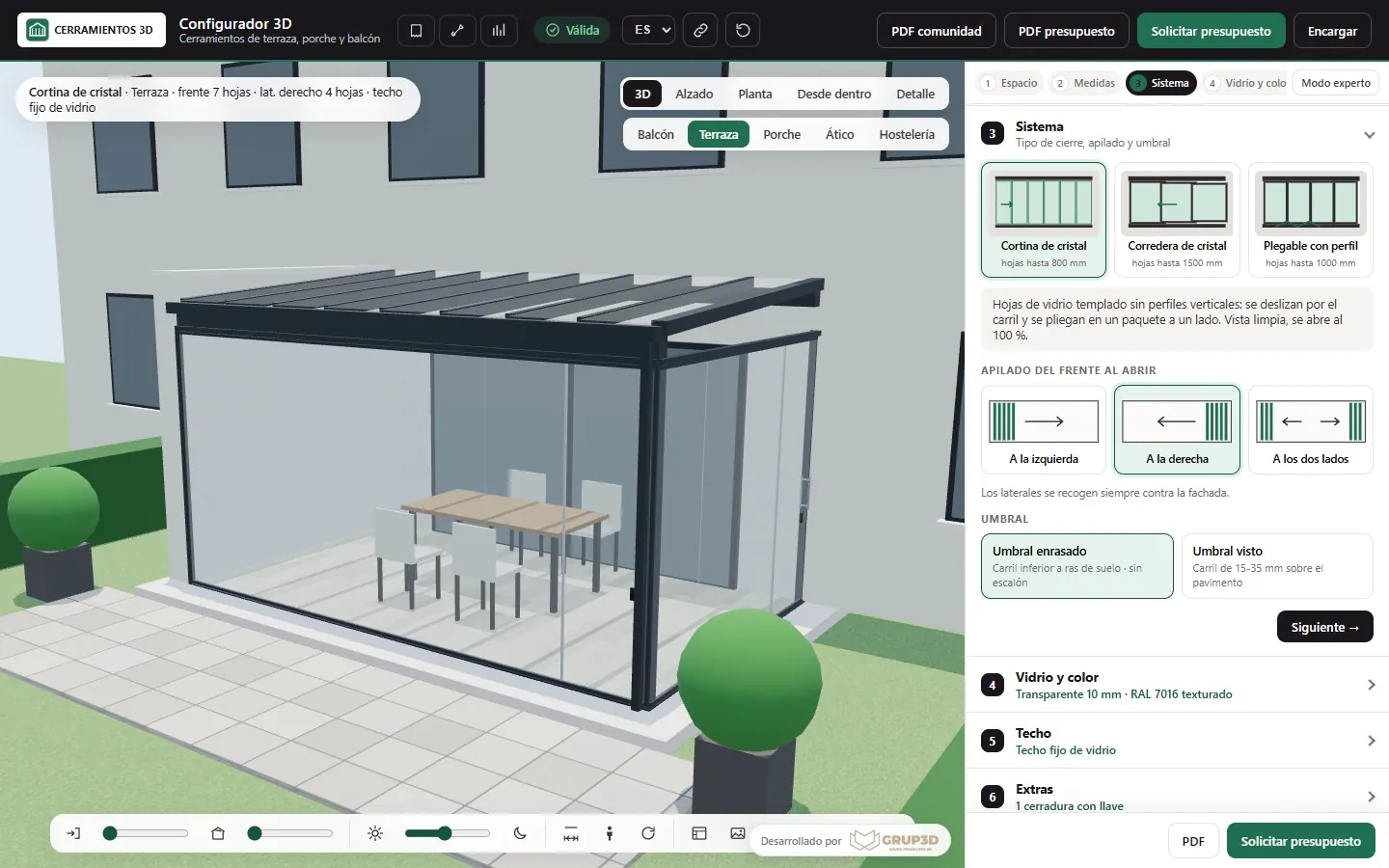
  • Suggests the way out in one click: another system, one more panel, another glass, the big motor. Like the warnings with a fix in the kitchen demo and the panel split in the terrace enclosure demo.
  • When there is no way out, it lets the customer request a technical study with what they had configured, instead of losing them.
— WHAT IT DOES NOT DO
  • It does not hide the rules: what cannot be chosen is shown greyed out and explains why; the customer learns the product as they configure.
  • It lets nothing through to the factory: the order sheet only comes out of a configuration that meets every rule. See reducing order errors in the factory.
  • It does not decide for the customer what is a choice: the handing is chosen while looking at the part in 3D; mandatory items go in on their own and show on the sheet.
System choice in the 3D terrace enclosure configurator from the demo, with the panel split according to the maximum width and weight
Rule with a way out in the terrace enclosure demo: if the front exceeds the panel width, the configurator splits in one more panel or suggests another system. Sample products.
— TEST AND CHANGE

Test, publish
and change without programming.

Rules are not taken as good because they sound right: they are tested against orders already manufactured.

TEST

With your orders

Two or three orders already manufactured are put into the configurator: it has to accept them, calculate the same and produce the same sheet. And two or three that went wrong: it has to stop them. Those cases are stored and run again every time a rule is touched. See how a technical configurator is validated.

PUBLISH

With a version and a date

The rules go to the website with a version; every order records which version it was placed with. If a customer asks why their March order allowed a size that today does not, it is written down.

CHANGE

From the panel, within maintenance

Changing a limit, a weight, an exclusion or a mandatory item is editing the row from the panel and testing; it is included in maintenance. A new class of rule (a calculation that did not exist) is a development and is priced separately. See 3D configurator maintenance.

Development starts from €6,500 for a visual configurator of one product family; most manufacturer projects fall between €14,500 and €35,000, depending on catalogue, rules and integrations, plus maintenance from €190/month. Rules with a warning and a way out are at the level with rules and price; cutting-list calculations, at the technical level.

— FREQUENTLY ASKED QUESTIONS

What we get asked
about the rules.

There are more short answers in frequently asked questions about 3D configurators and who we are in 3D configurator company.

What are a configurator's manufacturing rules?

What stops people ordering what cannot be manufactured: size and weight limits, dependencies (if this, then that), exclusions (this does not go with that), mandatory items depending on the use and calculations (how many posts, which power supply, how many boxes, the cutting list). They are programmed with yours.

We do not have the rules written down. Is that a problem?

It is normal. They are drawn out in two meetings with whoever manufactures: one going through the catalogue family by family and another with three or four orders that went wrong. They end up in a table with one row per rule (condition, warning, way out) that you review before programming.

What does the customer see when they break a rule?

A warning on the spot, in their words, with the way out in one click: another system, one more panel, another glass, the big motor. What cannot be chosen is shown greyed out and explains why. When there is no way out, they can request a technical study with what they had configured.

How do we know the rules are right before publishing?

They are tested with your orders already manufactured: the configurator has to accept them and produce the same sheet; and with the ones that went wrong: it has to stop them. Those cases are stored and run again every time a rule is touched.

Can we change a rule later without programming?

Yes. Changing a limit, a weight, an exclusion or a mandatory item is editing the row from the panel, testing and publishing with a version; it is included in maintenance. A new class of rule, such as a calculation that did not exist, is a development and is priced separately.

How much does a configurator with rules cost?

Development starts from €6,500 for a visual configurator of one product family; most manufacturer projects fall between €14,500 and €35,000, depending on catalogue, rules and integrations, plus maintenance from €190/month. Rules with a warning and a way out are at the level with rules and price; the cutting list, at the technical level. Details in the price of a 3D configurator.

— OPEN DEMO

Try it now
or see it with
your range.

Try breaking the rules in the open demos: a sash that is too wide, a railing that is too low, a tank for chemicals without a bund. The configurator warns and suggests the way out. No sign-up, with sample products, at configurador.grup3d.es/demo.

With your rules in front of you? Bring three orders that had to be remade and in a 20-minute video call we will draw out the rules that were missing and put them in the table. No commitment.

Would you rather talk it through? Call us on 662 061 421 or write to grup3d@grup3d.es.