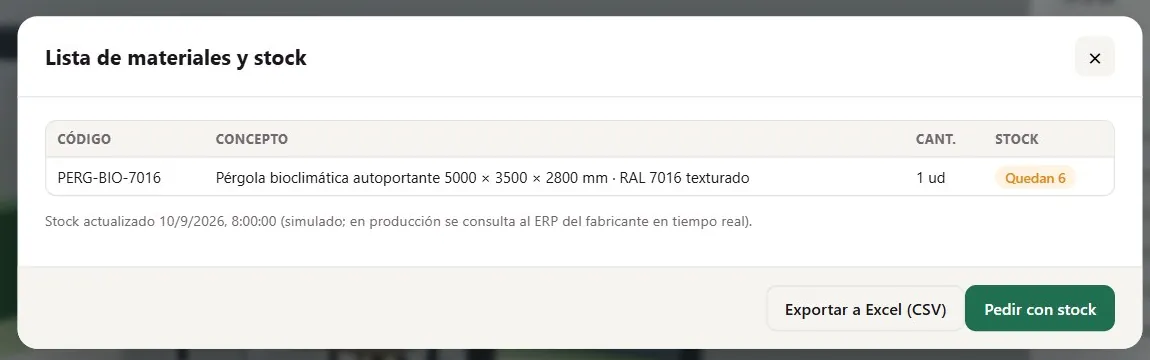
Bill of materials against stock in the 3D pergola configurator of the Grup3D demo: each component with its reference, quantity and availability
GUIDE · ERP · MANAGEMENT SOFTWARE · ORDERS · STOCK · IN PHASES
— GUIDE FOR MANUFACTURERS · 2026

Integrating a 3D configurator
with the ERP
of the manufacturer.

The question comes up in the first meeting: “and does this go into our software?”. It can, and it should, but not on day one. What data goes from the management software to the configurator (price list, references, stock) and what comes back (the order with its lines), how it is done in phases without stopping anything, what you have to ask your software supplier for and what you have in the meantime: panel, email and CSV.

— WHAT DATA

What data travels
and in which direction.

A configurator and a management system exchange three kinds of data. Not all of them are needed from the start.

FROM THE ERP TO THE CONFIGURATOR

References and price list

The item list with its references and the price list with its discounts. At the start they are loaded with a template and changed from the panel; once connected, they update on their own when they change in the software. That way the configurator never shows a reference that no longer exists.
FROM THE ERP TO THE CONFIGURATOR

Stock and lead times

What is in the warehouse and what lead time each component has, so that the configurator can warn (“this finish takes three weeks”) or suggest another. It is what you see in the pergola demo as the bill of materials against stock, with sample data.

FROM THE CONFIGURATOR TO THE ERP

The order with its lines

Customer or distributor, project reference, delivery, date and every line with reference, description, quantity and price. It is the order sheet that already comes out as PDF, going in as a sales order or as a quote in your software. What it carries, in documents a 3D configurator generates.

— IN PHASES

How it is done
in phases, without stopping anything.

The connection to your software is developed in the project, bespoke. In the meantime, the configurator works in full.

  1. 01

    No connection: panel, email and CSV

    From day one, every request stays in the panel with its configuration and its status, reaches you by email with the PDF and the order sheet, and exports to CSV with the columns your software imports. Many manufacturers stay here for months: someone imports the CSV or types the order in with the sheet in front of them, without interpreting anything.

  2. 02

    Price list and references from the software to the configurator

    The software exports items and price list (in a periodic file or on request) and the configurator reads them. The manufacturing rules stay in the configurator; prices and references stop being maintained in two places. This is done when the price list changes often or the catalogue is large.

  3. 03

    The order from the configurator to the software

    Every confirmed order goes in as a sales order or a quote, with its lines and references, and returns its number. It is the phase that depends most on the software supplier: they need to provide a way to create orders from outside (a connection for external programs, an import file or an intermediate table) and a test environment. In integrated technical configurators this connection is included in the price. See technical configurator with cutting list.

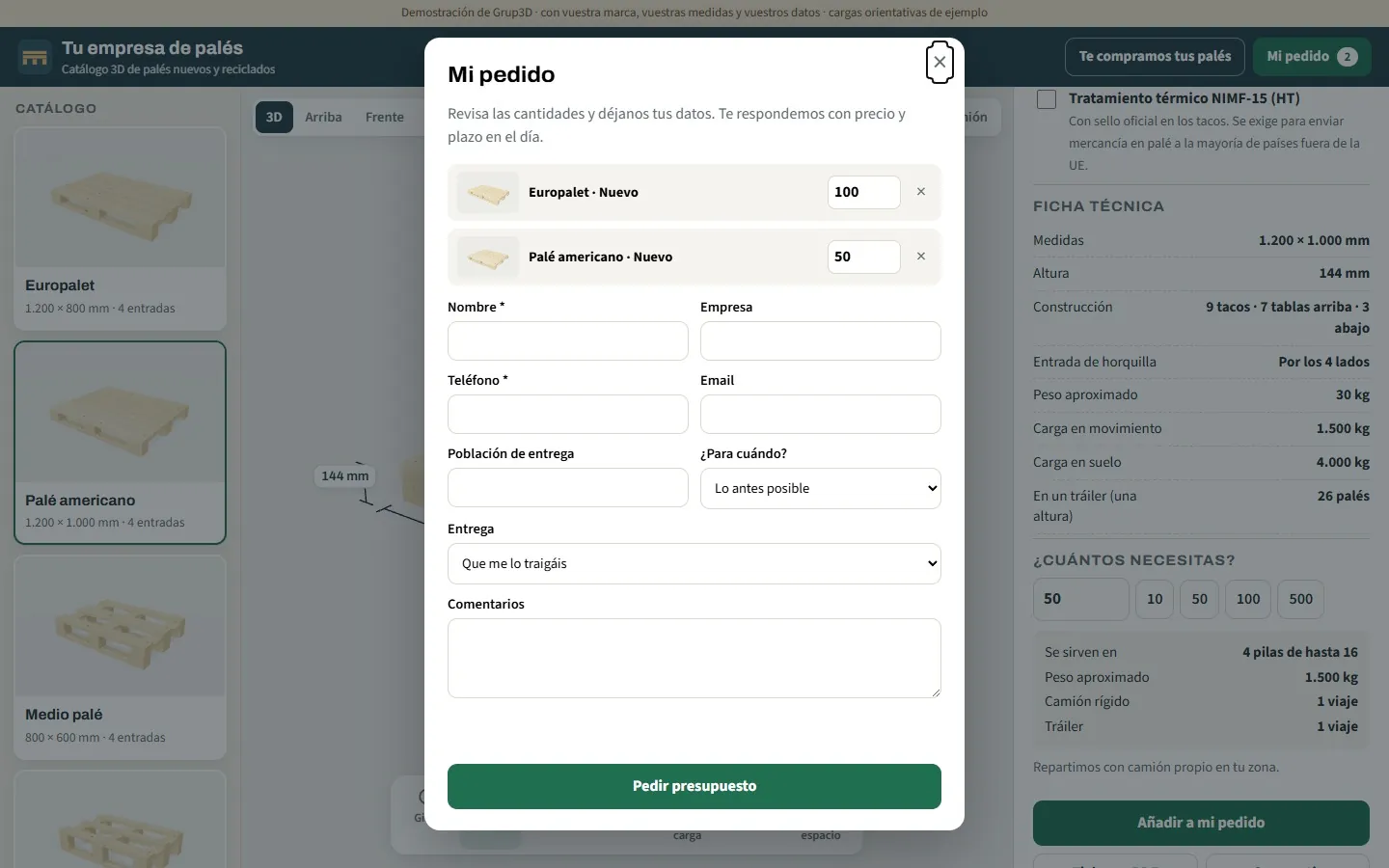
Order screen of the 3D pallet catalogue from the demo with the order lines, references and quantities
The order sheet from the pallet demo: lines with reference and quantity, ready to import into management software. Sample data.
— WHAT TO ASK FOR

What to ask
your software supplier for.

One question and four details. With them, the connection is priced with figures.

— THE QUESTION
  • “How is a sales order created from outside the software, and how are items and price list exported?” There are three possible answers: a documented connection for external programs, an import file with a fixed format, or an intermediate table the software reads. Any of them works; what does not work is “it can't be done”.
  • A test environment separate from the live one, to test orders without touching the accounts.
  • A user with permission to create orders and read items, and nothing else.
  • The list of mandatory fields for an order in your software: customer, warehouse, series, payment method. What the configurator does not know is filled with a fixed value or added by the office afterwards.
— WHAT YOU DECIDE
  • What goes in automatically and what gets reviewed: distributor orders with their user, straight in; requests from private customers, as quotes until a sales rep confirms them.
  • Where the truth lives: the price list is edited in the software and the configurator reads it, or the other way round. Never in both.
  • What happens if the software does not respond: the order is stored in the panel and retried; no request is ever lost because of a dropped connection.
  • The CRM: requests can also go in as opportunities in your CRM, using the same method. See generating leads with a 3D configurator.

Development starts from €6,500 for a visual configurator of one product family; most manufacturer projects fall between €14,500 and €35,000, depending on catalogue, rules and integrations, plus maintenance from €190/month. The integrated technical configurator (€25,000 – €35,000) includes the connection to your shop or your management software. At the other levels it is priced as an extension, once we see how your software exposes data.

— EXAMPLES

Three cases
where the connection changes the daily routine.

With products from the open demos, with sample data.

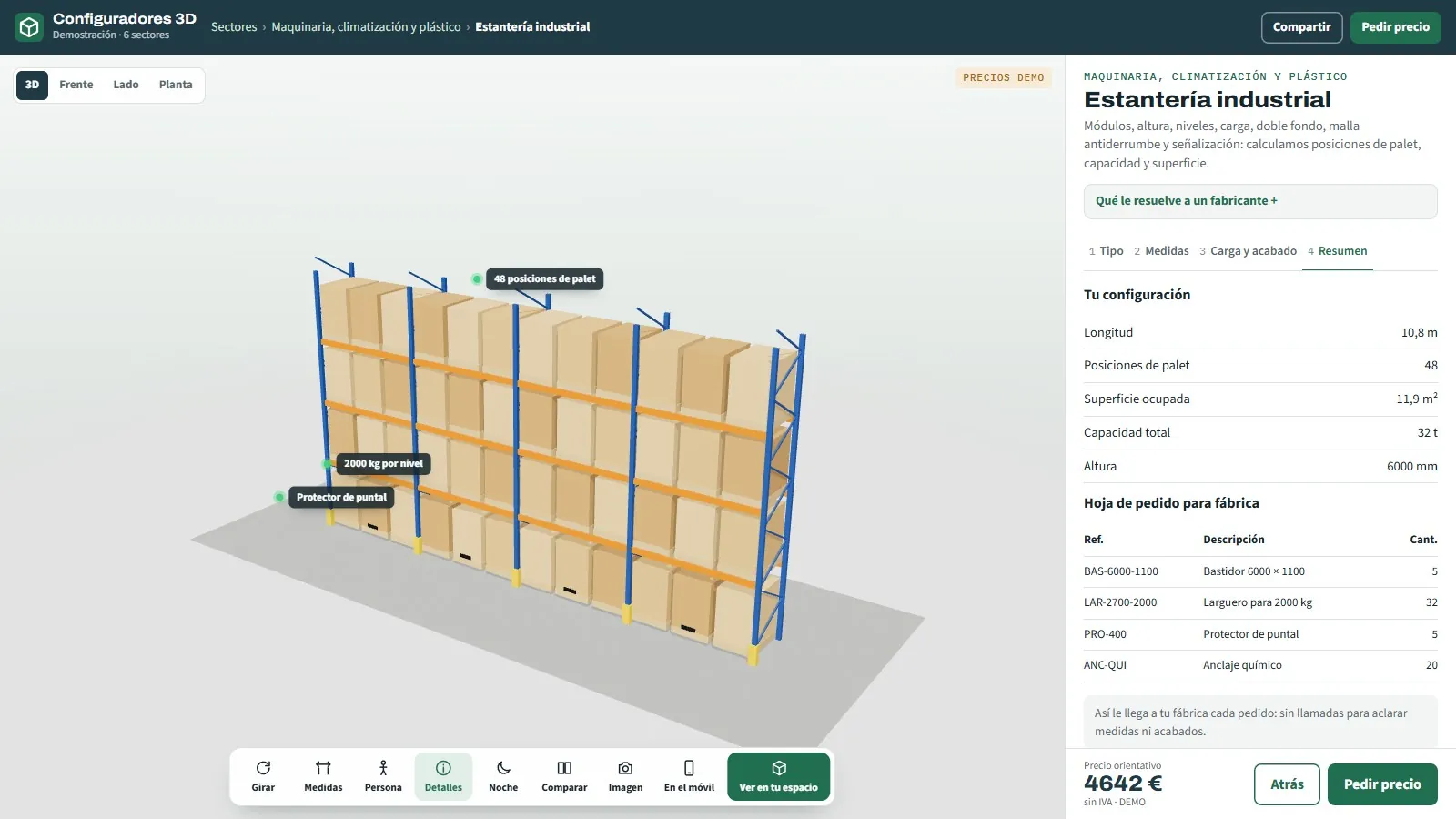
Summary of the 3D industrial shelving configurator from the demo with the component list and the indicative price

Shelving: ordering by component

Frames, beams, protectors and anchors with reference and quantity. Connected, the order goes in with its lines and the software deducts stock; unconnected, the CSV imports in a minute.

Bill of materials against stock from the 3D pergola configurator of the demo

Pergolas: bill of materials against stock

Every order generates the list of what has to be bought from the supplier; with the software's stock, the configurator knows what is available and the lead time for every profile and every motor.

Screen of the 3D pallet catalogue from the demo with the pallet's sizes and entries

Pallets: price list and references from the software

Hundreds of references generated from dimensions, with prices that change with the timber: the price list is maintained in the software and the 3D catalogue reads it, without reloading anything.

— FREQUENTLY ASKED QUESTIONS

What we get asked
about the ERP.

There are more short answers in frequently asked questions about 3D configurators and who we are in 3D configurator company.

Does the configurator connect to our ERP or management software?

Yes, bespoke, in the project. Reading items, price list and stock from the software, or sending the order with its lines as a sales order, is developed according to how your software exposes data: a connection for external programs, an import file or an intermediate table. In the meantime, every request stays in the panel, arrives by email and exports to CSV.

Do we need the ERP connected to start?

No. The configurator works in full without a connection: a panel with the requests and their status, PDF and order sheet by email and CSV export with the columns your software imports. The connection is done in a later phase, once the configurator already gets the order sheet right.

What do we have to ask our software supplier for?

How a sales order is created from outside and how items and price list are exported (external connection, file or table), a test environment, a user with limited permissions and the list of mandatory fields for an order. With that, the connection is priced with figures.

Where is the price list maintained, in the ERP or in the configurator?

In one place only. If your software is the reference, the configurator reads it; if not, the price list is edited in the configurator's panel with its template and its version. What is never done is maintaining it in both places.

What about stock and delivery times?

If the software exposes stock, the configurator can warn that a finish or a component takes longer, or suggest another, and the bill of materials comes out against stock, as in the pergola demo with sample data. It is a separate phase, priced once we see your software.

How much does a configurator connected to the ERP cost?

Development starts from €6,500 for a visual configurator of one product family; most manufacturer projects fall between €14,500 and €35,000, depending on catalogue, rules and integrations, plus maintenance from €190/month. The integrated technical configurator (€25,000 – €35,000) includes the connection to your shop or your management software. Details in the price of a 3D configurator.

— OPEN DEMO

Try it now
or see it with
your range.

Generate an order sheet in the shelving, pallet or pergola demos and look at its lines: reference, quantity and price, just as they would go into management software. No sign-up, with sample data, at configurador.grup3d.es/demo.

With your software in front of you? Tell us which one you use and how orders go in today, and in a 20-minute video call we will see which phase makes sense first and what you would have to ask your supplier for. No commitment.

Would you rather talk it through? Call us on 662 061 421 or write to grup3d@grup3d.es.